
Call of Duty Mobile
Call of Duty Mobile Android Cheats & Hacks (2026 Guide) – Aimbot, ESP, Wallhack, Radar & No Recoil
Jun
Call of Duty Mobile is one of the most competitive mobile shooters ever released. Fast 5v5 multiplayer, Battle Royale, Zombies, ranked matches, classic Call of Duty maps, seasonal weapons, operators, scorestreaks, and constant updates make COD Mobile feel much bigger than a normal phone game.
But that also means the competition is brutal.
Players on Android deal with fast aim duels, aggressive movement, sweaty ranked lobbies, campers, snipers, emulator players, controller users, and Battle Royale enemies hiding across huge areas. One bad peek, one missed spray, or one enemy you did not see can end the match instantly.
Because of that, many players search for Call of Duty Mobile Android cheats and hacks to gain better aim, cleaner recoil control, stronger visibility, and more awareness during matches.
Modern COD Mobile Android cheats usually include features like aimbot, ESP, wallhack, radar, no recoil, no spread, enemy alerts, skeleton ESP, item ESP, and customizable cheat menus.
In this 2026 guide, we will cover the most popular COD Mobile Android cheat features, how they work, what players should know before using them, and how to choose a reliable provider.
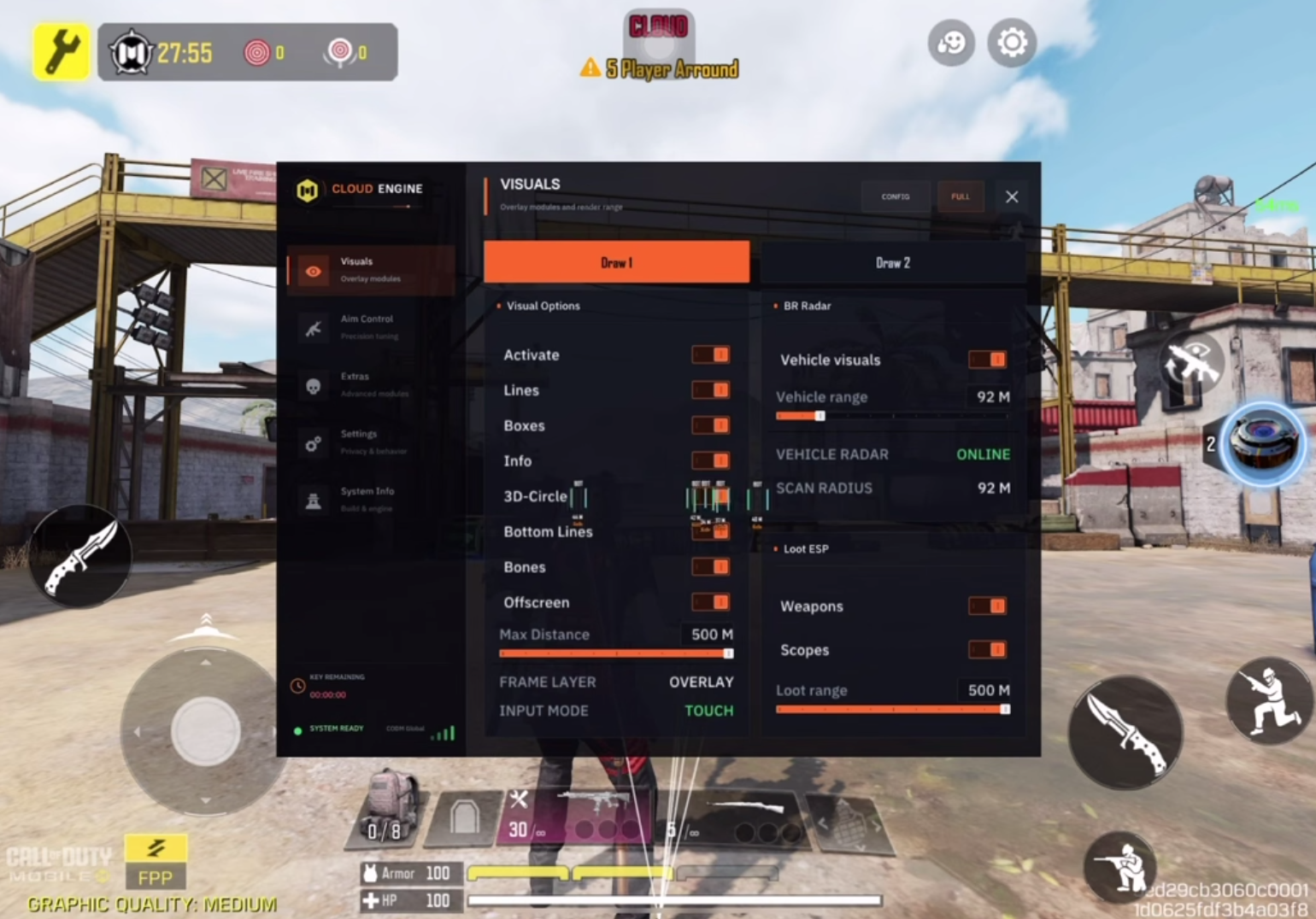
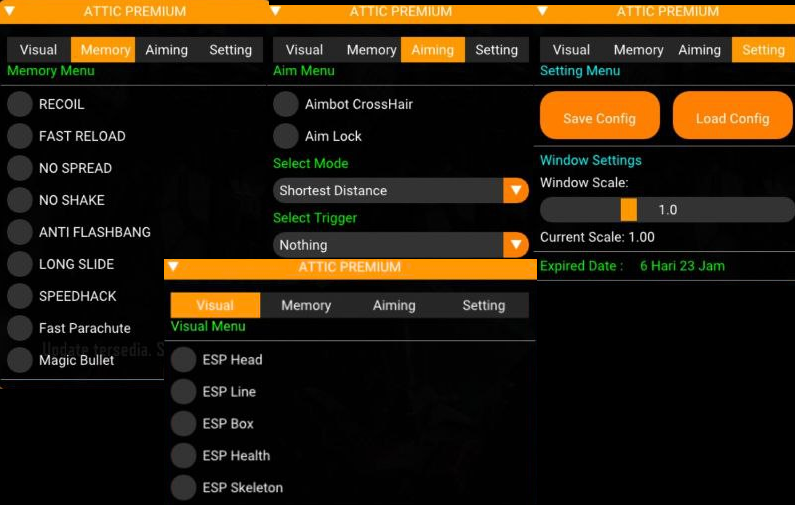
Attic Call of Duty Mobile Android
$2.99 – $49.99Price range: $2.99 through $49.99
Kernel Call of Duty Mobile – Global Android
$4.99 – $39.99Price range: $4.99 through $39.99

Vvip Call of Duty Mobile Android
$9.99 – $33.99Price range: $9.99 through $33.99
Why Players Use Cheats in Call of Duty Mobile Android
COD Mobile may be played on a phone, but the gameplay is not casual anymore.
Ranked multiplayer is extremely competitive. Battle Royale requires map awareness and long-range visibility. Search & Destroy rewards fast reactions and perfect positioning. Even casual modes can feel sweaty when experienced players use strong loadouts, optimized HUD layouts, gyro aim, triggers, controllers, or emulators.
Common frustrations include:
Enemies pre-aiming corners
Campers holding tight angles
Snipers watching long lanes
Players using high-sensitivity movement
Hard-to-control recoil on some weapons
Difficult visibility on small phone screens
Battle Royale enemies hiding far away
Losing ranked points after one bad match
Getting outgunned by better devices or better FPS
Missing targets during close-range fights
This is why COD Mobile cheats are popular on Android.
Instead of relying only on reaction time and phone controls, cheats can provide better aiming, improved visibility, and cleaner awareness. ESP helps you see enemies before they surprise you. Aimbot helps you stay on target. No recoil makes sprays easier to control. Radar gives you extra information during rotations.
For many players, the goal is simple: win more fights, die less often, and play with more confidence.
Most Popular Call of Duty Mobile Android Cheats in 2026
Most COD Mobile Android cheats come as a menu or overlay with multiple features inside one package. Some are designed for rooted Android devices, some use virtual environments, and some are made for specific versions of COD Mobile.
The most popular features usually include:
Aimbot
Aim assist
ESP
Wallhack
Radar hack
No recoil
No spread
Magic bullet
Skeleton ESP
Name ESP
Health ESP
Distance ESP
Weapon ESP
Item ESP
Vehicle ESP
Enemy warning
Custom crosshair
Anti-screenshot options
Android cheat menu
Each feature gives a different type of advantage. Some features are subtle and focus on awareness. Others directly improve combat and can look obvious if used too aggressively.
COD Mobile Android Aimbot
Aimbot is one of the most searched COD Mobile cheat features.
In Call of Duty Mobile, fights are often decided in less than a second. If your crosshair is slightly off target, the enemy can delete you before you correct your aim. This is especially true in ranked modes, close-range SMG fights, and long-range Battle Royale gunfights.
A COD Mobile Android aimbot helps keep your aim closer to the enemy.
Common aimbot settings include:
Aimbot enable or disable
Aim key or always-on mode
FOV adjustment
Smooth aim
Target bone selection
Head aim
Chest aim
Distance limit
Visible check
Ignore knocked enemies
Ignore bots
Aim priority
Prediction
Recoil compensation
The best aimbot settings are usually not the strongest ones. Extreme lock-on, instant snapping, or constant headshots can look obvious. A smoother setup is usually better for players who want a more natural style.
Best Aimbot Settings for Legit Gameplay
For legit-style gameplay, players usually use moderate settings.
A good natural setup may include:
Small or medium FOV
Smooth aim enabled
Aim at chest or upper body
Visible check enabled
Distance limit enabled
No instant snapping
Aim key instead of always-on aim
Lower aim strength for ranked matches
This makes the aim assistance feel more like improved control instead of robotic lock-on.
In COD Mobile, looking natural matters. If every kill looks like your crosshair is magnetized by alien technology, other players may report you quickly.
A smoother aimbot helps you win more fights while still looking like a real player.
COD Mobile ESP and Wallhack
ESP is another major feature in Call of Duty Mobile Android cheats.
ESP stands for Extra Sensory Perception. It displays enemy information on your screen, even when players are behind walls, buildings, terrain, smoke, or other cover.
In COD Mobile, ESP is useful in both Multiplayer and Battle Royale.
In Multiplayer, ESP helps you read enemy movement, pre-aim corners, avoid campers, and understand where players are rotating.
In Battle Royale, ESP helps you spot enemies at longer distances, track squads, avoid ambushes, and survive final zones.
Common ESP features include:
Player boxes
Skeleton ESP
Enemy names
Distance indicators
Health bars
Weapon display
Snaplines
Visibility check
Team check
Bot check
Vehicle ESP
Item ESP
Grenade warning
Color customization
A clean ESP setup can be one of the strongest advantages in COD Mobile because awareness is everything. If you know where enemies are before they know where you are, you control the fight before it begins.
Skeleton ESP
Skeleton ESP draws a bone-style outline over enemy players.
This is useful because it shows body position more clearly than a basic box. You can see if an enemy is standing, crouching, sliding, jumping, or moving behind cover.
Skeleton ESP is especially helpful in:
Ranked Multiplayer
Search & Destroy
Battle Royale final circles
Close-range fights
Tracking enemies through buildings
Spotting campers
Pre-aiming corners
Many players prefer skeleton ESP because it is easier to read during fast movement.
A box tells you where the enemy is. A skeleton tells you how the enemy is moving.
Radar Hack for Call of Duty Mobile
Radar is a cleaner alternative to full ESP.
Instead of placing every enemy marker directly on your main screen, radar shows nearby players on a small map-style overlay.
A COD Mobile radar hack can show:
Enemy positions
Enemy direction
Nearby squads
Distance from enemies
Team positions
Battle Royale threats
Players around buildings
Rotation information
Radar is especially useful for players who do not want a messy screen. It gives awareness without covering the entire game view.
In Multiplayer, radar helps you predict rotations and avoid flanks. In Battle Royale, it helps you move through open areas more safely and avoid squads camping inside buildings.
No Recoil and No Spread
No recoil is one of the most practical COD Mobile Android cheat features.
Every weapon in COD Mobile has its own recoil pattern. Some weapons are easy to control, while others become difficult during long sprays or medium-range fights.
No recoil or recoil reduction helps keep your weapon stable.
Common weapon assistance features include:
No recoil
Recoil reduction
No spread
Spread control
Less shake
Weapon stabilization
Crosshair stability
This is useful because it improves consistency without always looking as obvious as a strong aimbot.
No recoil is especially helpful with:
Assault rifles
SMGs
LMGs
Long-range Battle Royale weapons
High-fire-rate weapons
Ranked multiplayer loadouts
A moderate recoil setting is usually better than full zero recoil. If your gun has absolutely no movement at all, it may look suspicious.
The best setup feels controlled, not impossible.
Magic Bullet in COD Mobile
Magic bullet is a more aggressive feature found in some COD Mobile Android cheats.
It can make bullets connect more easily with enemies, depending on how the cheat is built. Some versions may help shots register even when aim is not perfectly aligned.
This feature can be powerful, but it is also one of the most obvious if abused.
Magic bullet is usually used with:
Aimbot
FOV settings
Distance limits
Visibility checks
Hitbox selection
Players who want a subtle setup should be careful with magic bullet. Strong settings can create unnatural kills that lead to reports.
For safer-looking gameplay, many players prefer smooth aimbot and recoil control instead of extreme magic bullet settings.
Enemy Warning and Alert Features
Enemy warning is a simple feature, but it can save you constantly.
This feature alerts you when enemies are nearby. It is useful when looting, healing, reviving, reloading, or rotating through dangerous areas.
Enemy warning may include:
Nearby enemy alert
Distance alert
Sound alert
On-screen warning
Direction indicator
Grenade warning
Vehicle warning
This is especially useful in Battle Royale. Many deaths happen when a squad silently pushes while you are looting or healing. Enemy warning gives you a chance to prepare before the fight starts.
In Multiplayer, enemy alerts can help you avoid flanks and surprise pushes.
Battle Royale ESP for COD Mobile Android
Battle Royale is one of the best modes for ESP because the map is larger and enemies can hide almost anywhere.
A COD Mobile Battle Royale cheat may include:
Player ESP
Bot ESP
Vehicle ESP
Item ESP
Weapon ESP
Airdrop ESP
Loot crate ESP
Distance ESP
Health ESP
Squad ESP
Radar
Enemy warnings
This allows players to move around the map with much more confidence.
Instead of running blindly into buildings or open fields, you can see where enemies are, where vehicles are located, and where useful loot may be found.
Battle Royale ESP is especially useful in final circles where every building, hill, rock, and rooftop can hide a player waiting for an easy kill.
Multiplayer Cheats for COD Mobile Android
In Multiplayer, the best cheat features are usually fast and combat-focused.
Popular Multiplayer cheat features include:
Aimbot
ESP
Wallhack
No recoil
No spread
Skeleton ESP
Health ESP
Radar
Enemy warning
Custom crosshair
These features help in modes like:
Team Deathmatch
Domination
Hardpoint
Search & Destroy
Kill Confirmed
Free-for-All
Ranked Multiplayer
In ranked matches, subtlety matters more. Extreme settings can lead to reports quickly because players watch killcams and notice unnatural aim.
A clean setup for Multiplayer usually means low FOV aimbot, smooth aim, moderate recoil control, and minimal ESP.
Search & Destroy Cheats
Search & Destroy is one of the most tactical modes in COD Mobile.
Since players do not respawn during the round, information is extremely valuable. ESP and radar can help you know where enemies are rotating, which bombsite is being pushed, and whether someone is holding an angle.
Useful Search & Destroy features include:
Player ESP
Skeleton ESP
Distance ESP
Radar
Enemy warning
Visible check
Smooth aim
No recoil
This helps with:
Pre-aiming corners
Avoiding campers
Checking bombsites
Winning clutch situations
Reading enemy rotations
Holding safer angles
Search & Destroy rewards information more than chaos. Even a simple radar can completely change how the mode feels.
Root vs No Root COD Mobile Cheats
Android cheats often depend on the device setup.
Some COD Mobile cheats require root access, while others are marketed as no-root tools or virtual-space-based tools.
Root cheats may offer stronger access, but they also require more setup and may not work on every phone. No-root cheats are usually easier to use, but feature quality and stability can vary heavily.
Common Android cheat types include:
Root cheat menus
No-root APK menus
Virtual space tools
Modded APKs
Overlay-based tools
Emulator-based tools
Private Android loaders
Before buying a COD Mobile Android cheat, always check what setup is required.
Important questions to ask:
Does it require root?
Does it support no-root devices?
Does it support Android 13, 14, 15, or newer?
Does it support your device brand?
Does it work on Global, Garena, or other versions?
Does it require a virtual space app?
Does it work after the latest COD Mobile update?
Compatibility is everything. A cheat that works on one Android device may not work on another.
Global, Garena, Korean, and Regional Versions
Call of Duty Mobile has different regional versions, and cheat compatibility can vary.
Some tools support only Global. Others may support Garena, Korean, Vietnamese, or other regional builds.
Before purchase, check whether the cheat supports your exact version:
COD Mobile Global
COD Mobile Garena
COD Mobile Korea
COD Mobile Vietnam
Other regional builds
Do not assume that one cheat supports every version.
Different regions can have different updates, different packages, and different protection changes. Buying without checking compatibility is how people turn money into digital confetti.
Are Call of Duty Mobile Android Cheats Safe?
No COD Mobile cheat is 100% safe.
Any cheat provider claiming “permanent undetected forever” should not be trusted blindly. Mobile games update often, anti-cheat systems change, and detection risk always exists.
A safer provider usually offers:
Private builds
Regular updates
Clear compatibility information
Active support
Setup instructions
Status updates after game patches
Reasonable feature list
No fake “anti-ban forever” claims
Low-quality cheats are usually:
Detected quickly
Poorly updated
Unstable
Full of malware
Copied from free sources
Broken after updates
Missing support
This is especially important on Android because modded APKs and random downloads can be risky. Downloading unknown files from random Telegram groups or forums can put your device and accounts at risk.
How to Reduce Ban Risk
There is always risk when using cheats, but players can reduce obvious reports by avoiding rage settings.
Basic safety tips:
Use moderate aimbot settings
Avoid instant headshot snapping
Do not track players through walls obviously
Do not prefire every hidden enemy
Use no recoil carefully
Avoid extreme magic bullet settings
Do not use obvious speed or movement hacks
Do not stream with visible overlays
Do not brag in chat
Keep the cheat updated
Check status after every game update
Manual reports matter. If your gameplay looks impossible, other players will notice.
The smartest cheat setup is not always the strongest one. It is the one that helps you win while still looking believable.
System Requirements for COD Mobile Android Cheats
Requirements depend on the cheat provider, but most COD Mobile Android cheats may require:
Android phone or tablet
Android 6.0 or higher for the base game
At least 2 GB RAM for the base game
More RAM recommended for stable cheat performance
Stable internet connection
Correct COD Mobile version
Global, Garena, or supported regional build
Root or no-root setup, depending on the cheat
Overlay permission if required
Storage permission if required
Updated game files
For better performance, a stronger Android device is recommended. COD Mobile can run on low-end devices, but cheats, overlays, and extra menus can add more load.
A better phone usually means smoother FPS, cleaner tracking, and fewer crashes.
What Makes a Good COD Mobile Android Cheat?
A good COD Mobile cheat should be stable, updated, and easy to configure.
Look for:
Clean menu
Working ESP
Smooth aimbot
Custom FOV
No recoil control
Radar
Device compatibility
Regional version support
Regular updates
Clear instructions
Fast support
Reasonable pricing
Honest risk information
Avoid tools that look too good to be true.
If a seller promises every feature, every version, every phone, permanent safety, and instant wins with no risk, that is usually not a product. That is a glitter-covered warning sign.
Best Features for Ranked Multiplayer
For ranked multiplayer, subtle features are usually best.
Recommended features:
Smooth aimbot
Small FOV
No recoil
Visible check
Skeleton ESP
Enemy warning
Radar
Health ESP
Avoid using extreme settings in ranked. Players are more likely to report suspicious kills, especially in higher ranks.
The goal is to win more gunfights, not turn every killcam into a science-fiction crime scene.
Best Features for Battle Royale
For Battle Royale, awareness features are usually the most important.
Recommended features:
Player ESP
Radar
Vehicle ESP
Item ESP
Airdrop ESP
Health ESP
Distance ESP
Enemy warning
No recoil
Smooth aim
Battle Royale has bigger maps and longer fights, so information gives a massive advantage. Knowing where enemies are before they see you can help you rotate safely, avoid traps, and choose better engagements.
Best Features for Casual Players
Casual players usually want simple features that improve the game without needing complicated settings.
Best casual features:
ESP
Radar
No recoil
Enemy warning
Basic aimbot
Custom crosshair
A simple setup is often better than turning on every feature at once.
Too many features can make the screen messy and make gameplay feel unnatural. Clean menus win.
Free COD Mobile Android Cheats – Are They Worth It?
Free COD Mobile cheats are usually risky.
Many free cheats are:
Detected
Outdated
Fake
Full of ads
Packed with malware
Broken after updates
Made from public pasted code
Missing support
On Android, free modded APKs can be especially dangerous because they may request unnecessary permissions or include unwanted files.
A private paid cheat from a reliable provider is usually a better choice than downloading random APKs from unknown sources.
Your phone is not a disposable toaster. Do not feed it suspicious files from the internet swamp.
Choosing a Reliable COD Mobile Cheat Provider
Before buying, check the product page carefully.
A reliable provider should clearly mention:
Supported game version
Supported Android versions
Root or no-root requirement
Supported region
Feature list
License duration
Setup guide
Update status
Delivery method
Support contact
Good support is important because mobile cheats can be more device-specific than PC cheats.
If something does not work, you need a provider who can help with setup instead of disappearing like a smoke grenade with legs.
COD Mobile Android Cheats FAQ
What are Call of Duty Mobile Android cheats?
COD Mobile Android cheats are tools that provide extra features such as aimbot, ESP, wallhack, radar, no recoil, item ESP, enemy alerts, and cheat menus.
What is the best COD Mobile Android cheat feature?
ESP and aimbot are the most popular features. ESP gives awareness, while aimbot improves aim consistency.
Do COD Mobile cheats work without root?
Some cheats are no-root, but others require root. Compatibility depends on the provider and the device.
What is COD Mobile ESP?
ESP is a visual overlay that shows enemies, distance, health, skeletons, items, vehicles, and other information through walls or terrain.
What is COD Mobile aimbot?
Aimbot helps your aim stay on targets more consistently. Most aimbots include FOV, smoothness, bone selection, distance limits, and visible checks.
Is no recoil useful in COD Mobile?
Yes. No recoil or recoil reduction helps keep weapons stable during sprays, especially in ranked matches and Battle Royale fights.
Are COD Mobile Android cheats safe?
No cheat is completely safe. Detection risk always exists, especially after game updates or anti-cheat changes.
Do COD Mobile cheats support Global and Garena?
Some cheats support Global, some support Garena, and some support multiple regions. Always check compatibility before purchase.
Can I use COD Mobile cheats on emulator?
Some Android cheats are for phones only, while others may work with emulators. Check the product page before buying.
Are free COD Mobile cheats safe?
Usually not. Free cheats are often detected, outdated, fake, or unsafe for your device.
Final Thoughts on Call of Duty Mobile Android Cheats
Call of Duty Mobile remains one of the strongest mobile shooters in 2026. With ranked multiplayer, Battle Royale, Zombies, seasonal updates, iconic maps, and competitive gunplay, the game rewards fast reactions and strong awareness.
That is why Call of Duty Mobile Android cheats continue to be popular.
Aimbot improves tracking. ESP shows enemies before they surprise you. Radar helps with rotations. No recoil makes weapons easier to control. Enemy warnings help you avoid ambushes. Item and vehicle ESP make Battle Royale easier to navigate.
The best cheat setup depends on your playstyle. Ranked players usually benefit from smooth aim and moderate recoil control. Battle Royale players benefit more from ESP, radar, and long-distance awareness. Casual players usually want a clean menu with simple features that work reliably.
If you want better visibility, stronger aim, and more control in COD Mobile on Android, a reliable private cheat can completely change how you play.
