
PUSSYCAT Rob Run Cheat – Aimbot, Player ESP, Loot ESP, Radar & No Recoil
PUSSYCAT Rob Run Cheat is a multifunctional cheat for ROB RUN on Steam, featuring advanced Aimbot, Player ESP, Vehicle ESP, NPC ESP, Camera ESP, Loot ESP, World Object ESP, Radar, and powerful weapon modifications, including No Recoil, No Spread, and No Sway.
Designed for players looking for enhanced combat capabilities and detailed environmental information, PUSSYCAT combines customizable targeting assistance, player tracking, valuable loot detection, and interactive object visualization in one convenient interface.
Whether you’re playing as a robber, police officer, or civilian, PUSSYCAT provides separate player-category settings, customizable ESP overlays, and advanced filtering options.
Compatible with supported Windows 10 and Windows 11 (64-bit) configurations and the Steam version of ROB RUN.
🎯 Advanced Rob Run Aimbot – Memory & Mouse Aim Assistance
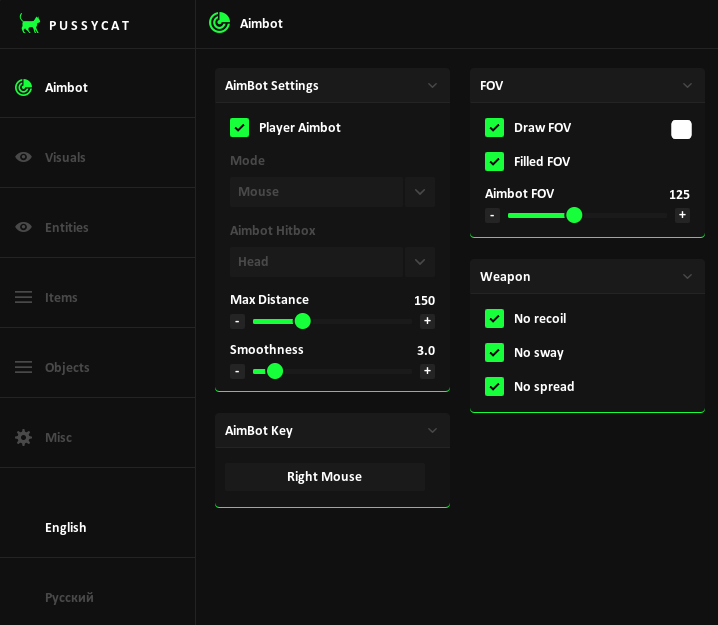
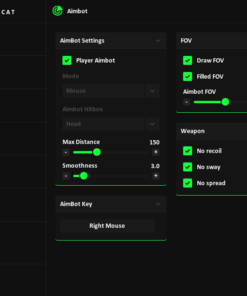
PUSSYCAT includes a fully configurable Rob Run Aimbot with two targeting modes, adjustable aim smoothing, customizable hitboxes, and FOV controls.
Choose your preferred targeting method and configure the Aimbot according to your weapon and combat preferences.
Aimbot Features
- Memory Aimbot: Memory-based targeting mode.
- Mouse Aimbot: Mouse-based aiming assistance.
- Target Hitbox Selection: Choose between head, neck, and body.
- Aimbot Smoothness: Adjust the speed and smoothness of aim movements.
- Maximum Target Distance: Configure the maximum targeting range.
- Custom Aimbot Keybind: Assign your preferred activation key.
- FOV Circle: Display the Aimbot targeting area.
- Filled FOV: Enable a customizable background inside the targeting circle.
- Adjustable FOV Radius: Set the size of the target acquisition area.
Switch between Memory and Mouse modes and customize your settings for different combat situations.
🔫 Weapon Hacks – No Recoil, No Spread & No Sway
PUSSYCAT includes weapon modifications designed to improve weapon stability and aiming control during ROB RUN gunfights.
Weapon Features
- No Recoil: Remove weapon recoil.
- No Spread: Eliminate weapon bullet spread.
- No Sway: Remove weapon sway for more stable aiming.
These modifications complement the built-in Aimbot and provide additional options for customizing weapon behavior.
👁️ Rob Run Player ESP & Wallhack – Complete Player Tracking
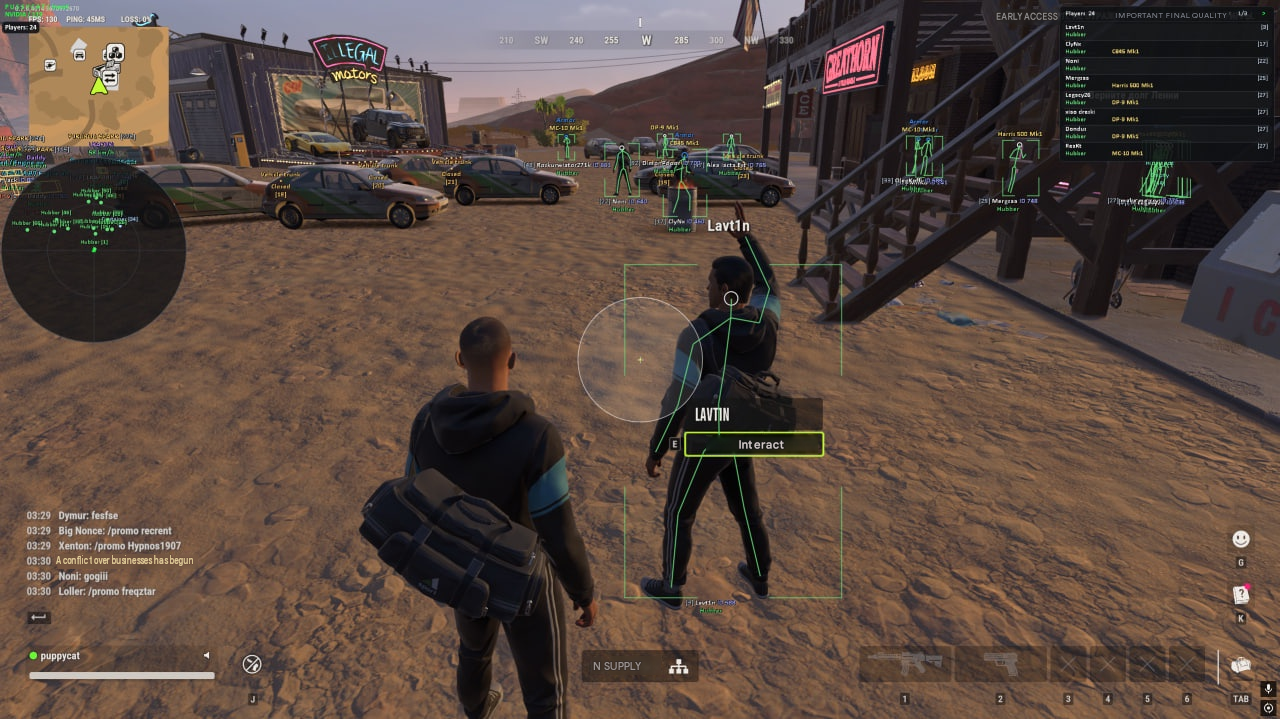
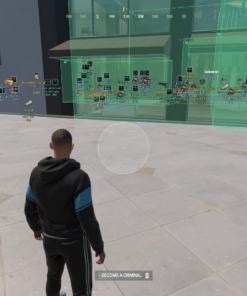
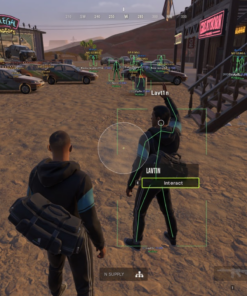
The advanced PUSSYCAT Player ESP provides detailed information about nearby players, their equipment, positions, and current status.
Visualize player locations through obstacles using customizable ESP overlays and independently configure which player categories appear on your screen.
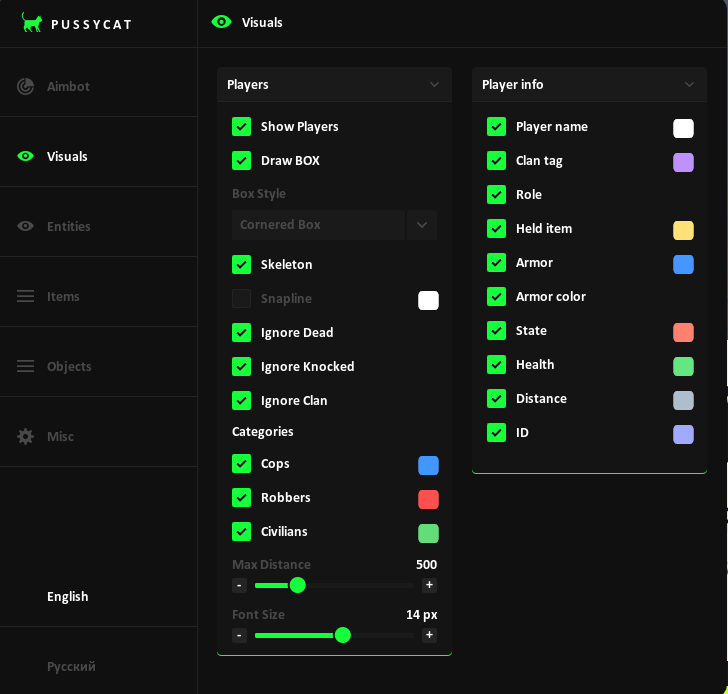
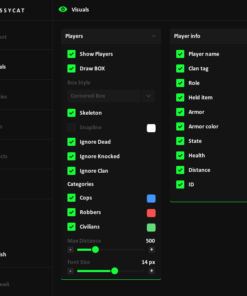
Player ESP Features
- Player ESP: Enable or disable player visualization.
- Full Boxes: Display complete bounding boxes around players.
- Corner Boxes: Use compact corner-style ESP boxes.
- Skeleton ESP: Visualize player skeletons.
- Snaplines: Draw lines toward players from the bottom, top, or crosshair.
- Player Names: Display nicknames.
- Clan Tags: Identify player clan information.
- Player Roles: Distinguish police officers, robbers, and civilians.
- Held Items: Show weapons and other items equipped by players.
- Item Icons: Display supported held-item icons.
- Health ESP: Monitor player health.
- Armor ESP: Display armor information with customizable colors.
- Player State: Identify the current status of players.
- Distance ESP: Display distances to players.
- Player ID: Show individual player identifiers.
Advanced Player ESP Filters
Customize which players are displayed using dedicated filtering options:
- Ignore Dead Players
- Ignore Knocked Players
- Ignore Clan Members
- Separate Police Officer ESP
- Separate Robber ESP
- Separate Civilian ESP
- Adjustable Maximum Display Distance
- Customizable ESP Font Size
These settings allow you to reduce unnecessary overlay information and focus on selected player categories.
🚗 Vehicle ESP – Track Cars, Drivers & Vehicle Information
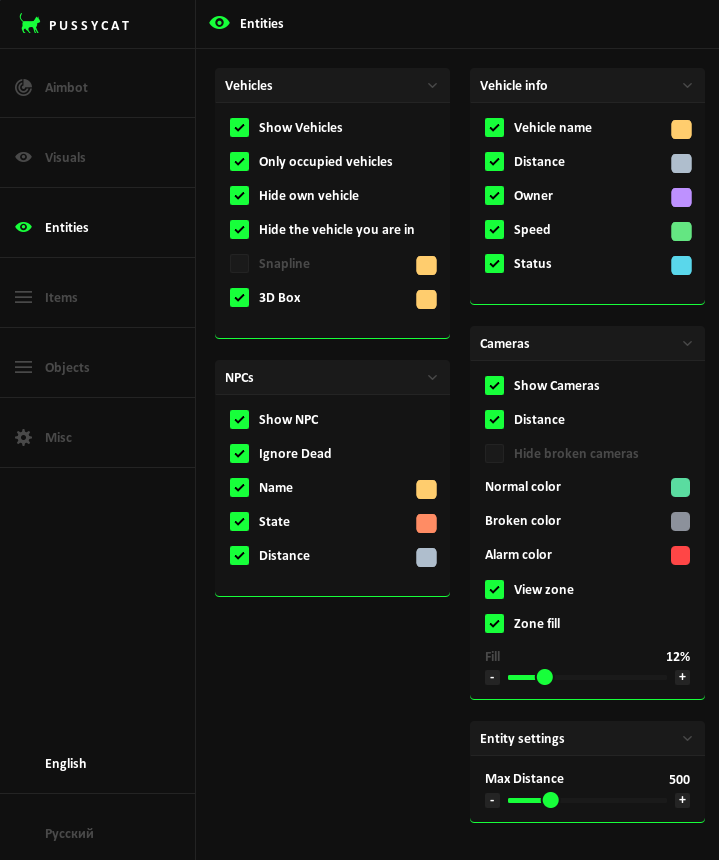
PUSSYCAT includes dedicated Rob Run Vehicle ESP features for identifying vehicles and displaying useful information about their movement and status.
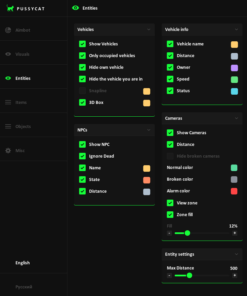
Vehicle ESP Features
- Vehicle ESP: Display nearby vehicles.
- 3D Vehicle Boxes: Highlight vehicles using three-dimensional bounding boxes.
- Vehicle Snaplines: Draw directional lines toward vehicles.
- Vehicle Names: Identify supported vehicles.
- Vehicle Owner: Display ownership information.
- Vehicle Speed: Monitor vehicle movement speed.
- Vehicle Status: Show the current vehicle state.
- Vehicle Distance: Display the distance to vehicles.
- Occupied Vehicles Only: Hide unoccupied vehicles.
- Hide Own Vehicle: Exclude your personal vehicle.
- Hide Current Vehicle: Hide the vehicle you are currently occupying.
🤖 NPC ESP – Non-Player Character Detection
Track non-player characters through a dedicated NPC ESP module.
NPC ESP Features
- NPC Visualization
- NPC Names
- NPC Current States
- Distance Indicators
- Hide Dead NPCs
- Adjustable Maximum Display Distance
NPC tracking can be configured separately from Player ESP.
📷 Camera ESP – Surveillance Camera Detection
The Rob Run Camera ESP module displays information about supported surveillance cameras, including their locations, states, and viewing areas.
Camera ESP Features
- Camera ESP: Display surveillance camera positions.
- Camera Distance: Show the distance to cameras.
- Camera View Zones: Visualize surveillance coverage areas.
- Filled View Zones: Highlight camera viewing areas.
- Normal Camera Colors: Configure colors for active cameras.
- Broken Camera Colors: Identify destroyed cameras.
- Alarm Colors: Customize alarm-state visualization.
- Hide Broken Cameras: Filter out broken surveillance cameras.
- Maximum Distance: Adjust camera rendering distance.
💰 Rob Run Loot ESP – Advanced Item Detection & Loot Filters
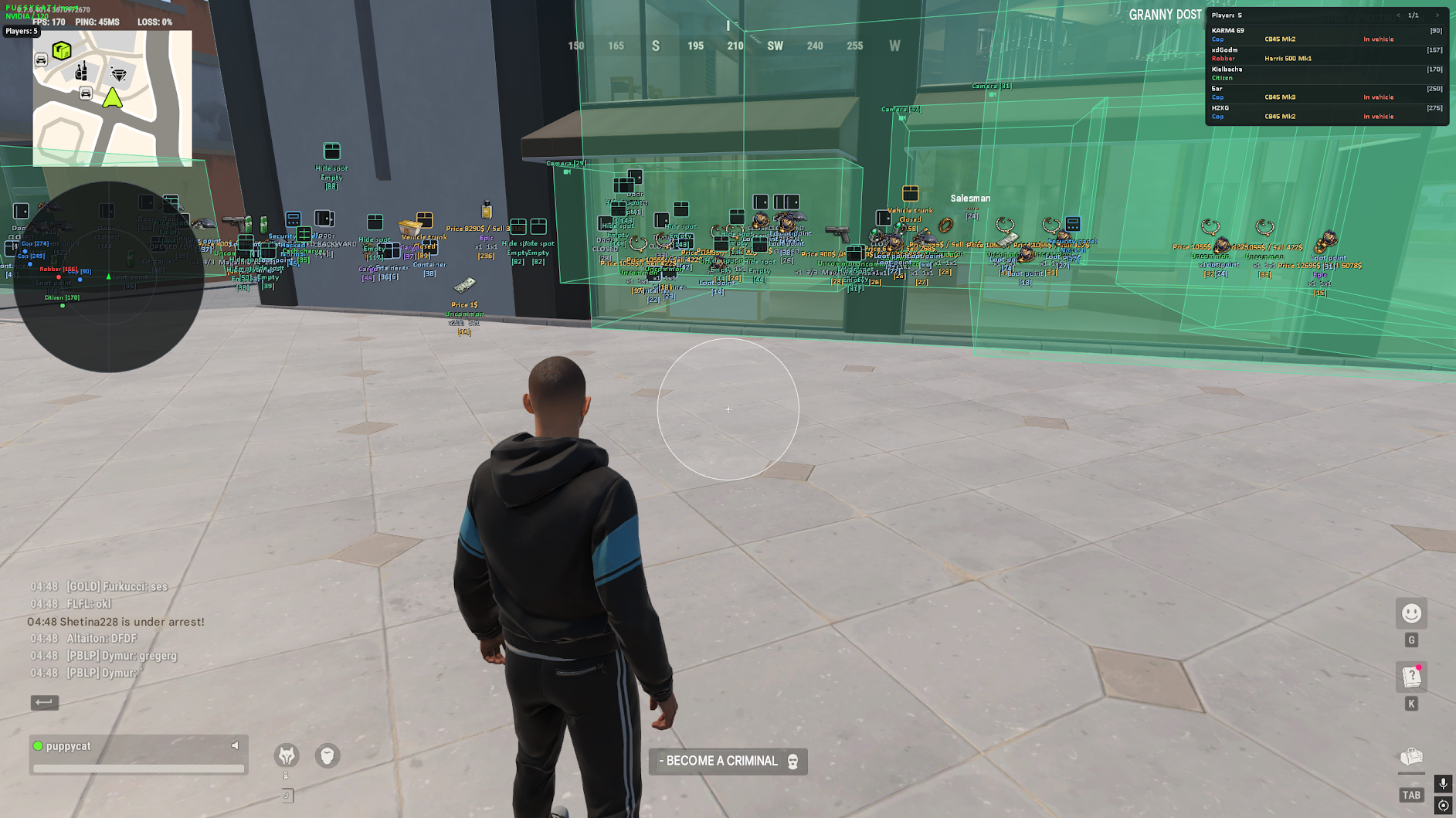
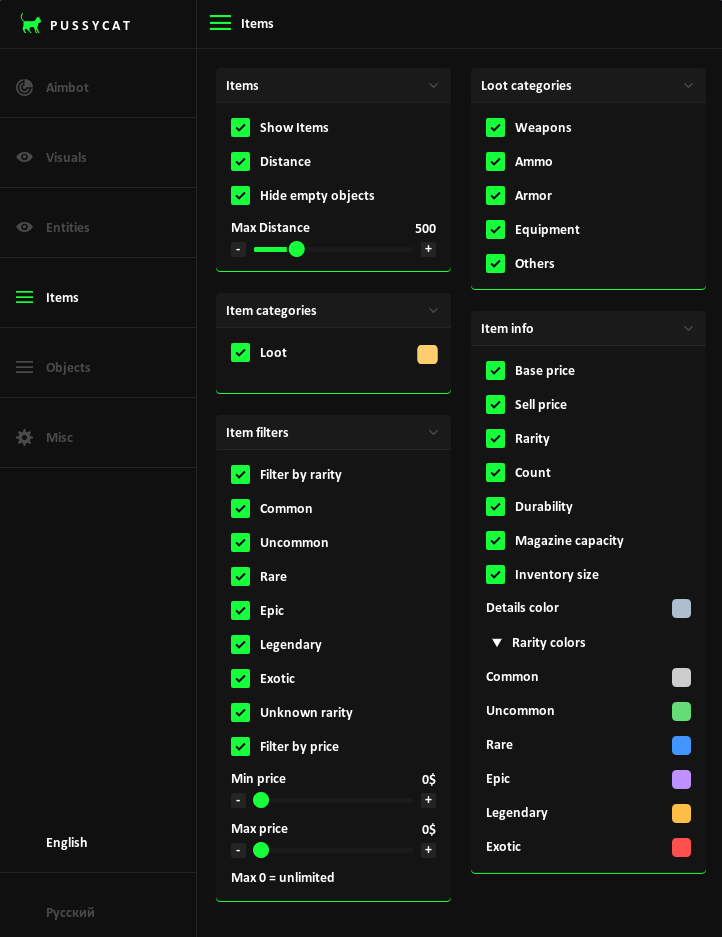
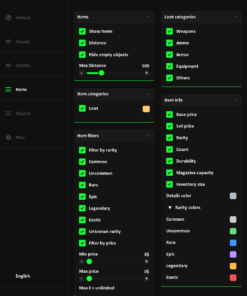
One of the standout features of PUSSYCAT is its advanced Loot ESP system, combining item detection with rarity, price, and item-information filters.
Locate supported weapons, ammunition, armor, equipment, and other valuable objects while filtering displayed loot according to your preferences.
Loot & Item ESP Features
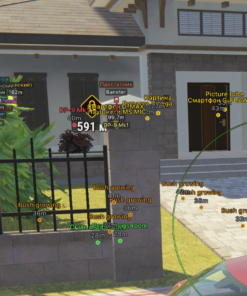
- Item ESP: Display supported loot objects.
- Item Names & Icons: Identify items using text labels and icons.
- Loot Distance: Show the distance to detected items.
- Maximum Display Distance: Customize loot rendering range.
- Hide Empty Objects: Remove empty objects from the overlay.
- Weapon ESP: Locate weapons.
- Ammo ESP: Display ammunition.
- Armor ESP: Identify armor items.
- Equipment ESP: Find equipment.
- Additional Loot Categories: Display other supported objects.
Loot Rarity Filters
PUSSYCAT allows you to filter items by rarity, including:
- Common
- Uncommon
- Rare
- Epic
- Legendary
- Exotic
- Unknown
Configure which rarity categories appear in your overlay and customize their display colors.
Loot Price Filters & Item Information
PUSSYCAT provides additional item details to help identify and compare supported loot.
- Minimum Price Filter: Set the minimum item price to display.
- Maximum Price Filter: Set the maximum item price to display.
- Base Price: Display an item’s base value.
- Sell Price: Show its selling price.
- Rarity: Identify the item’s rarity tier.
- Item Count: Display available quantity.
- Durability: Monitor item condition.
- Magazine Capacity: Show supported weapon magazine information.
- Inventory Size: Display item inventory-space requirements.
- Custom Detail Colors: Configure the appearance of information labels.
- Custom Rarity Colors: Use different colors for item rarity categories.
With these filters, you can focus on specific equipment types and item values instead of displaying every available piece of loot.
📦 World Object ESP – Bags, Containers, Doors & Cash Nodes
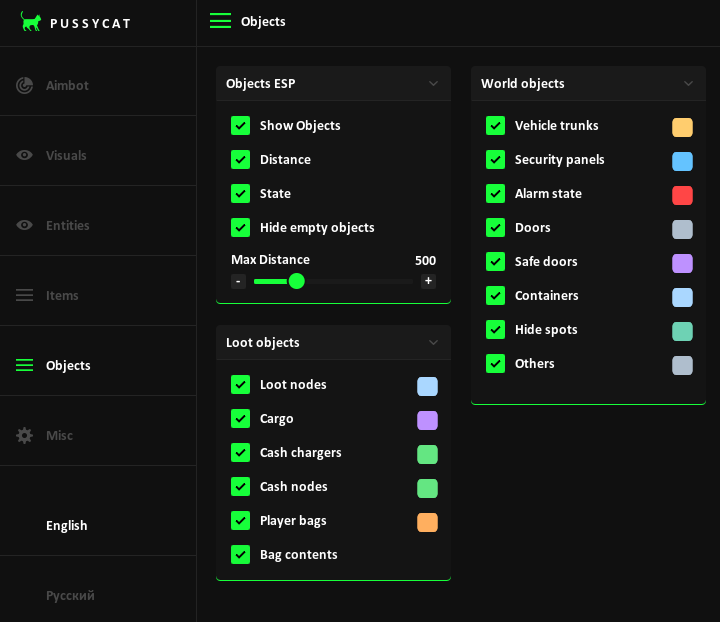
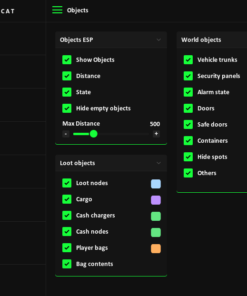
PUSSYCAT includes an expanded World Object ESP module covering interactive objects and environmental elements throughout ROB RUN.
This system extends beyond traditional loot visualization by providing information about containers, player bags, vehicle storage, security devices, and other supported objects.
World Object ESP Features
- Player Bag ESP: Locate player bags.
- Bag Contents ESP: Display supported information about items inside bags.
- Loot Nodes: Identify loot-related world objects.
- Cargo ESP: Locate cargo.
- Cash Charger ESP: Display cash chargers.
- Cash Node ESP: Identify cash-related nodes.
- Vehicle Trunk ESP: Track vehicle storage compartments.
- Container ESP: Locate supported containers.
- Door ESP: Display doors.
- Safe Door ESP: Identify safe doors.
- Security Panel ESP: Locate security-related panels.
- Alarm State: Display supported alarm information.
- Hide Spot ESP: Locate hiding spots.
- Object Icons: Display supported object icons.
- Object State: Show object status information.
- Object Distance: Display the distance to detected objects.
- Hide Empty Objects: Filter empty objects.
- Adjustable ESP Range: Control maximum rendering distance.
The World Object ESP system provides additional information about the surrounding environment and supported interactive elements.
🧭 Rob Run Radar – Player & Item Tracking
The integrated Rob Run Radar provides a customizable overview of nearby characters and items.
Adjust the radar’s position, scale, range, and transparency to match your preferred interface layout.
Radar Features
- Radar Enable: Toggle the radar on or off.
- Camera Rotation: Rotate the radar with your camera.
- Radar Grid: Display an optional grid.
- Player Roles: Show supported character roles.
- Item Tracking: Display supported items on the radar.
- Item Names: Show item labels.
- Local Player Marker: Display your character’s position.
- Distance Information: Show supported distance information.
- Radar Size: Adjust radar dimensions.
- Radar Range: Configure tracking distance.
- Dot Size: Customize radar markers.
- Radar Opacity: Adjust transparency.
- X/Y Position: Move the radar to your preferred screen location.
🎮 Player List, Player Counter & Crosshair
PUSSYCAT includes additional interface features for displaying player information and customizing your on-screen crosshair.
Additional Features
- Player List: Display a dedicated list of players.
- Player Counter: Show player count information.
- Custom Crosshair: Enable an additional crosshair overlay.
- Crosshair Size: Adjust crosshair dimensions.
- Crosshair Thickness: Customize line thickness.
⚔️ Battle Mode & Overlay Performance Settings
Use the built-in Battle Mode and performance controls to customize how PUSSYCAT operates during gameplay.
Battle Mode
- Dedicated Battle Mode
- Custom Battle Mode Activation Key
- Configurable Activation Controls
Overlay Settings
- Overlay FPS Limiter: Set a maximum overlay frame rate.
- Adjustable Overlay FPS: Customize the overlay’s refresh rate.
- Menu Keybind: Select your preferred menu activation key.
⚙️ Configuration Management & Languages
PUSSYCAT provides a built-in configuration system for managing your preferred settings.
Configuration Features
- Save Configurations
- Load Saved Configurations
- Customize Aimbot Settings
- Configure ESP Display Options
- Adjust Radar Settings
- Manage Overlay Preferences
Supported Interface Languages:
- English
- Russian
💻 PUSSYCAT Rob Run – System Requirements
| Specification | Compatibility |
|---|---|
| Game | ROB RUN |
| Game Client | Steam |
| Operating System | Windows 10 / Windows 11 |
| Windows Architecture | 64-bit (x64) |
| Supported OS Versions | 21H2–26H2, on applicable supported Windows builds |
| Processor | Intel / AMD |
| Display Mode | Borderless Windowed |
| Built-in HWID Spoofer | Not Included |
| OBS Capture Bypass | Not Included |
| Anti-Cheat | In-game |
Important: ROB RUN must be running in Borderless Windowed mode. Check the current product status and compatibility before purchasing.
⭐ Why Choose PUSSYCAT Rob Run Cheat?
- Two Aimbot Modes: Choose Memory or Mouse targeting assistance.
- Advanced Player ESP: Track players with boxes, skeletons, health, armor, names, and equipment information.
- Detailed Loot Filters: Filter items by rarity, base price, selling price, and category.
- Expanded World Object ESP: Detect player bags, containers, doors, cash nodes, security panels, and more.
- Vehicle & Camera Tracking: Access additional information about vehicles and surveillance systems.
- Custom Radar: Monitor characters and supported items.
- Weapon Modifications: No Recoil, No Spread, and No Sway.
- Additional Utilities: Player List, Player Counter, Custom Crosshair, and Battle Mode.
- Custom Configurations: Save and load preferred settings.
- Steam Compatibility: Designed for ROB RUN on supported Windows PCs.
❓ Frequently Asked Questions
Does PUSSYCAT Rob Run include Aimbot?
Yes. PUSSYCAT includes Memory and Mouse Aimbot modes with customizable hitboxes, aim smoothing, activation keys, maximum targeting distance, and FOV controls.
Does PUSSYCAT include Player ESP and Wallhack features?
Yes. PUSSYCAT provides Player ESP with boxes, skeletons, snaplines, names, health, armor, equipped items, player roles, and additional information.
Can PUSSYCAT display police officers, robbers, and civilians separately?
Yes. The Player ESP includes separate categories for cops, robbers, and civilians.
Does PUSSYCAT have Loot ESP with rarity filters?
Yes. The Loot ESP includes rarity filtering for Common, Uncommon, Rare, Epic, Legendary, Exotic, and Unknown items.
Can I filter loot by price?
Yes. PUSSYCAT supports minimum and maximum price filters, along with item base price, sell price, quantity, rarity, durability, magazine capacity, and inventory size information.
Does PUSSYCAT include Player Bag ESP?
Yes. The World Object ESP supports player bags and bag contents, along with various containers, cargo objects, and other supported environmental objects.
Does PUSSYCAT have Radar?
Yes. The radar can display characters and items with configurable range, size, opacity, rotation, and screen position.
Does PUSSYCAT include No Recoil and No Spread?
Yes. No Recoil, No Spread, and No Sway are listed weapon modification features.
Does PUSSYCAT support Windows 11?
Yes. PUSSYCAT supports compatible 64-bit Windows 10 and Windows 11 builds within its stated version requirements.
Does PUSSYCAT work on Steam?
Yes. The supported ROB RUN game client is Steam.
Which display mode is required?
Borderless Windowed mode is required.
Is an HWID Spoofer included?
No. PUSSYCAT does not include a built-in HWID spoofer.
Does PUSSYCAT include OBS Capture Bypass?
No. OBS capture bypass is not included.
Is PUSSYCAT guaranteed undetected?
No third-party cheat can guarantee permanent undetectability or eliminate the risk of anti-cheat detection and account restrictions.
🛒 Buy PUSSYCAT Rob Run Cheat at CrazyCapyStore
Get access to PUSSYCAT Rob Run Cheat, featuring advanced Memory and Mouse Aimbot, Player ESP, Loot ESP, Vehicle ESP, NPC ESP, Camera ESP, World Object ESP, Radar, No Recoil, No Spread, and more.
Choose your preferred license duration:
- 1 Day Access
- 7 Days Access
- 30 Days Access
Review the current product status, screenshots, system requirements, and available license options before purchasing.
PUSSYCAT ROB RUN – AIMBOT, ESP, LOOT FILTERS, RADAR & WEAPON MODIFICATIONS
Available at CrazyCapyStore.com.
| Duration | 1 day, 7 days, 30 days |
|---|
Reviews
There are no reviews yet.