
Pioner Cheats & Hacks
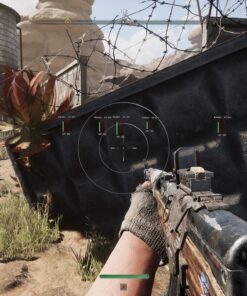
Looking for Pioner cheats and hacks for PC? This category includes private tools for players who want better combat control, stronger awareness, and a smoother gameplay experience in Pioner. Depending on the selected product, available features may include aimbot, ESP, wallhack-style visuals, radar, loot ESP, player tracking, no recoil, weapon assistance, and other useful options.
Pioner is a game where information, positioning, and reaction speed can make a huge difference. A good cheat setup can help you understand what is happening around you, spot enemies faster, track important objects, and play with more confidence. Whether you are looking for simple visuals or a more complete Pioner hack with combat features, you can find available options here.
Buy Pioner Cheats for PC
At CrazyCapiStore, you can buy Pioner cheats for PC with clear product descriptions, delivery instructions, and support if you need help with setup. Each product page includes its own feature list, compatibility details, supported Windows versions, requirements, and current status.
Some Pioner cheats may focus mainly on ESP and visual awareness, while others may include aimbot, radar, recoil control, loot tracking, or extra combat tools. Features can vary between products, so always check the individual product page before purchasing.
Pioner Aimbot
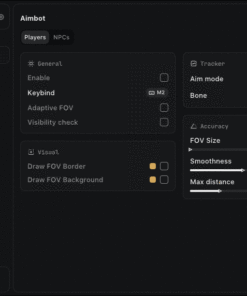
Some products in this category may include a Pioner aimbot designed to help with aiming consistency during combat. Depending on the selected cheat, aimbot features may include smooth aim, FOV control, aim keybinds, target selection, visible checks, bone selection, distance limits, and other adjustable settings.
A customizable aimbot allows you to build a setup that fits your playstyle. You can keep the configuration simple and controlled or use stronger settings if the product supports them.
Pioner ESP & Wallhack
ESP is one of the most important features in any Pioner cheat. With Pioner ESP, you can get additional visual information about enemies, players, loot, objects, distance, health, and other important elements depending on the selected product.
Common ESP features may include:
- Player ESP
- Enemy boxes
- Skeleton ESP
- Name ESP
- Distance ESP
- Health display
- Loot ESP
- Item ESP
- Object ESP
- Radar
- Custom colors
- Render distance settings
- Visibility checks
A good ESP setup can help you avoid surprise fights, track enemy movement, find valuable items faster, and make better decisions during gameplay.
Pioner Loot ESP
Loot ESP can be especially useful in games where resources, items, and equipment matter. Depending on the product, Pioner loot ESP may help you locate valuable items, containers, weapons, supplies, or other important objects faster.
Instead of wasting time searching blindly, loot visuals can help you move with more purpose and focus on the items that matter most.
Pioner Radar Cheats
Some Pioner hacks may include radar features for extra awareness. Radar can help you understand enemy movement, track nearby players, and stay aware of danger around you.
Radar-focused tools are a strong choice for players who prefer information-based gameplay instead of heavy combat assistance.
Pioner No Recoil & Weapon Features
Depending on the selected Pioner cheat, weapon features may include no recoil, recoil reduction, no spread, weapon control, or other aim-related tools. These features can make weapons easier to handle and improve consistency during fights.
Weapon features are different from product to product, so always check the exact feature list before buying.
Private Pioner Hacks
This category is focused on private Pioner tools rather than random public downloads. Public cheats are often unstable, outdated, fake, or risky to use. Buying from a trusted store gives you clearer instructions, better support, and a smoother experience.
CrazyCapiStore focuses on clear product pages, fast delivery, and support instead of confusing download links or unknown sources.
Why Buy Pioner Cheats from CrazyCapiStore?
CrazyCapiStore makes it easy to find and buy Pioner cheats with clear information and a simple checkout process.
Key Benefits
- Pioner cheats and hacks for PC
- Aimbot, ESP, radar, and loot visuals depending on the product
- Clear feature lists and product descriptions
- Instant delivery on supported products
- Setup instructions included
- Support available if you need help
- Multiple cheat options when available
- Secure checkout process
- Compatibility and status information on product pages
Choose the Best Pioner Cheat for Your Setup
Before purchasing, check the product page carefully. Supported Windows versions, game compatibility, available features, setup steps, and current status can vary between different Pioner cheats.
Some tools may be better for clean ESP gameplay, while others may be more focused on aimbot, radar, loot tracking, or combat control. If you are not sure which product is right for your PC or playstyle, contact support before buying.
Pioner Cheats FAQ
What are Pioner cheats?
Pioner cheats are tools that may add extra gameplay features such as ESP, aimbot, radar, loot visuals, recoil control, and other combat or visual options depending on the selected product.
Do Pioner cheats include ESP?
Some Pioner cheats may include ESP features such as player boxes, skeletons, names, distance, health, loot ESP, item ESP, and radar. Check the product page for the exact feature list.
Can I buy a Pioner aimbot?
If a Pioner aimbot product is available, it will be listed in this category with its own description, features, requirements, and setup instructions.
Are all Pioner hacks the same?
No. Different products can have different features, menus, supported systems, update status, and setup requirements. Always read the product description before purchasing.
Do I need Windows 10 or Windows 11?
Most PC cheats require Windows 10 or Windows 11, but supported builds depend on the specific product. Always check compatibility before buying.
What should I do after purchase?
After purchase, you will receive delivery details and instructions. Follow the guide carefully and contact support if you need help with setup or installation.