
Oxide Survival Island
Oxide Survival Island iOS Cheats & Hacks for iPhone and iPad
Jul
Oxide: Survival Island places players in a competitive multiplayer environment filled with hidden enemies, limited resources, dangerous bases and unpredictable PvP encounters. Every decision matters, whether you are gathering materials, exploring unfamiliar territory, protecting your shelter or preparing to raid another group.
The standard iPhone and iPad experience relies heavily on touchscreen controls and limited visual information. Other players can disappear inside dark buildings, hide behind terrain or approach from outside your immediate field of view.
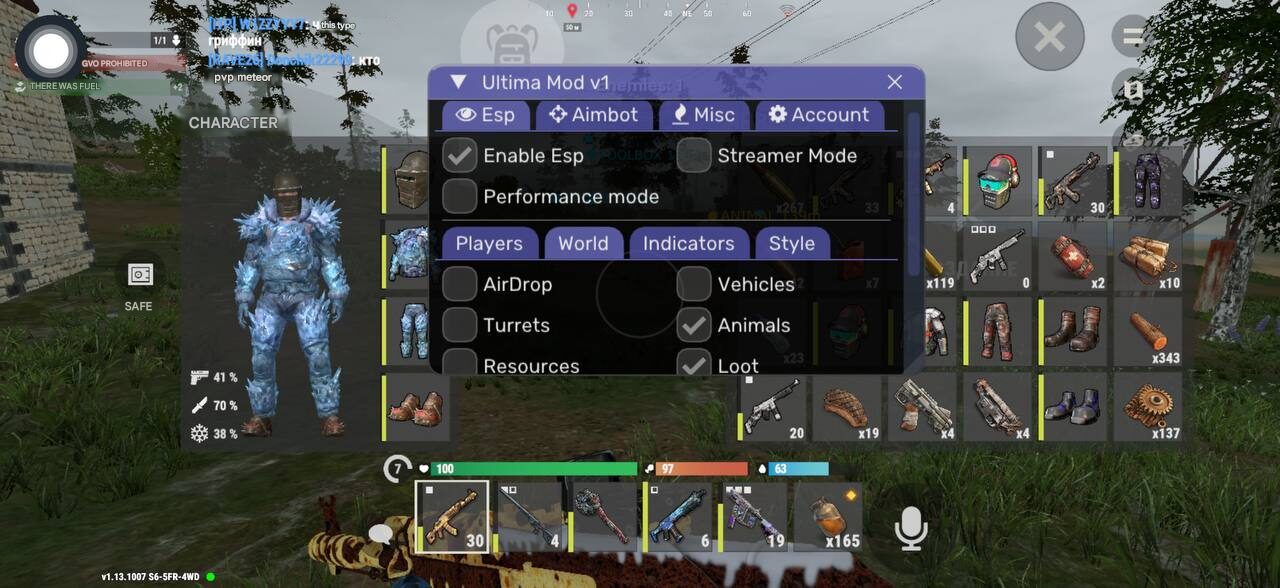
Oxide Survival Island iOS cheats provide additional visual, targeting and camera tools designed to give players more information about the surrounding environment. Available functions may include player highlighting, enemy health, distance indicators, directional snaplines, customizable aim assistance, visible check, freecam, skin options and recording protection.
One of the available solutions is Ultima Mod for Oxide Survival Island iOS, which combines these features inside a configurable in-game menu for supported iPhones and iPads.
Looking for the current Oxide iOS cheat?
Check the latest product status, supported game version, installation method and available features on the product page.
Ultima Mod Oxide Survival Island iOS
$4.99 – $25.99Price range: $4.99 through $25.99
What Is an Oxide Survival Island iOS Cheat?
An Oxide iOS cheat is a third-party game modification that adds functions not normally available through the standard Oxide interface.
Instead of depending only on sound, visibility and manual camera movement, players can access additional information about nearby opponents. Depending on the selected settings, the menu may display player health, distance, directional lines and other useful details.
Some iOS mods also include aiming assistance and camera functions that change how the player observes the environment.
These tools may be useful while:
- Exploring unfamiliar parts of the island
- Approaching player-built bases
- Defending your own structures
- Searching for enemies inside dark areas
- Participating in clan battles
- Monitoring players at longer distances
- Fighting through touchscreen controls
- Scouting dangerous locations
- Recording gameplay without showing selected overlays
The available functions and installation method may change after game or iOS updates, so compatibility should always be confirmed before installation.
Oxide iOS ESP and Player Highlighting
Player ESP is one of the most important features included in many Oxide Survival Island iOS hacks.
ESP provides additional visual information about other players. It can make enemies easier to identify when they are positioned near structures, terrain, vegetation or other objects that would normally make them difficult to see.
Enemy Highlighting
Enemy highlighting visually separates detected players from the surrounding environment.
Oxide includes many dark interiors, shadowed areas and player-built structures where another character can blend into the background. This becomes even more difficult on smaller iPhone displays, where distant targets occupy only a tiny part of the screen.
Enemy highlighting can help with:
- Detecting players around buildings
- Monitoring doors and base entrances
- Finding opponents in dark interiors
- Watching nearby terrain
- Spotting movement at longer distances
- Identifying players during group fights
- Reducing unexpected close-range encounters
This feature can be particularly useful during resource gathering, when players are often focused on materials rather than constantly checking every direction.
Player Health Display
The health display shows the current health level of detected enemies.
This information can influence how you approach a fight. A fully healed opponent may require a more careful engagement, while an injured player may be easier to pressure before they can retreat or recover.
Health information can help you:
- Identify weakened players
- Estimate remaining damage
- Confirm successful hits
- Choose between attacking and retreating
- Prioritize targets during group combat
- Monitor whether an enemy has healed
The feature is useful during both close-range encounters and longer battles involving several players.
Distance to Enemy
Distance ESP displays how far another player is from your current position.
A visual marker alone does not always make it clear whether an enemy is nearby or far across the map. A numerical distance indicator gives additional context and makes it easier to assess the situation.
Distance information may help you:
- Select an appropriate weapon
- Identify immediate threats
- Monitor players approaching your base
- Decide whether to engage
- Avoid walking into a nearby group
- Track enemies moving away
- Prioritize the closest opponent
On mobile devices, this can make target information much easier to understand without constantly adjusting the camera.
Snaplines to Players
Snaplines draw directional lines toward detected players.
They help show the general direction of enemies, especially when several ESP markers appear on the screen simultaneously. Instead of searching manually for each player, you can use the line as a visual guide.
Snaplines can be useful during:
- Base defence
- Open-area exploration
- Clan fights
- Movement through structures
- Encounters involving several enemies
- Situations with limited visibility
Customizable Oxide iOS Aimbot
Touchscreen aiming can be difficult during fast combat. Players must control movement, camera position, aiming and firing through the same display, often while an opponent is moving unpredictably.
An Oxide Survival Island iOS aimbot assists with target acquisition and helps direct the crosshair toward a selected player.
Ultima Mod includes configurable aim settings rather than relying on a single fixed targeting mode.
Available options may include:
- Head or body targeting
- Target preference
- Visible check
- Adjustable targeting distance
- Custom FOV radius
- Aim smoothing
- Configurable aim activation
These settings allow the targeting behaviour to be adjusted for different weapons, distances and combat situations.
Target Preference
Target preference determines which part of the opponent the aim assistance should prioritize.
Depending on the current version, available options may include:
- Head
- Body
Head targeting focuses on greater precision, while body targeting may provide more stable tracking when an enemy is moving quickly.
The best setting depends on the selected weapon, combat distance and preferred aiming behaviour.
Visible Check
Visible check helps the targeting system determine whether an opponent is directly visible or blocked by an obstacle.
Without visible check, an aimbot may attempt to focus on players behind walls, rocks or terrain. Enabling this function helps limit targeting to enemies who can actually be reached from the current position.
Visible check is especially useful around:
- Player-built bases
- Interior rooms
- Doorways
- Defensive walls
- Rocks and hills
- Uneven terrain
- Crowded building areas
This can make aim assistance more practical during normal gameplay.
Adjustable Aim Distance
The distance setting determines how far the targeting system searches for potential opponents.
A shorter distance can keep the aim assistance focused on nearby threats. A larger distance may allow it to detect and select enemies who are farther away.
Reducing the aim distance may be helpful during close-range combat, while a larger value can be used when monitoring open areas.
Custom FOV Radius
The FOV radius defines the area around the centre of the screen where the aimbot can select a target.
A smaller FOV creates more controlled target selection because an enemy must be closer to the crosshair before the aim assistance activates.
A larger FOV makes it easier to acquire players positioned farther from the centre of the screen.
This setting allows users to balance faster target acquisition with more selective aiming behaviour.
Aim Smoothing
Aim smoothing controls how quickly the crosshair moves toward a selected target.
Lower smoothing values generally create faster movement. Higher values produce slower and more gradual aim adjustment.
Smoothing can be adjusted according to:
- Weapon type
- Combat range
- Target movement
- Device screen size
- Personal preference
- Desired aiming behaviour
Freecam for Oxide Survival Island iOS
Freecam allows the camera to move independently from the normal player perspective.
Instead of seeing only what is directly in front of the character, freecam can be used to observe nearby areas and inspect locations that would otherwise require physical movement.
Freecam may help with:
- Scouting around structures
- Checking the exterior of a base
- Monitoring nearby entrances
- Observing dangerous locations
- Examining terrain
- Planning a route
- Checking for nearby players
- Viewing areas from alternative angles
This feature can be valuable before entering an unfamiliar building or moving into an area where another player may be hiding.
The exact movement range and behaviour may vary between product versions.
Skin Hack and Cosmetic Options
Ultima Mod includes a skin-related feature for supported items and equipment.
A skin hack changes the visual appearance of selected in-game objects without requiring the standard cosmetic unlock process. It is intended for players who want greater visual variety while playing Oxide on iPhone or iPad.
The exact list of available skins may change after updates. Some cosmetic options may also depend on the current game version.
Skin functions are primarily visual and do not necessarily change the normal statistics or behaviour of the selected item.
Recording Protection
Recording protection is designed to hide the cheat menu or selected visual elements from compatible screen-recording methods.
This can be useful when:
- Recording gameplay clips
- Capturing screenshots
- Sharing the screen
- Creating gameplay videos
- Saving highlights
- Streaming through supported methods
Recording protection may depend on the selected recording application, iOS version and current product build.
It should not be treated as a guarantee that every overlay will remain hidden through all recording, capture or streaming methods. Players should test the function before creating important footage.
Integrated Anti-Ban Protection
Ultima Mod includes an anti-ban component intended to reduce common detection risks.
However, no Oxide Survival Island iOS cheat can honestly guarantee permanent protection from account suspension. Online games may use updates, server-side systems, manual reviews and player reports.
The anti-ban feature should therefore be treated as an additional protection layer rather than complete immunity.
For improved stability:
- Use only the latest supported version
- Check product status after every Oxide update
- Follow the current installation guide
- Avoid files from unknown download websites
- Do not combine several unrelated modifications
- Wait for confirmation after major game updates
- Avoid unrealistic or obviously abnormal behaviour
- Consider using an alternative account
Compatibility information on the current product page should always take priority over older videos, screenshots or tutorials.
Oxide iOS Cheat Menu
Ultima Mod includes an in-game menu divided into separate categories.
The interface may contain sections such as:
- Player
- Building
- Aimbot
- Miscellaneous
- Information
- Account
- Settings
This structure makes it easier to manage individual functions without enabling everything at once.
Players can select only the features needed for the current situation. For example, you may use ESP while exploring, freecam while scouting, or aim assistance only during PvP encounters.
Configurable settings also make the menu more flexible across different iPhone and iPad screen sizes.
Oxide Survival Island Cheats for iPhone
Oxide iOS cheats can be used on supported iPhone models, provided that the device, operating-system version and installation method are compatible with the current product build.
Performance may vary based on:
- iPhone model
- Available memory
- iOS version
- Oxide graphics settings
- Number of displayed ESP objects
- Background applications
- Current product version
Newer devices generally provide smoother performance when several visual elements are displayed simultaneously.
For better performance:
- Close unnecessary background applications
- Keep sufficient storage available
- Use stable game graphics settings
- Enable only the functions currently required
- Restart the game after long sessions
- Use a stable internet connection
Device compatibility should be confirmed before purchasing.
Oxide Survival Island Cheats for iPad
Supported iPads may provide a more comfortable experience because of their larger display.
The additional screen space can make it easier to:
- Read ESP information
- Track several players
- Adjust menu settings
- Control the camera
- Use touchscreen movement
- Monitor a larger visible area
- Manage aimbot controls
However, compatibility still depends on the specific iPad model, iPadOS version and current Ultima Mod release.
A larger screen does not automatically guarantee support, so the current requirements should always be checked first.
Does the Oxide iOS Cheat Require Jailbreak?
The installation requirements may change between releases.
Depending on the current distribution method, installation may involve:
- A signed iOS application
- A sideloading method
- A certificate-based installation
- A computer-assisted setup
- A jailbreak-compatible package
- Another supported installation process
Do not assume that jailbreak is always required or never required. Check the current product description before purchasing.
Apple certificate availability can also change, which may temporarily affect installation methods that rely on application signing.
Oxide iOS Mod Menu Versus Free IPA Downloads
Many players search for terms such as:
- Free Oxide iOS cheat
- Oxide Survival Island mod menu IPA
- Oxide hacked IPA
- Oxide cheat download for iPhone
- Oxide iOS aimbot free
- Oxide Survival Island hack no jailbreak
Free IPA files frequently circulate without clear information about their origin or supported version.
An unknown file may be:
- Built for an outdated Oxide release
- Signed with an expired certificate
- Modified by an unknown person
- Missing advertised features
- Incompatible with your device
- Distributed without instructions
- Abandoned after an update
- Bundled with unwanted modifications
- Reuploaded under a different product name
A maintained premium tool provides clearer compatibility information, setup instructions and support when installation methods change.
This is particularly important on iOS, where certificates, signing methods and operating-system updates can affect whether an application can be installed or launched.
Compatibility and Requirements
Before purchasing an Oxide iOS cheat, verify the current requirements.
Check:
- Supported Oxide game version
- Supported iOS or iPadOS version
- Compatible iPhone and iPad models
- Jailbreak or non-jailbreak requirements
- Signing or sideloading method
- Current certificate status
- Product update status
- Available features
- Known temporary limitations
Do not rely on installation instructions from an old YouTube video or an unrelated product page. iOS installation methods can change more frequently than Android setups.
Always use the instructions included with the current product release.
Oxide iOS Versus Android Cheats
Oxide cheats are available separately for iOS and Android.
Although both versions may include features such as player ESP and aim assistance, they are not necessarily identical.
The iOS version may offer:
- Player highlighting
- Health display
- Distance information
- Snaplines
- Customizable aimbot
- Visible check
- Freecam
- Skin functions
- Recording protection
- Anti-ban features
The Android version may offer a different set of tools, such as:
- Loot and weapon highlighting
- Autofarm
- Noclip
- Instant reload
- Memory functions
- Expanded iPad-style view
Users should purchase the version created for their actual device and operating system.
Using an Android package on iPhone or an iOS IPA on Android will not work.
Playing on Android instead?
Why Choose Ultima Mod for Oxide iOS?
Ultima Mod combines several important visual, aiming and camera features inside one package.
Available functions include:
- Enemy highlighting
- Player health display
- Enemy distance
- Snaplines
- Customizable aim assistance
- Head or body targeting
- Visible check
- Adjustable aim distance
- Configurable FOV radius
- Aim smoothing
- Freecam
- Skin options
- Recording protection
- Integrated anti-ban component
- In-game menu
- Support for compatible iPhones and iPads
The exact feature set may change between updates, so the latest product page should always be treated as the primary source for compatibility and availability.
Frequently Asked Questions
Are Oxide Survival Island cheats available for iOS?
Yes. A separate iOS version is available for supported iPhones and iPads. Features may include player ESP, health and distance display, snaplines, aimbot, visible check, freecam, skins and recording protection.
Does the Oxide iOS cheat include ESP?
Yes. Ultima Mod includes player highlighting together with health, distance and directional information.
Is there an Oxide Survival Island aimbot for iPhone?
Yes. The iOS version includes configurable aim assistance with target preference, visible check, distance settings, FOV controls and smoothing.
What does visible check do?
Visible check helps prevent the aimbot from selecting players who are fully blocked by walls, structures, terrain or other solid objects.
Does Ultima Mod include freecam?
Yes. Freecam allows the camera to observe nearby locations independently from the standard player perspective.
Can I use the cheat on an iPad?
The product may work on supported iPads. Compatibility depends on the device model, operating-system version, installation method and current product release.
Does it require jailbreak?
Requirements can change between versions. Some releases may use signing or sideloading, while others may require a different installation method. Check the latest product requirements before ordering.
Does recording protection hide the menu?
Recording protection is intended to hide selected overlays from compatible capture methods. Results may vary between recording applications and iOS versions.
Is the cheat completely undetectable?
No third-party modification can guarantee zero detection risk. The anti-ban component is intended to reduce common risks, but updates, reports and server-side systems can still affect an account.
Does it work after every game update?
Compatibility should be checked after each Oxide update. Major changes may temporarily require an updated Ultima Mod version.
Can I install an Android Oxide cheat on iPhone?
No. Android and iOS use different application formats and installation methods. You need the version specifically created for iPhone or iPad.
Are free Oxide iOS IPA files safe?
Unknown files can be outdated, modified or distributed without support. Use files only from a source you trust and verify compatibility with the current Oxide version.
Get Oxide Survival Island Cheats for iOS
Oxide is a game where limited information creates much of the danger. Players can hide inside structures, move through dark terrain or approach while you are focused on gathering materials.
An Oxide Survival Island iOS cheat provides additional information and controls that can make the environment easier to understand. Player ESP, health information, distance indicators and snaplines help identify nearby activity. Customizable aim assistance improves touchscreen target acquisition, while visible check helps avoid selecting blocked players.
Freecam adds another way to observe dangerous locations, and skin options provide additional cosmetic customization. Recording protection may also hide selected overlays from supported capture methods.
Check the current Ultima Mod product page for supported iPhone and iPad models, iOS requirements, installation instructions, product status and available subscription periods.
Get Ultima Mod for Oxide Survival Island iOS
