
Ultima Mod for Oxide Survival Island iOS
Oxide: Survival Island is a competitive multiplayer survival game where information can be just as valuable as weapons and resources. Enemies may be hiding behind buildings, moving through dark areas, or preparing to attack from outside your normal field of view.
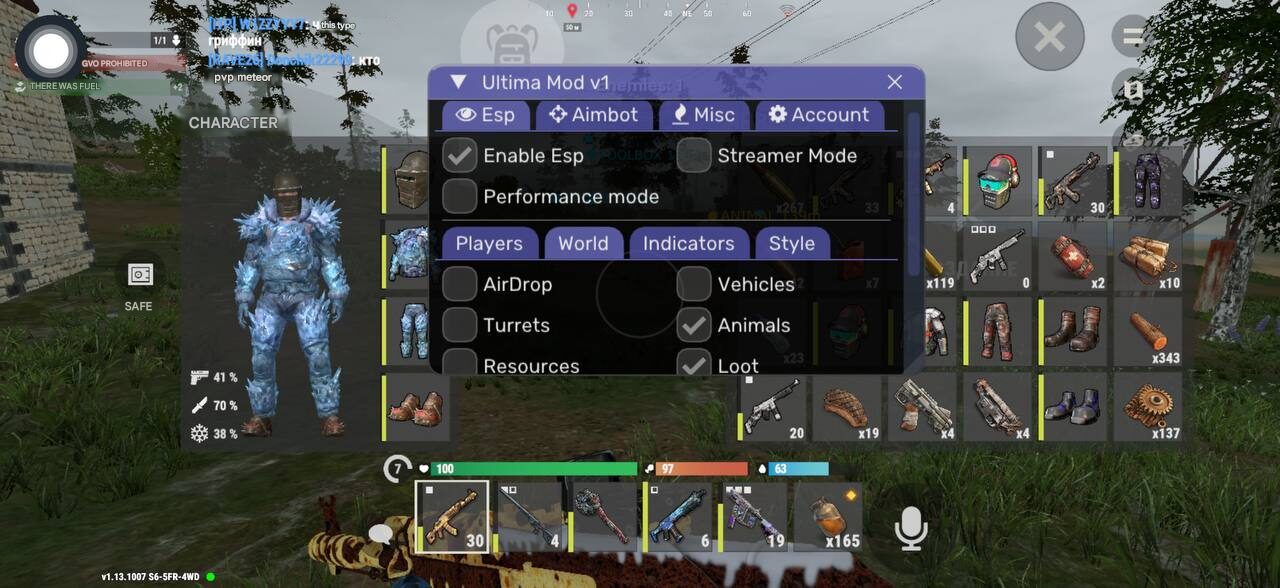
Ultima Mod for Oxide Survival Island iOS adds a complete set of visual, aiming, camera, and customization features directly to the game. The integrated menu allows you to configure every important function, including enemy ESP, health display, distance indicators, snaplines, aimbot settings, freecam, skins, and recording protection.
The cheat is designed for supported iPhones and iPads and includes a clean in-game menu with separate sections for ESP, aimbot, miscellaneous settings, account information, and other options.
Main Ultima Mod Features
Player ESP and Enemy Highlighting
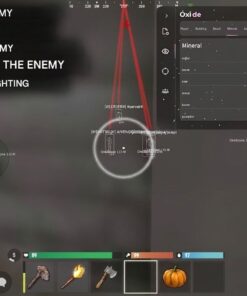
The player ESP system makes nearby opponents easier to identify, even when they are positioned inside dark buildings, behind objects, or at a considerable distance.
Enemy highlighting helps players stand out from the surrounding environment, reducing the chance of being surprised while gathering resources, approaching a base, or moving through dangerous areas.
The visual system includes:
- Enemy highlighting
- Player health display
- Distance to enemy
- Snaplines to players
- Configurable visual information
- Improved awareness during PvP and exploration
These tools provide a clearer overview of nearby activity without requiring you to constantly rotate the camera and inspect every corner of the map.
Player Health Display
Ultima Mod can display the current health of detected opponents.
Knowing an enemy’s health allows you to make better decisions during combat. You can identify weakened targets, determine whether an opponent has recovered, and estimate how much additional damage may be needed to finish a fight.
Health information is especially useful during group battles, base defence, and encounters where several players are visible at the same time.
Distance to Enemy
The distance indicator shows how far each detected player is from your current position.
This helps distinguish immediate threats from opponents who are still far away. Distance information can also make it easier to select the correct weapon, decide whether to engage, and monitor players moving toward your base.
Snaplines
Snaplines draw directional lines toward detected enemies.
This feature helps you quickly understand where other players are located, even when their character model is difficult to see. Snaplines are particularly useful during fast movement, fights around structures, and encounters involving several opponents.
Customizable Oxide iOS Aimbot
Ultima Mod includes an adjustable aimbot for Oxide Survival Island on iOS.
Touchscreen aiming can be difficult during fast PvP fights, particularly when an opponent is moving unpredictably. The aimbot assists with target acquisition and helps keep your aim directed toward the selected enemy.
Available aimbot settings include:
- Target preference
- Head or body targeting
- Visible check
- Maximum targeting distance
- Adjustable FOV radius
- Aim smoothing
- Configurable activation behaviour
These settings allow you to choose between faster target acquisition and smoother, more controlled aim assistance.
Target Preference
The target preference option determines which part of the enemy character the aimbot should prioritize.
Depending on the available settings, you can select targets such as:
- Head
- Body
Head targeting offers greater precision, while body targeting may provide more stable tracking during movement.
Visible Check
Visible check helps the aimbot determine whether a selected enemy is actually visible.
When enabled, the targeting system avoids locking onto players who are fully blocked by walls, terrain, or other solid objects. This makes the aim assistance more practical around bases, rocks, doorways, and interior locations.
Adjustable Aim Distance
The distance setting controls how far the aimbot can search for potential targets.
Reducing the targeting distance can help focus the system on nearby threats, while a larger distance allows it to detect players farther away.
Custom FOV Radius
The FOV radius defines the area around your crosshair where the aimbot can select a target.
A smaller FOV provides more controlled targeting, while a wider FOV makes it easier to acquire enemies positioned farther from the centre of the screen.
Aim Smoothing
Smoothing controls how quickly the aim moves toward a selected target.
Higher smoothing values create slower and more gradual movement. Lower values provide faster target acquisition. This allows players to adjust the aimbot according to their preferred weapon and combat style.
Freecam
The freecam function allows you to move the camera independently from the normal player perspective.
Freecam can be useful for observing nearby areas, checking around structures, inspecting dangerous locations, and gaining a better understanding of the environment without moving your character normally.
It may help with:
- Scouting buildings
- Checking areas around a base
- Observing nearby players
- Examining difficult-to-see locations
- Planning movement through dangerous areas
- Monitoring entrances and surrounding terrain
Availability and behaviour may vary depending on the currently supported game version.
Skin Hack
Ultima Mod includes a skin modification feature that provides access to additional visual customization options.
The skin hack can change the appearance of supported items or equipment without affecting their normal gameplay characteristics. It is designed for players who want more cosmetic variety while using the mod.
The exact list of supported skins may change between Ultima Mod updates.
Recording Protection
The recording protection feature is designed to hide the cheat interface or selected visual elements from supported screen-recording methods.
This can be useful when recording gameplay, creating clips, or sharing the screen without displaying the full menu overlay.
Recording protection may depend on the recording application, iOS version, and current Ultima Mod build. It should not be treated as guaranteed protection for every recording or streaming method.
Integrated Anti-Ban System
Ultima Mod includes an anti-ban component intended to reduce common detection risks while using supported features.
However, no third-party modification can guarantee complete protection from account suspensions. Game updates, server-side detection, manual reviews, and player reports can still affect account safety.
For the best possible stability:
- Use only the latest supported Ultima Mod version
- Check the product status after every Oxide update
- Follow the provided installation instructions
- Avoid downloading modified files from unknown websites
- Do not combine Ultima Mod with unrelated modifications
- Wait for an update if the product is marked as updating
Using an alternative account is recommended when testing any third-party game modification.
Clean In-Game Menu
Ultima Mod includes a convenient menu divided into several sections, making it easy to manage individual features.
Available menu categories may include:
- Player
- Building
- Aimbot
- Miscellaneous
- Information
- Account
- Settings
Individual functions can be enabled, disabled, or adjusted without activating every feature at once.
Compatibility
Ultima Mod is developed for supported versions of Oxide: Survival Island on iOS.
Compatibility may depend on:
- Current Oxide game version
- iOS version
- iPhone or iPad model
- Installation and signing method
- Current Ultima Mod release
- Available device memory
- Product status
Always check the current product status and requirements before purchasing or installing the cheat.
Do not rely on old installation videos or previously downloaded files after a major Oxide update. Updated installation instructions are provided when the supported method changes.
Ultima Mod Feature List
- Enemy highlighting
- Player health display
- Enemy distance
- Snaplines to players
- Customizable aimbot
- Head and body target preference
- Visible check
- Adjustable aim distance
- Custom FOV radius
- Aim smoothing
- Freecam
- Skin hack
- Recording protection
- Integrated anti-ban system
- User-friendly in-game menu
- Support for compatible iPhone and iPad devices
Get Ultima Mod for Oxide Survival Island iOS
Ultima Mod combines visual information, customizable aim assistance, camera control, cosmetic features, and recording protection in one complete Oxide Survival Island iOS package.
Whether you want to locate nearby enemies, monitor their health and distance, improve touchscreen aiming, scout an area with freecam, or customize supported skins, Ultima Mod provides a broad selection of tools through a convenient mobile menu.
Check the current product status, supported iOS versions, installation requirements, and available subscription options before ordering.
Get Ultima Mod for Oxide Survival Island iOS and access ESP, aimbot, freecam, skin customization, and additional survival tools in one package.
| Duration | 1 day, 7 days, 30 days |
|---|
Reviews
There are no reviews yet.