

Magic Oxide Survival Island Android Cheat
Surviving in Oxide: Survival Island requires more than gathering wood and building a shelter. Other players may be hiding inside structures, moving through dark terrain, watching your base, or preparing an attack from outside your normal field of view.
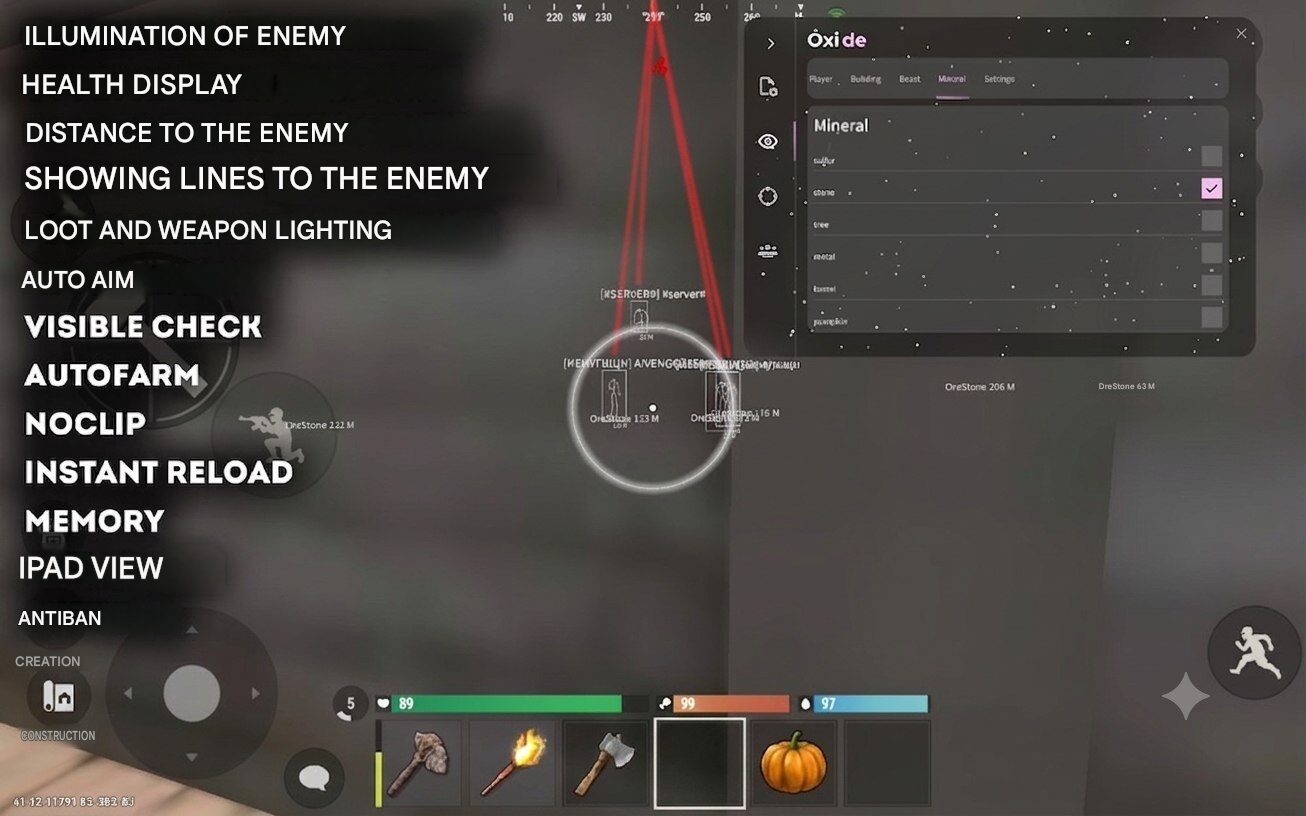
Magic Oxide Survival Island Android Cheat provides a complete collection of visual, combat, farming, movement, and quality-of-life features for supported Android devices. The mod helps you detect nearby enemies, view important player information, locate valuable loot, improve touchscreen aiming, automate repetitive farming actions, and move through the map with greater freedom.
Magic includes player highlighting, health display, enemy distance, snaplines, loot and weapon ESP, aimbot, visible check, autofarm, noclip, instant reload, memory functions, expanded iPad-style view, and an integrated anti-ban system.
It is designed primarily for Android phones and tablets. Depending on the current release and installation method, the mod may also work on a Windows PC through a compatible Android emulator.
Main Magic Android Features
- Player and enemy highlighting
- Player health display
- Distance to enemies
- Snaplines to detected players
- Loot and weapon highlighting
- Android aimbot
- Visible check
- Autofarm
- Noclip
- Instant reload
- Memory functions
- Expanded iPad-style view
- Integrated anti-ban protection
- Convenient in-game menu
- Android phone and tablet support
- Possible PC emulator support
Player ESP and Enemy Highlighting
The player ESP system helps identify nearby enemies who may otherwise be difficult to notice.
Oxide contains dark interiors, dense terrain, player-built structures, rocks, trees, and many locations where another player can hide. Enemy highlighting makes detected players stand out more clearly from the environment, giving you additional time to react.
Player ESP can be useful when:
- Exploring unfamiliar areas
- Approaching player-built bases
- Gathering resources in open locations
- Defending your own base
- Searching dark buildings
- Monitoring nearby clans
- Moving through high-risk PvP zones
- Checking whether an area is occupied
The feature is especially useful on mobile screens, where distant characters can be harder to distinguish than on a large monitor.
Player Health Display
Magic can display the current health of detected players.
Knowing an opponent’s remaining health gives you more information before and during combat. You can identify damaged targets, decide whether to continue an attack, and estimate how much additional damage may be required.
The health display is useful during:
- One-on-one fights
- Clan battles
- Base defence
- Raids
- Long-range encounters
- Fights involving several opponents
It can also help confirm whether your attacks are successfully dealing damage.
Distance to Enemy
The distance indicator shows how far another player is from your current position.
This helps you distinguish between an immediate threat and a player who is still far away. Instead of relying only on the size of an ESP marker, you receive a clearer measurement of the target’s location.
Enemy distance information can help you:
- Select an appropriate weapon
- Decide whether to attack or retreat
- Monitor players approaching your base
- Prioritize nearby targets
- Avoid walking directly into a group
- Estimate how quickly an enemy can reach you
Snaplines to Players
Snaplines draw directional lines from your screen toward detected players.
This makes it easier to understand where enemies are located, particularly when multiple ESP markers are visible at the same time. Rather than searching around the entire screen, you can follow the line toward the relevant target.
Snaplines are useful while moving quickly, defending structures, exploring crowded areas, and participating in larger PvP fights.
Loot and Weapon ESP
Finding equipment and valuable resources is a major part of progression in Oxide: Survival Island.
Magic includes loot and weapon highlighting, making supported objects easier to identify in the surrounding environment. This reduces the amount of time spent manually searching every room, container, floor, and patch of terrain.
Loot ESP may help locate:
- Dropped weapons
- Equipment
- Resources
- Items left after combat
- Objects hidden by vegetation
- Supplies near structures
- Valuable items that are difficult to notice
- Supported mineral and resource objects
This feature can improve both PvP looting and general resource gathering.
Oxide Survival Island Android Aimbot
Magic includes an aimbot for Oxide Survival Island on Android.
Touchscreen combat can be difficult, especially when movement, camera control, aiming, and firing must all be managed at once. The aimbot assists with target acquisition and helps direct your aim toward selected enemies.
It can be useful during:
- Close-range fights
- Fast-moving encounters
- Base defence
- Clan battles
- Combat on smaller phone screens
- Encounters involving several players
- Situations where precise touchscreen aiming is difficult
The aimbot works together with visible check to provide more practical target selection around buildings, terrain, and other obstacles.
Visible Check
Visible check helps determine whether a selected player is directly visible or blocked by an object.
When enabled, the targeting system can avoid focusing on enemies who are fully covered by walls, rocks, terrain, or structures. This helps prevent the aimbot from repeatedly attempting to target an inaccessible player.
Visible check is particularly useful around:
- Bases
- Doorways
- Interior rooms
- Rocks and hills
- Defensive walls
- Uneven terrain
- Dense building areas
Autofarm
Resource collection is one of the most repetitive parts of Oxide: Survival Island.
Players constantly need materials for building, crafting, repairs, weapons, equipment, and base expansion. The autofarm feature helps automate supported gathering actions and reduces the amount of repeated manual input required.
Autofarm can help with:
- Collecting building materials
- Farming wood and minerals
- Restocking after a raid
- Preparing for base expansion
- Gathering supplies for a clan
- Replacing lost equipment
- Reducing repetitive touchscreen actions
This feature is useful for players who want to spend more time exploring, building, or participating in PvP instead of manually repeating the same farming routine.
Noclip
Noclip changes normal movement restrictions and may allow movement through supported objects or areas that would ordinarily block the player.
It can be useful for:
- Navigating confined areas
- Escaping difficult locations
- Exploring structures
- Moving through supported obstacles
- Reaching areas that are difficult to access normally
- Examining parts of the environment
Noclip is one of the more advanced features in Magic. Its availability and behaviour may change after game updates, so always check the current product status before using it.
Instant Reload
Reloading at the wrong moment can leave you vulnerable during a fight.
The instant reload function is designed to reduce or remove the normal waiting period associated with supported weapon reloads. This allows you to return to combat more quickly and spend less time exposed between attacks.
Instant reload can be valuable when:
- Defending a base entrance
- Fighting several opponents
- Using weapons with slower reload animations
- Engaging enemies at close range
- Preventing an opponent from pushing during a reload
- Participating in prolonged clan battles
Functionality may vary depending on the selected weapon and current Oxide version.
Memory Functions
Magic also includes a dedicated category for memory-based features.
Memory functions modify supported game values or behaviours while Oxide is running. The exact options available in this section may change between product releases as the game and mod are updated.
Keeping memory settings in a separate menu category allows players to use ESP and visual features without automatically enabling every advanced function.
Check the current product version or setup guide for the complete list of supported memory options.
Expanded iPad View
The iPad view feature expands the visible perspective and allows more of the surrounding environment to appear on the screen.
Although it is referred to as iPad view, the option can also improve visibility on supported Android phones and tablets.
A wider perspective can provide:
- Increased peripheral vision
- Better awareness during close-range combat
- Improved visibility around buildings
- Easier tracking of moving enemies
- More information near the edges of the screen
- A more comfortable view on larger displays
This is a useful quality-of-life feature for players who find the standard mobile camera too narrow.
Integrated Anti-Ban Protection
Magic includes an anti-ban component intended to reduce common detection risks.
However, no third-party modification can guarantee that an account will never receive a suspension. Game updates, server-side detection, manual reviews, unusual behaviour, and reports from other players may still affect account safety.
For better stability:
- Use only the latest supported Magic version
- Check the product status after each Oxide update
- Follow the supplied installation instructions
- Avoid old or reuploaded files from unknown websites
- Do not combine several unrelated modifications
- Wait for an update when the product is marked as updating
- Consider testing on an alternative account
Anti-ban protection should be treated as an additional safety layer, not as a guarantee of complete account protection.
Android Phone and Tablet Compatibility
Magic is intended for supported Android devices.
Compatibility may depend on:
- Android operating-system version
- Phone or tablet model
- Device architecture
- Current Oxide game version
- Installation method
- Root or non-root requirements
- Available memory and storage
- Current Magic product release
Modern Android devices with sufficient memory generally provide the smoothest experience, particularly when several ESP elements are displayed simultaneously.
Before purchasing, check the latest compatibility information and installation requirements on the product page.
Can Magic Work on a Windows PC?
Magic may also work on a Windows PC through a supported Android emulator.
In this case, Oxide runs inside an Android environment on the computer rather than through a separate native Windows version of the cheat.
PC emulator compatibility may depend on:
- Supported emulator
- Android instance version
- Emulator architecture
- Virtualization settings
- Current Magic release
- Oxide game version
- Installation method
Important: PC support should not be advertised as a native Windows version unless the developer has specifically confirmed that a separate Windows build exists.
A safer product-page formulation is:
Compatible with supported Android phones and tablets. Windows PC use may be available through a compatible Android emulator. Contact support to confirm the currently supported setup before purchasing.
Magic Mod Versus Free Oxide APK Files
Many players search for a free Oxide Survival Island cheat APK, hacked APK, or Android mod menu.
These downloads are often uploaded without reliable information about their developer, supported version, or update status. Some remain online long after they have stopped working.
An unknown APK may be:
- Built for an outdated Oxide version
- Missing advertised functions
- Modified by another person
- Incompatible with your device
- Distributed without installation support
- Abandoned after a game update
- Bundled with unwanted applications
- Reuploaded under a different name
A maintained product provides clearer compatibility information, installation instructions, update notices, and customer support.
Installation and Requirements
The exact installation method may change depending on the current Magic version.
Before installation:
- Check that your Android or emulator version is supported.
- Confirm compatibility with the current Oxide update.
- Remove outdated versions of the mod.
- Follow the supplied setup instructions.
- Allow only the permissions required by the installation guide.
- Do not download replacement files from unofficial sources.
- Contact support if the menu does not appear after installation.
Older YouTube tutorials and third-party guides may no longer match the current setup process.
Why Choose Magic for Oxide Survival Island?
Magic combines the main features players usually search for in an Oxide Survival Island Android cheat within one menu.
The package includes:
- Visual information for players and loot
- Enemy health and distance indicators
- Directional snaplines
- Android aim assistance
- Visible check
- Automated resource farming
- Noclip movement
- Instant reload
- Memory functions
- Expanded field of view
- Android and possible PC emulator support
- Product updates and installation guidance
Individual functions can be enabled or disabled depending on how you want to play.
Frequently Asked Questions
Is Magic available for Oxide Survival Island on Android?
Yes. Magic is designed for supported Android versions of Oxide: Survival Island and includes ESP, aimbot, autofarm, noclip, instant reload, loot highlighting, and other features.
Does Magic include player ESP?
Yes. It can highlight detected players and display information such as health, distance, and directional snaplines.
Does it include loot and weapon ESP?
Yes. Supported loot, weapons, minerals, and resource objects can be highlighted to make them easier to locate.
Is there an Oxide Android aimbot?
Yes. Magic includes aim assistance together with visible check for more practical targeting around walls, buildings, and terrain.
What does visible check do?
Visible check helps determine whether a target is directly visible or blocked by a solid object. This prevents the aim assistance from repeatedly targeting inaccessible players.
Does Magic include autofarm?
Yes. Autofarm is designed to reduce repetitive input while collecting supported resources and materials.
Does it work on an Android phone?
Magic is intended for compatible Android phones and tablets. Support depends on the device, Android version, game version, and current product release.
Can I use Magic on PC?
It may work on a Windows PC through a supported Android emulator. Confirm the exact emulator and setup with support before purchasing.
Is it a native Windows cheat?
Do not describe it as native Windows software unless the developer has confirmed a separate Windows build. PC compatibility usually means running the Android version through an emulator.
Does Magic require root?
Root requirements may change depending on the current version and installation method. Check the latest product requirements before ordering.
Is Magic completely undetectable?
No third-party modification can guarantee zero detection risk. Magic includes an anti-ban component, but updates, reports, and server-side systems can still affect an account.
Does it work after every Oxide update?
Compatibility should be checked after each game update. Some functions may temporarily require an updated Magic build.
Get Magic for Oxide Survival Island Android
Magic provides a broad set of features for players looking for Oxide Survival Island Android cheats and hacks.
With enemy highlighting, health information, distance indicators, snaplines, loot and weapon ESP, aimbot, visible check, autofarm, noclip, instant reload, memory functions, and expanded iPad view, the mod covers combat, exploration, farming, and navigation.
Check the current product status, Android requirements, PC emulator compatibility, available subscription periods, and installation instructions before purchasing.
| Duration | 1 day, 7 days, 14 days, 30 days |
|---|
eren.sakrak900 (verified owner) –
I bought but still not come. But I know this is really very good tools. Thanks for Seller.