
Mistfall Hunter
Mistfall Hunter Cheats & Hacks 2026: Aimbot, ESP and Loot Tracking with Arcane
Aug
Mistfall Hunter combines dark fantasy combat with the unforgiving risk of an extraction game. Every expedition can reward you with valuable equipment, rare treasures and resources, but a single unexpected encounter can end the entire run.
Enemies can hide behind ruins, dangerous NPCs may be waiting around the next corner, and rival players can attack while you are focused on collecting loot. Surviving requires more than mechanical skill. You also need awareness, accurate targeting and the ability to quickly separate valuable objects from ordinary clutter.
That is where Mistfall Hunter cheats such as Arcane can change the way you approach each expedition.
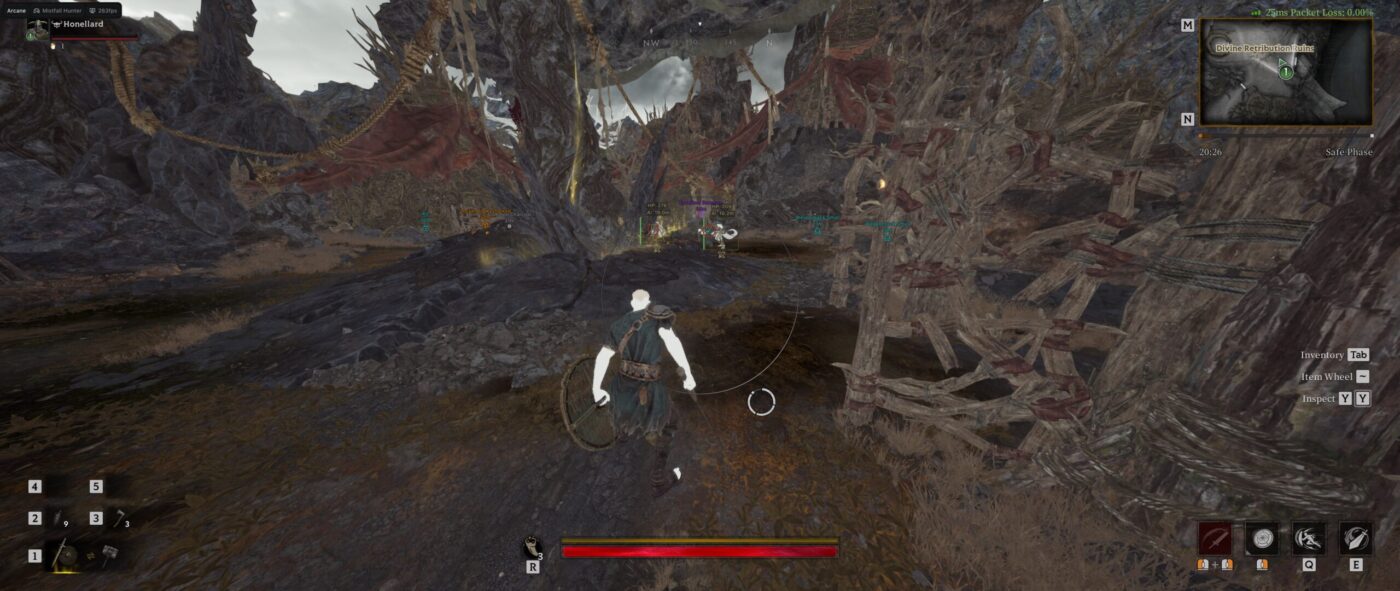
Arcane Mistfall Hunter Cheat is a complete gameplay enhancement package for the Steam version of the game. It combines a configurable aimbot, player and NPC ESP, dropped-item filters, treasure tracking, Fullbright, a field-of-view changer and a convenient Battle Mode.
Instead of filling the screen with unnecessary information, Arcane lets you decide exactly what should be displayed and how every visual element should look.
What Is Arcane Mistfall Hunter Cheat?
Arcane is a configurable Mistfall Hunter hack developed for players who want improved combat control and more information about the surrounding area.
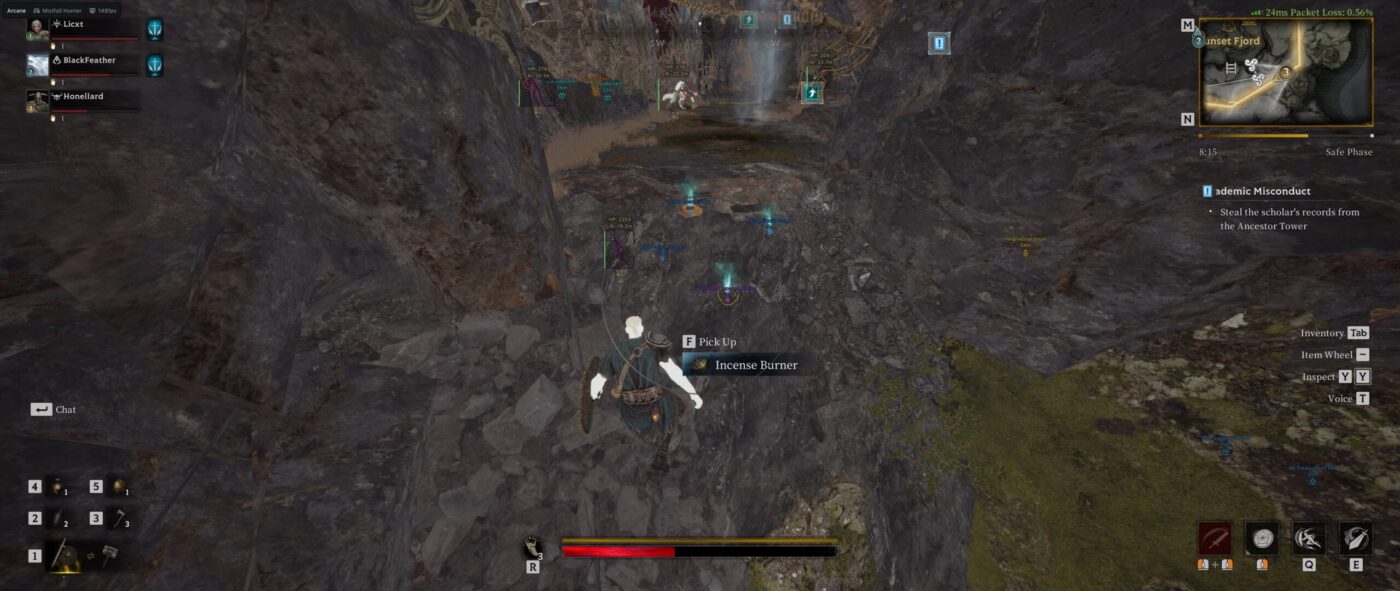
The software can highlight players, NPCs, dropped equipment and numerous types of treasure. It also includes aiming assistance for both human opponents and non-player enemies.
Arcane is not limited to a basic box ESP. Users can customize bounding boxes, skeletons, health indicators, distance text, visibility checks, view lines, icons, transparency and maximum rendering distance.
Its main features include:
- Mistfall Hunter aimbot
- Player ESP
- NPC ESP
- Item ESP
- Treasure and container tracking
- Dropped-item rarity filters
- Visibility checks
- Fullbright
- Custom field of view
- Battle Mode
- Crosshair
- Automatic software updates
- Custom menu and unload keys
This combination makes Arcane suitable for exploration, looting, PvE encounters and PvP combat.
Mistfall Hunter Aimbot
Combat in Mistfall Hunter can become chaotic very quickly. Players frequently need to switch between monsters and rival hunters while paying attention to positioning, health and nearby environmental threats.
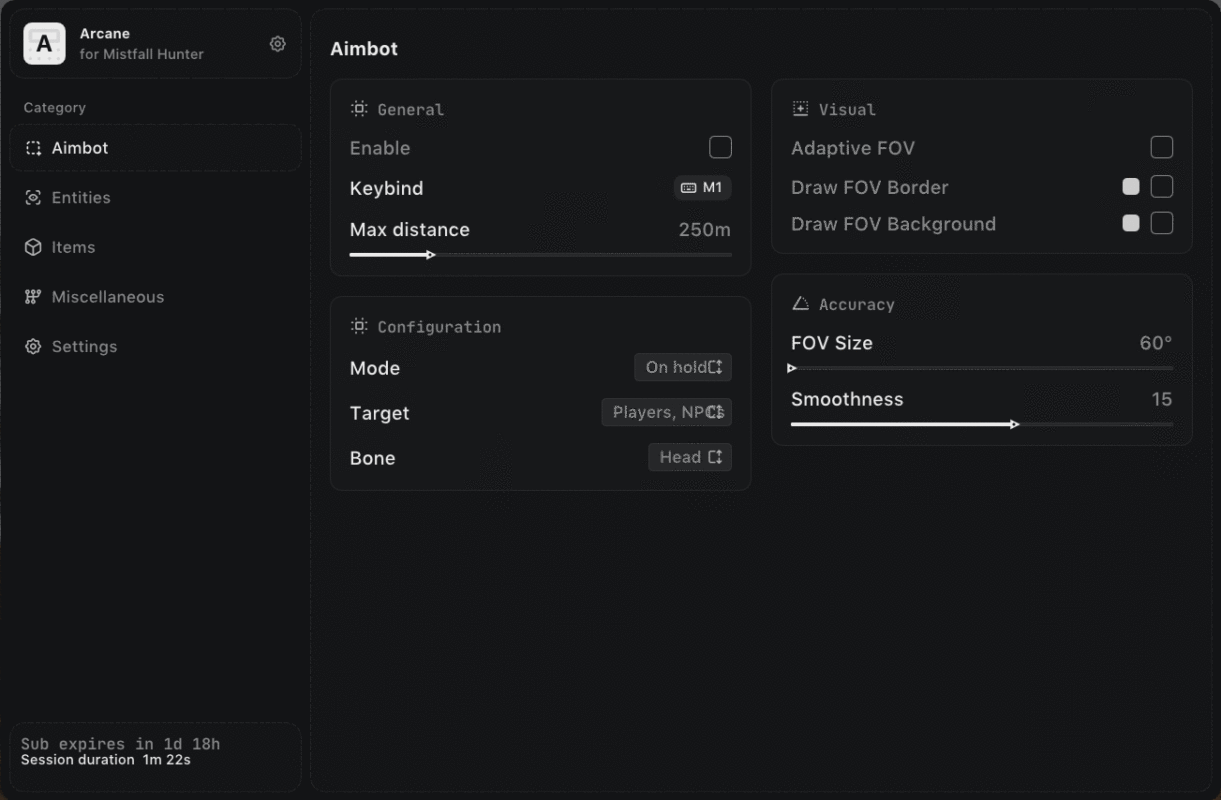
The Mistfall Hunter aimbot included with Arcane provides configurable targeting assistance for these situations.
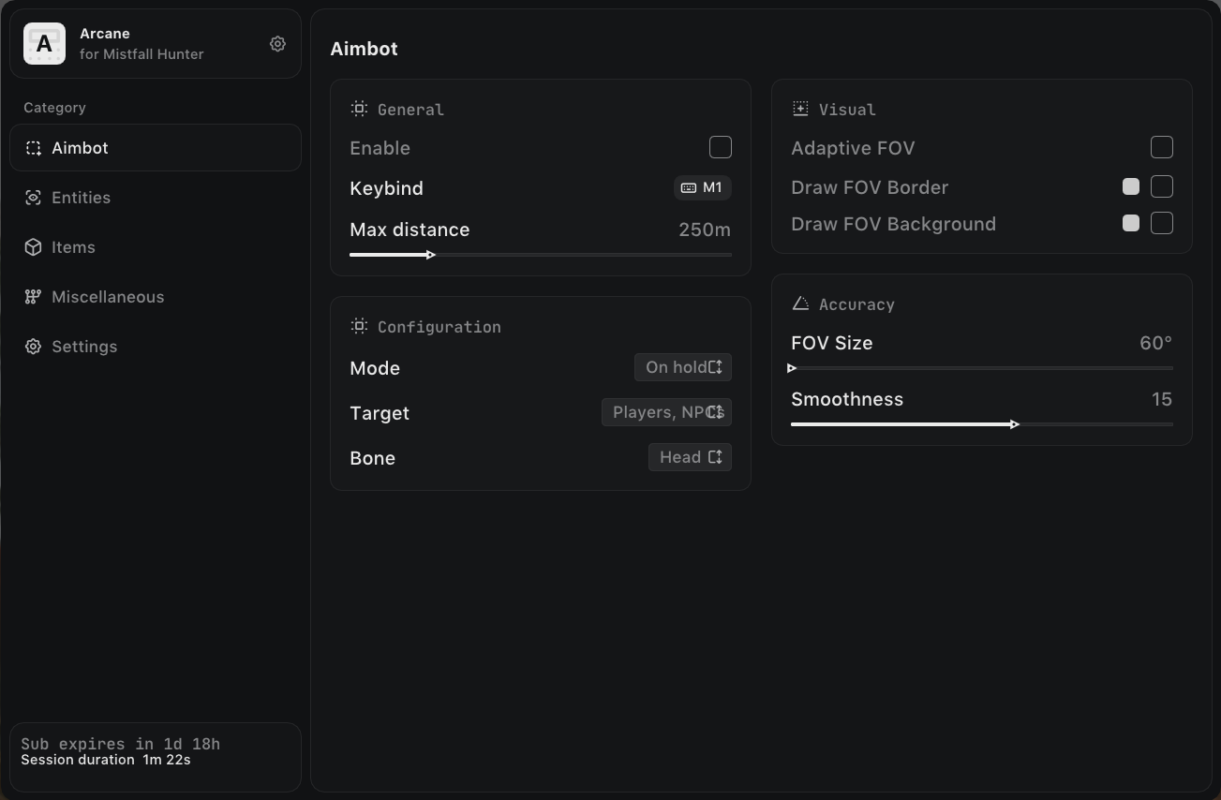
You can select whether the aimbot should target players, NPCs or both. It is also possible to choose the preferred target bone depending on your weapon, combat style and current objective.
Available target bones include:
- Head
- Neck
- Body
- Pelvis
The activation method can be configured as either permanently active or enabled only while holding a selected key.
Adjustable Aimbot Settings
Arcane gives users control over the behavior of the aimbot instead of forcing everyone to use the same configuration.
Available options include:
- Enable or disable aimbot
- Custom activation key
- Maximum targeting distance
- Always-on mode
- Hold-key activation mode
- Player targeting
- NPC targeting
- Selectable target bone
- Adaptive FOV
- Adjustable FOV size
- FOV border
- FOV background
- Aim smoothness
- Visibility check
Smoothness can be adjusted to control how quickly the aim moves toward a selected target. The field-of-view settings determine the area in which targets can be selected.
The visibility check can prevent the aimbot from focusing on targets that are currently hidden behind solid objects, helping prioritize enemies that can actually be attacked.
Adaptive Aimbot FOV
A traditional fixed aiming circle may not work equally well in every encounter. Long-range combat, close-quarters fights and battles against groups of enemies can require different targeting behavior.
Arcane includes an Adaptive FOV option that helps the targeting area respond more effectively to changing combat situations.
Users can also display a visible FOV border and background. This makes it easier to understand which enemies are currently inside the active targeting zone.
The FOV size can be increased for faster target acquisition or reduced for more selective aiming.
Mistfall Hunter Player ESP
Enemy players are often the most unpredictable threat during an extraction run. They can approach while you are fighting NPCs, wait near valuable objectives or attack when you are preparing to leave an area.
The Mistfall Hunter ESP included with Arcane displays information about nearby players before they become an immediate threat.
Player ESP can show:
- Bounding box
- Corner box
- Filled box
- Skeleton
- Head circle
- View direction line
- Line to enemy
- Health bar
- Numerical health
- Player name
- Distance
- Player icon
- Team information
- Visibility status
Users can select an ESP style with or without a background. Box filling can use a static appearance or a gradient, while health bars can use static, health-based or gradient indicators.
The maximum display distance can also be adjusted. This prevents distant targets from covering the screen with unnecessary information.
Skeleton ESP and View Direction
Knowing that another player is nearby is helpful, but understanding their movement and orientation provides additional context.
Skeleton ESP displays the target’s body structure, while the head circle makes the upper part of the model easier to identify. Skeleton thickness can be customized for better visibility at different resolutions.
The view line indicates the direction in which another player is looking. This can help you understand whether an opponent is watching your position, moving toward another target or facing away from you.
Arcane allows the start and end colors of the view line to be customized.
Mistfall Hunter NPC ESP
The world is not only populated by rival players. Hostile NPCs can block important routes, guard valuable locations or interfere during PvP encounters.
Arcane includes a separate Mistfall Hunter NPC ESP system with extensive customization options.
NPC ESP supports:
- Box and corner-box styles
- Optional background
- Static or gradient box fill
- Skeleton display
- Head circle
- Adjustable skeleton thickness
- View direction line
- Line to NPC
- Health bar
- Numerical health text
- NPC name
- Distance
- Icon display
- Team information
- Visibility check
- Maximum rendering distance
Player and NPC visuals can be configured independently. This makes it easier to distinguish human opponents from AI-controlled enemies during crowded encounters.
For example, player ESP can use one layout while NPC ESP uses another. Different visual styles reduce confusion and help you understand the battlefield at a glance.
Mistfall Hunter Item ESP
Finding valuable equipment efficiently is one of the most important parts of an extraction game. Searching every room and checking every object manually consumes time and increases the chance of encountering another player before you are prepared.
The Mistfall Hunter item ESP included with Arcane highlights dropped equipment and other useful objects.
Item ESP includes:
- Distance display
- Adjustable transparency
- Maximum display distance
- Individual rarity filters
- Separate treasure categories
You can reduce clutter by displaying only the rarities and object types that matter to you.
Dropped Item Rarity Filters
Arcane can identify dropped items based on their rarity.
Supported rarity filters include:
- Common
- Uncommon
- Rare
- Excellent
- Epic
Players who are only searching for valuable equipment can disable common items and focus on higher-tier drops. Alternatively, every rarity can remain enabled during early progression or resource-gathering runs.
This filtering system makes the Mistfall Hunter loot ESP more practical than a simple feature that highlights every object on the map.
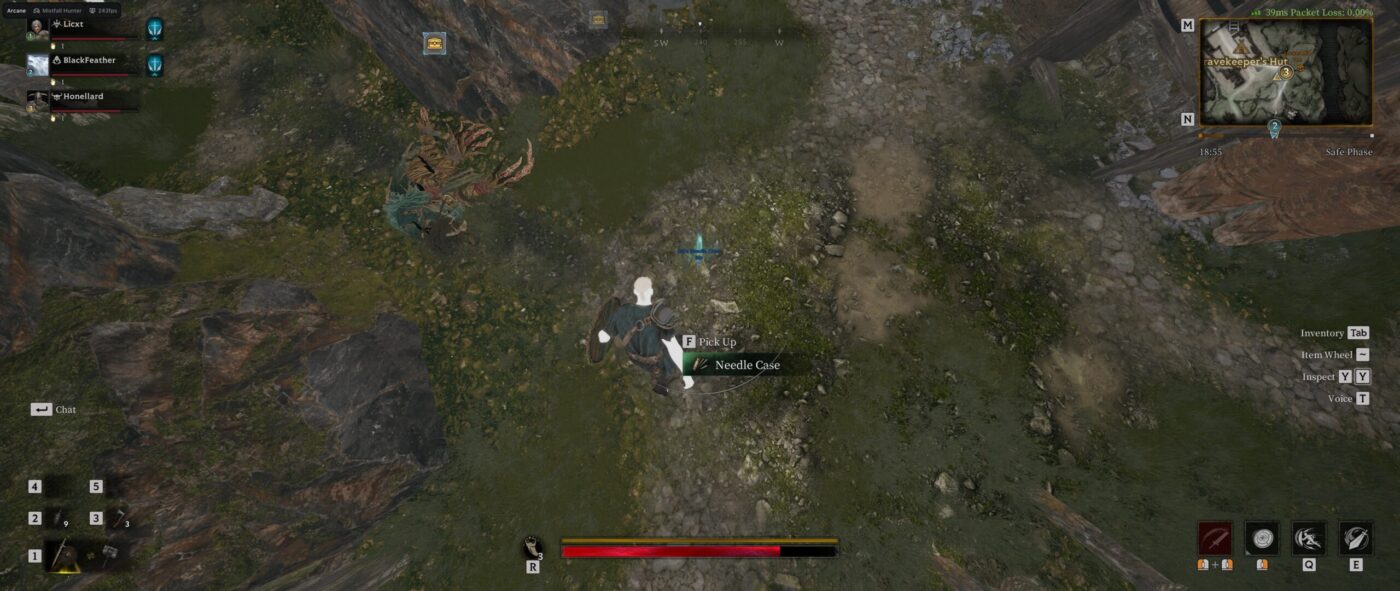
Treasure and Object Tracking
Arcane can also display numerous environmental objects and treasure categories.
Available filters include:
- Containers
- Portable containers
- Vessels
- Bodies
- Effigies
- Natural objects
- Large objects
- Furniture
- Characters
- Other objects
These categories can help locate loot sources that might otherwise blend into the environment.
Separate filters also make it possible to build different configurations for different objectives. A treasure-focused setup can prioritize containers and bodies, while a faster combat configuration can hide most environmental objects.
Battle Mode
Displaying large amounts of information is useful during exploration, but the same information can become distracting when a fight begins.
Arcane solves this problem with Battle Mode.
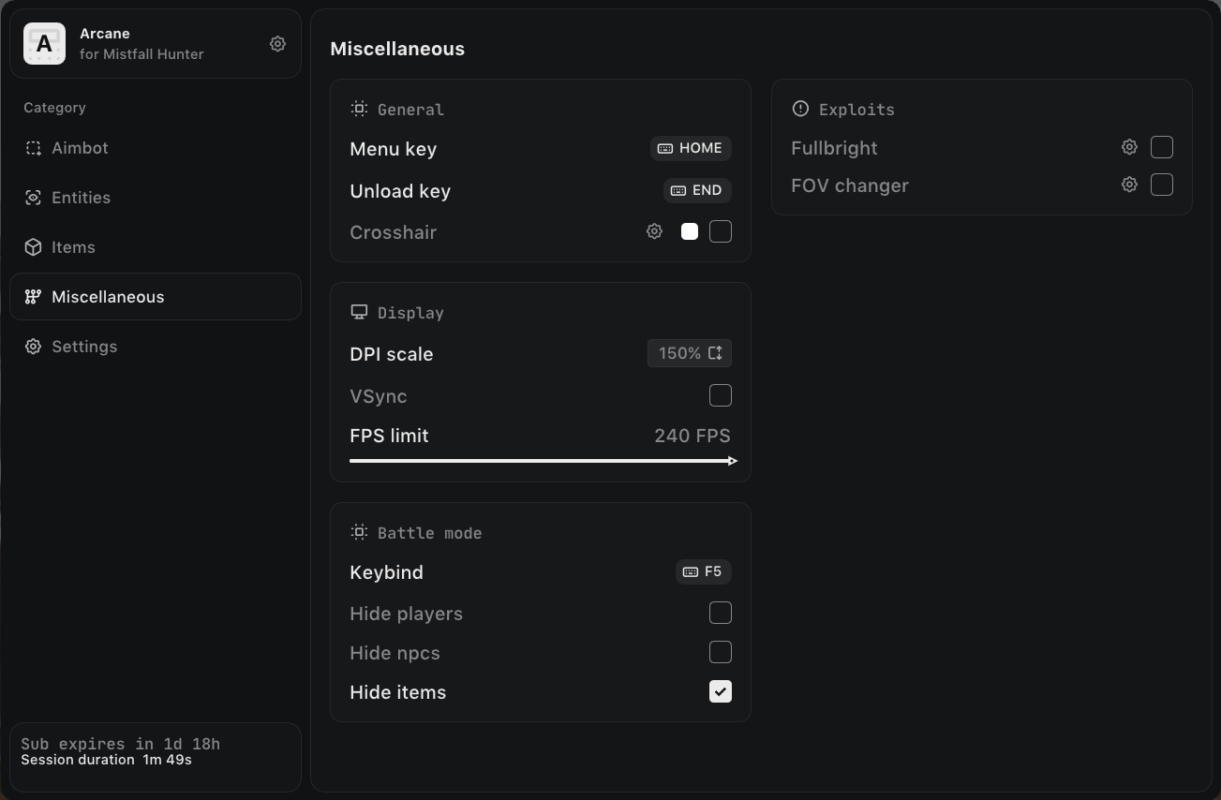
Battle Mode can be assigned to a custom key and used to instantly hide selected ESP categories.
You can configure it to:
- Hide player ESP
- Hide NPC ESP
- Hide item ESP
For example, a player can keep item and treasure tracking visible while exploring, then activate Battle Mode to remove loot information during combat.
This creates a cleaner battlefield without forcing the user to manually disable several settings through the menu.
Fullbright
Dark environments can make it difficult to identify paths, objects and enemy movement.
The Fullbright feature increases environmental visibility and makes dark areas easier to navigate. It can be especially useful when exploring enclosed locations or tracking movement in poorly illuminated sections of the map.
Fullbright does not replace player or NPC ESP. Instead, it improves general visibility while the ESP provides specific information about important targets.
FOV Changer
Arcane includes a field-of-view changer that allows users to modify how much of the environment is visible on the screen.
A wider field of view can provide better peripheral awareness during exploration and group encounters. A narrower setting may feel more focused during certain types of combat.
The ideal value depends on screen size, resolution and personal preference, so the feature remains adjustable.
Custom Crosshair
A configurable crosshair can provide a consistent center-screen reference while moving, aiming or preparing an attack.
The built-in crosshair works alongside the aimbot and ESP features but can also be used independently. It is especially useful for players who prefer having a permanent visual reference available on the screen.
Performance and Interface Settings
Arcane includes several additional settings for adapting the menu and overlay to different systems.
Available settings include:
- Custom menu key
- Custom unload key
- Crosshair
- DPI scaling
- VSync
- FPS limit
DPI scaling is particularly useful for high-resolution monitors or Windows installations using non-default display scaling.
The FPS limit and VSync options can help users adjust overlay behavior according to their current game and display configuration.
Automatic Updates for Game Patches
Games receive updates that can change internal systems and temporarily affect third-party software.
Arcane includes an automatic update module designed to simplify maintenance after supported Mistfall Hunter patches. Users do not normally need to manually download a completely new program for every routine update.
The software should still be launched according to the supplied instructions, and its current operational status should always be checked before use.
Arcane Mistfall Hunter Cheat System Requirements
Arcane supports a broad range of modern PC configurations.
Supported Platform
- Steam version of Mistfall Hunter
Supported Display Modes
- Windowed
- Borderless
Exclusive fullscreen mode is not listed as supported, so the game should be switched to Windowed or Borderless before launching the software.
Supported Hardware
- Intel processors
- AMD processors
- NVIDIA graphics cards
- AMD graphics cards
- Intel graphics
- Minimum 12 GB RAM
Supported Operating Systems
- Windows 10 x64
- Windows 11 x64
- Windows build 1903 and newer
Both the game and software should be run on a fully updated 64-bit version of Windows.
Why Use Arcane Mistfall Hunter Hacks?
Different Mistfall Hunter hacks focus on different parts of the game. Some provide only basic boxes, while others include aiming assistance without any useful loot information.
Arcane combines multiple systems in one configurable interface:
- Combat assistance through a customizable aimbot
- Player awareness through detailed player ESP
- PvE awareness through separate NPC ESP
- Faster looting through item and treasure tracking
- Cleaner combat through Battle Mode
- Improved environmental visibility through Fullbright
- Wider peripheral awareness through the FOV changer
- Easier maintenance through automatic updates
The ability to configure each category separately is one of the most useful parts of the software. Users do not have to keep every feature enabled at the same time.
Recommended Arcane Configuration
A balanced starting configuration can include:
- Player ESP enabled
- NPC ESP enabled at a moderate distance
- Visibility checks enabled
- Player names and health displayed
- Item ESP limited to Rare, Excellent and Epic items
- Treasure containers enabled
- Moderate aimbot FOV
- Higher aimbot smoothness
- Battle Mode assigned to an accessible key
- Fullbright enabled only when needed
This setup provides useful information without covering the entire screen with boxes, text and item labels.
Users can then adjust individual settings based on their preferred class, weapon and playstyle.
How to Reduce ESP Clutter
The most common mistake when configuring a Mistfall Hunter cheat is enabling every available visual option at the maximum distance.
While this displays more information, it does not necessarily make the software more useful.
A cleaner ESP configuration usually works better:
- Set different visual styles for players and NPCs.
- Reduce the maximum NPC display distance.
- Disable common dropped items.
- Display only important treasure categories.
- Use Battle Mode during combat.
- Keep health, distance and visibility information enabled.
- Disable secondary visual elements that you do not actively use.
A carefully configured overlay is easier to read and places the most important information at the top of your attention.
Mistfall Hunter Cheats for PvP
PvP encounters can begin without warning, particularly around valuable locations and extraction routes.
Arcane’s PvP-oriented features include:
- Player location information
- Health display
- Distance display
- Skeleton ESP
- View direction
- Visibility checks
- Configurable aim assistance
- Selectable target bones
- Adaptive FOV
- Battle Mode
Together, these tools provide a clearer understanding of enemy positions and make it easier to react when another player enters the area.
Mistfall Hunter Cheats for PvE and Looting
Arcane is not limited to PvP combat.
The NPC and item systems can assist during exploration and PvE-focused runs by highlighting:
- Hostile NPCs
- NPC health
- NPC distance
- Dropped equipment
- Rare loot
- Containers
- Bodies
- Environmental treasure objects
Players can create a dedicated looting configuration with a larger item display distance, then switch to a cleaner combat setup when entering dangerous areas.
Is Arcane the Best Mistfall Hunter Cheat?
The best Mistfall Hunter cheat depends on which features a player actually needs.
Arcane is a strong all-in-one option for users who want more than a basic ESP. It includes targeting assistance, separate player and NPC visuals, rarity-based loot filters, treasure categories, Battle Mode and several quality-of-life features.
Its extensive customization also makes it suitable for different screen resolutions, classes and playstyles.
No third-party game modification can honestly guarantee permanent compatibility or zero account risk. Game updates, anti-cheat changes and user behavior can affect any external software. Users should understand these risks and follow the latest product instructions.
Frequently Asked Questions
Does Arcane support the Steam version of Mistfall Hunter?
Yes. Arcane is designed for the Steam version of Mistfall Hunter.
Does the Mistfall Hunter cheat work on Windows 11?
Yes. Windows 10 and Windows 11 x64 are supported, starting from Windows build 1903.
Does Arcane work in fullscreen mode?
Arcane officially supports Windowed and Borderless display modes. Borderless mode is generally the most convenient choice.
Can the aimbot target NPCs?
Yes. The aimbot can be configured to target players, NPCs or both.
Can I select a specific target bone?
Yes. Available options include the head, neck, body and pelvis.
Does Arcane include player ESP?
Yes. Player ESP can display boxes, skeletons, health, names, distance, icons, view direction, team information and visibility status.
Does it include NPC ESP?
Yes. NPC ESP has a separate set of configurable visual options and a maximum-distance setting.
Can Arcane show dropped items?
Yes. Dropped items can be filtered by Common, Uncommon, Rare, Excellent and Epic rarity.
Can the cheat locate containers and treasure?
Yes. The treasure ESP can display containers, portable containers, vessels, bodies, effigies, natural objects, furniture and several other categories.
What does Battle Mode do?
Battle Mode temporarily hides selected player, NPC or item visuals when its assigned key is pressed. It can reduce overlay clutter during combat.
Does Arcane update automatically?
Yes. Arcane includes an automatic update module for supported game patches.
How much RAM is required?
A minimum of 12 GB RAM is required.
Does it support both Intel and AMD processors?
Yes. Both Intel and AMD processors are supported.
Get Arcane Mistfall Hunter Cheat
Arcane combines the most useful Mistfall Hunter cheats and hacks in one customizable package.
With a configurable Mistfall Hunter aimbot, detailed player and NPC ESP, dropped-item filters, treasure tracking, Battle Mode, Fullbright and automatic updates, it provides tools for combat, exploration and efficient looting.
Whether you are looking for a Mistfall Hunter ESP, a loot tracker, an NPC finder or a complete Mistfall Hunter cheat for Steam, Arcane delivers a broad feature set without forcing you to display unnecessary information.
Choose your preferred configuration, enter the Gyldenmist and keep the information that matters directly on your screen.
