


Obsidian Fortnite Cheat with Built-In HWID Spoofer
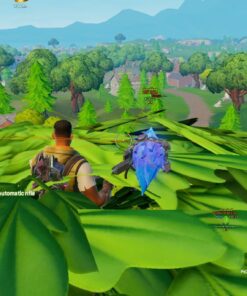
Obsidian Fortnite Cheat is a private all-in-one software package featuring an advanced Aimbot, Triggerbot, Player ESP, Radar, Loot ESP, weapon-specific settings and an integrated HWID Spoofer.
Designed for players who want precise control, detailed battlefield information and deep customization, Obsidian combines its main combat, visual and protection features inside one organized interface. Every major function can be adjusted individually, allowing users to create separate configurations for different weapons, engagement ranges and gameplay styles.
Whether you prefer a smoother legit-style setup or stronger combat-focused settings, Obsidian Fortnite Cheat provides flexible tools for aiming, target selection, player tracking, loot visibility and configuration management.
Why Choose Obsidian for Fortnite?
Fortnite combines fast movement, building, vertical combat, long-range engagements and close-quarters fights. A useful Fortnite tool must therefore offer more than a basic Aimbot or simple player boxes.
Obsidian is built around flexibility. Users can configure aiming behavior for individual weapon categories, adjust ESP elements, create custom radar settings, filter loot and manage several configuration profiles without rebuilding the entire setup before every session.
Main Advantages
- Advanced Fortnite Aimbot with static and curved aiming modes.
- Weapon-based configurations for rifles, shotguns, SMGs, pistols, snipers and other classes.
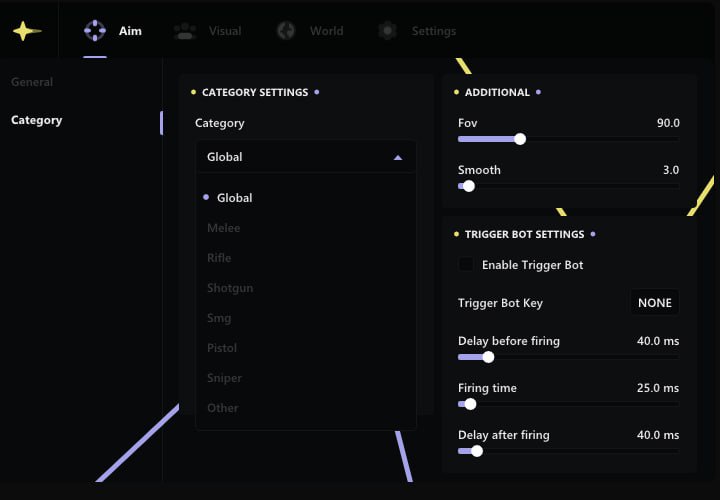
- Triggerbot with customizable pre-fire, fire and post-fire delays.
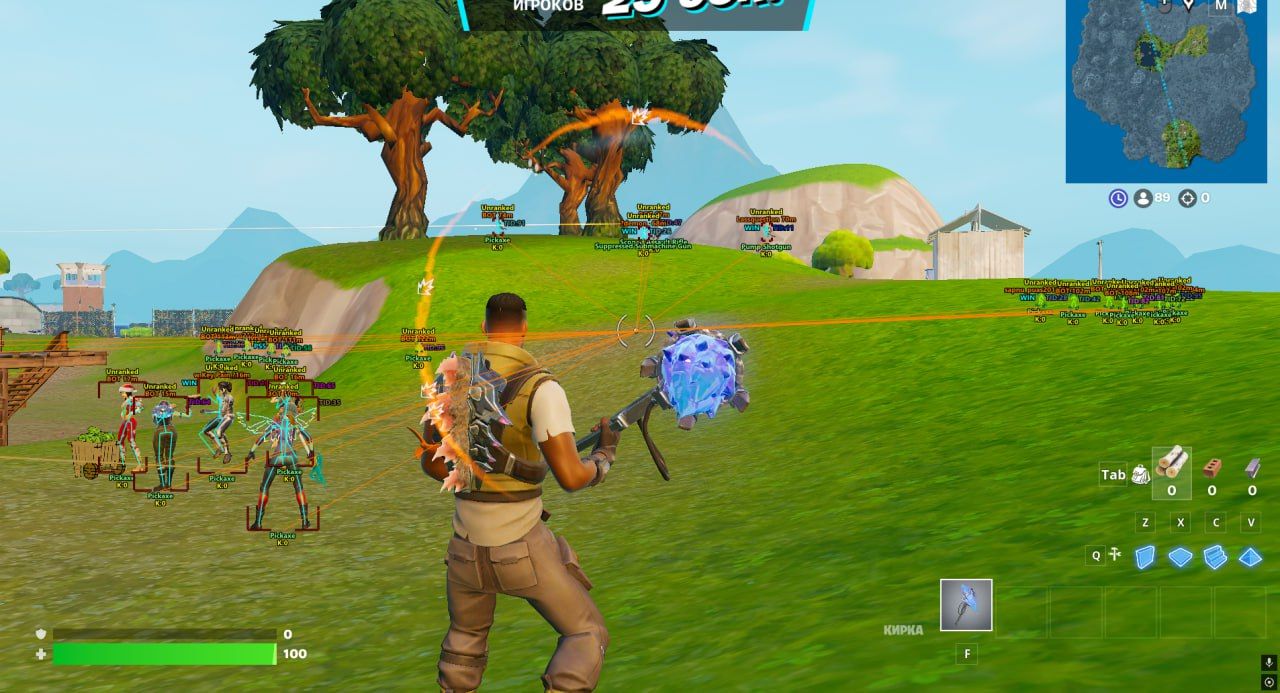
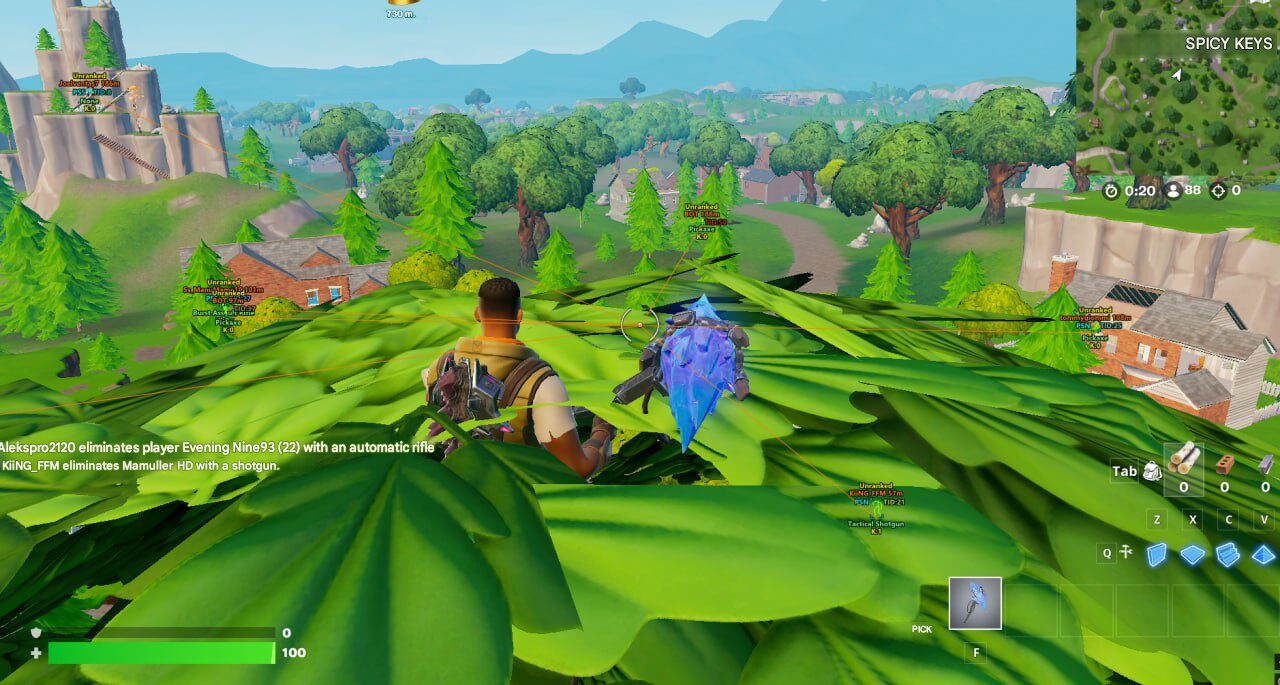
- Detailed Player ESP with boxes, skeletons, names, distance, rank and equipped weapons.
- AI and teammate display options with separate visual settings.
- Built-in Radar with adjustable size and real-time player tracking.
- Loot ESP with rarity information, item filters, names and distance.
- Integrated HWID Spoofer included with the main software.
- Intel and AMD support on compatible systems.
- Configuration profiles for saving and switching between preferred setups.
- Support for compatible versions of Windows 10 and Windows 11.
Obsidian Fortnite Cheat Features
Obsidian includes multiple feature categories covering aiming assistance, automatic firing, hitbox selection, player visuals, team information, radar, loot tracking, interface customization and system protection.
The menu is designed to keep these categories organized and easy to configure.
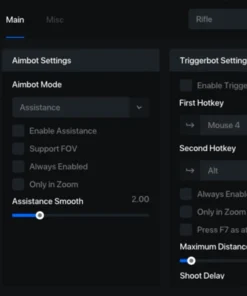
Advanced Fortnite Aimbot
The Obsidian Aimbot provides detailed control over how targets are selected and followed.
Instead of forcing every weapon to use the same settings, Obsidian allows users to create separate profiles for different weapon categories. This makes it possible to configure a tighter FOV for precision weapons, stronger assistance for close-range combat or smoother movement for general gameplay.
Core Aimbot Features
- Enable or disable the Aimbot.
- Choose between Static and Curved aiming.
- Assign primary and secondary activation keys.
- Display the active Aimbot FOV.
- Adjust the targeting FOV.
- Enable Smart Targeting.
- Enable Visibility Check.
- Lock onto selected targets.
- Include or ignore knocked players.
- Enable movement prediction.
- Configure separate settings by weapon category.
- Adjust aiming smoothness.
- Select preferred target bones.
- Use a forced target-bone hotkey.
Static and Curved Aimbot Modes
Obsidian includes two primary aiming styles.
Static Aimbot
Static aiming provides more direct target movement and can be useful for users who prefer faster target acquisition.
Curved Aimbot
Curved aiming follows a less direct movement path, creating smoother transitions toward the selected target.
The preferred mode can be combined with FOV, smoothing, visibility and weapon-specific settings.
Primary and Secondary Aim Keys
Users can assign separate primary and secondary activation keys.
This makes it possible to prepare two aiming behaviors for different situations, such as:
- A smoother primary aiming profile.
- A stronger secondary profile.
- Different activation keys for close-range and long-range weapons.
- Separate controls for regular and forced targeting.
Custom keybinds allow Obsidian to fit more naturally into an existing Fortnite control layout.
Adjustable Aimbot FOV
The Aimbot FOV determines how large the active target-selection area is around the center of the screen.
A smaller FOV creates a more focused targeting zone, while a larger FOV allows targets to be selected across a wider part of the display.
The visible FOV circle can be enabled when configuring the software and disabled later if a cleaner screen is preferred.
FOV values can be adjusted according to:
- Weapon category
- Engagement distance
- Screen resolution
- Mouse sensitivity
- Preferred aiming style
Advanced Aim Smoothing
Smoothness settings control how quickly the aim moves toward a selected target.
Higher smoothing values create slower and more gradual movement, while lower values provide faster target acquisition.
This allows users to prepare different aiming profiles for:
- Rifles
- Shotguns
- SMGs
- Pistols
- Sniper rifles
- General-purpose weapons
Smart Targeting
Smart Targeting helps control how the software selects available opponents.
It can be combined with Visibility Check, target distance, bone selection and knocked-player filtering to reduce unnecessary target switching.
This is particularly useful during fights involving several nearby players.
Visibility Check
The Visibility Check option allows the Aimbot to prioritize players who are not blocked by terrain, builds or other supported objects.
This helps reduce unwanted targeting through obstacles and gives users more control over which opponents are selected.
Target Lock
Target Lock allows the Aimbot to remain focused on a selected opponent while the configured conditions remain active.
This can reduce sudden switching between several nearby targets and provide more consistent behavior during an engagement.
Knocked Player Filter
Obsidian allows users to choose whether knocked players should be included or ignored.
Ignoring knocked opponents can help prioritize active threats, while including them may be useful in situations where finishing a downed player is preferred.
Movement Prediction
Movement Prediction helps compensate for targets who are running, jumping or moving across the screen.
Prediction can be especially useful with weapons where target movement and projectile travel must be considered.
The feature can be adjusted alongside weapon-specific FOV and smoothing settings.
Weapon-Based Aimbot Configuration
Obsidian allows aiming behavior to be configured separately for different weapon categories.
Supported Configuration Groups
- Global profile
- Melee
- Rifles
- Shotguns
- SMGs
- Pistols
- Snipers
- Other supported weapon classes
This gives users more control than a single universal configuration.
For example, a shotgun profile can use a wider FOV and faster response, while a sniper profile can use a smaller FOV and more focused targeting.
Bone Selection
Obsidian provides several target-bone options.
Available Target Areas
- Head
- Neck
- Chest
- Stomach
- Nearest supported bone
Bone selection can be combined with FOV, smoothing, Visibility Check and weapon profiles.
Forced Bone Targeting
The forced targeting option allows users to temporarily prioritize a selected bone through a separate hotkey.
This can be useful when the main profile is configured for one target area but a different hitbox is required in a specific situation.
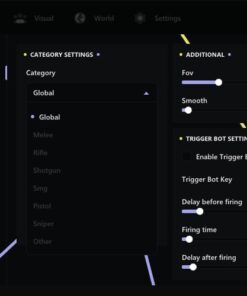
Triggerbot
Obsidian includes a customizable Triggerbot that can automatically fire when the selected conditions are met.
The Triggerbot can be enabled separately from the main Aimbot and assigned to its own activation key.
Triggerbot Features
- Enable or disable Triggerbot.
- Assign a dedicated activation key.
- Configure pre-fire delay.
- Configure firing delay.
- Configure post-fire delay.
- Create different timing profiles.
- Combine Triggerbot with Visibility Check and target settings.
Pre-Fire Delay
The pre-fire delay controls how long the system waits before firing after a valid target is detected.
A shorter delay provides faster activation, while a longer value creates a more controlled response.
Fire Delay
The fire delay controls the timing of the firing action itself.
This setting can be adjusted depending on the weapon type and preferred Triggerbot behavior.
Post-Fire Delay
The post-fire delay determines how long the Triggerbot waits before another activation.
This can help users adapt the feature for single-shot, semi-automatic and other supported weapon types.
Player ESP and Visual Information
The Player ESP section provides detailed information about detected players and supported AI entities.
Each visual element can be enabled separately, allowing users to create either a minimal layout or a more detailed information setup.
Player ESP Features
- Adjustable draw distance.
- AI display toggle.
- 2D Box ESP.
- 3D Box ESP.
- Skeleton ESP.
- Adjustable skeleton thickness.
- Multiple ESP line styles.
- Player name.
- Player distance.
- Kill count.
- Platform information.
- Player rank.
- Current weapon.
- Team ESP.
- Separate teammate colors.
- Custom visual colors.
- Configurable font size.
Adjustable ESP Draw Distance
The maximum draw distance controls how far away detected players and supported entities appear through ESP.
A lower distance can keep the interface cleaner during close-range gameplay, while a higher distance provides more information across larger areas.
Users can adjust the range according to their preferred map awareness and screen layout.
AI Display
Obsidian allows supported AI entities to be displayed or hidden.
This can help users distinguish between real players and AI-controlled characters or remove unnecessary information from the screen.
2D and 3D Box ESP
Obsidian supports both 2D and 3D player boxes.
2D Box ESP
A traditional flat box is displayed around the detected player.
3D Box ESP
A three-dimensional frame provides a different visual representation of player position and movement.
Users can select the style that best matches their preferred interface.
Skeleton ESP
Skeleton ESP displays the approximate body structure of detected players.
The line thickness can be adjusted to improve visibility or create a cleaner layout.
Skeleton ESP can be used alone or combined with boxes, player information and ESP lines.
ESP Lines
ESP Lines provide a directional connection between the user’s screen and detected players.
Multiple line styles are available, allowing the visual layout to be adjusted according to personal preference.
Player Information Display
Obsidian can display several types of information near detected players.
Available Player Information
- Name
- Distance
- Kill count
- Platform
- Rank
- Current weapon
Each element can be enabled or disabled separately.
This makes it possible to show only the most important information and avoid unnecessary visual clutter.
Team ESP
Team ESP helps distinguish teammates from opponents.
Teammates can be highlighted with separate colors, making it easier to identify friendly players during fast fights, rotations and crowded situations.
Separate team colors can also be saved inside configuration profiles.
Radar System
Obsidian includes a built-in Radar designed to provide additional positional awareness.
Radar Features
- Enable or disable Radar.
- Adjust radar size.
- Track detected players in real time.
- Use Radar together with Player ESP.
- Save Radar settings inside configurations.
The Radar provides a cleaner positional overview and can be especially useful when several players are moving around the same location.
Loot ESP and World Visualization
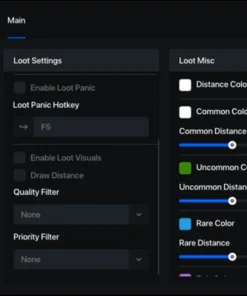
The Loot ESP system helps users locate supported weapons, equipment and other useful items.
Instead of displaying everything with the same style, Obsidian provides filters, rarity information and custom colors for different item categories.
Loot ESP Features
- Item names.
- Item distance.
- Custom colors by item type.
- Rarity indicators.
- Weapon-category filters.
- Adjustable loot distance.
- Custom font size.
- Configurable display options.
- Separate item profiles.
Custom Loot Colors
Different item categories can be assigned individual colors.
This makes it easier to distinguish between weapons, ammunition, healing items, equipment and other supported objects.
Distance-Based Loot Visibility
Users can control how far away loot information appears.
Reducing the distance can keep the display cleaner, while increasing it can provide a wider overview of available items.
Rarity Indicators
Supported items can be displayed with rarity information.
This helps users identify higher-tier loot and decide which objects are worth collecting.
Weapon Category Filters
Obsidian allows users to filter loot by weapon category.
Possible filters may include:
- Rifles
- Shotguns
- SMGs
- Pistols
- Snipers
- Other supported weapon groups
Unnecessary categories can be hidden to reduce visual clutter.
Loot Name and Distance Display
Users can choose whether to show:
- Item name
- Item distance
- Both name and distance
- Only selected item categories
These options can be combined with rarity and color settings.
Built-In HWID Spoofer
Obsidian Fortnite Cheat includes an integrated HWID Spoofer, eliminating the need to purchase and configure a separate spoofing product for supported systems.
The spoofer is designed to work together with the main Obsidian software and modify supported hardware identification data during use.
HWID Spoofer Benefits
- Included in the main product package.
- No separate spoofer purchase required.
- Compatible with supported Intel and AMD systems.
- Integrated into the Obsidian setup process.
- Designed for supported fresh-account configurations.
- Useful for users dealing with previous hardware-related restrictions.
The HWID Spoofer must be used according to the provided installation guide. No spoofing system can guarantee permanent protection from future account or hardware restrictions.
FPS Counter and FPS Limiter
Obsidian includes additional performance-related features.
Performance Options
- Display current FPS.
- Set a custom FPS limit.
- Monitor game performance.
- Save FPS preferences inside configurations.
These settings can help users maintain a preferred performance target and monitor how the game is running.
Custom Crosshair
The built-in Crosshair system provides additional aiming-reference options.
Crosshair Features
- Multiple crosshair styles.
- Adjustable size.
- Enable or disable Crosshair.
- Save Crosshair settings.
- Combine Crosshair with the Aimbot FOV display.
Users can create a crosshair layout that fits their resolution and preferred visual style.
Font Size Control
Obsidian allows users to adjust the font size used for ESP and Loot ESP information.
This can improve readability on different monitor sizes and resolutions.
A larger font may be useful on high-resolution displays, while a smaller font can keep the interface compact.
Language Support
The current interface includes support for:
- English
- Chinese
Available languages may change as the software receives future updates.
Configuration Profiles
The built-in Config System allows users to save and manage several profiles.
Config Features
- Create configurations.
- Save current settings.
- Load saved profiles.
- Switch between configurations.
- Prepare different weapon setups.
- Save ESP and Radar settings.
- Save Loot filters.
- Save Crosshair and FPS settings.
Possible configuration profiles may include:
- Legit-style Aimbot setup
- Close-range shotgun setup
- Rifle configuration
- Sniper configuration
- Minimal ESP profile
- Full-information ESP profile
- Loot-focused setup
- Performance-focused setup
Saved profiles eliminate the need to rebuild every setting before each session.
Clean and Organized Interface
Obsidian is designed to keep its main feature categories easy to understand.
The interface separates settings for:
- Aimbot
- Triggerbot
- Bone Selection
- Player ESP
- Team ESP
- Radar
- Loot ESP
- Crosshair
- Performance
- Configurations
- HWID Spoofer
This structure makes it easier to find and adjust individual options without navigating through a cluttered menu.
System Requirements
Before purchasing Obsidian Fortnite Cheat, make sure the computer meets the current requirements.
Processor Requirements
- Compatible Intel processor with AES support.
- Compatible AMD processor with AES support.
Virtualization Requirements
For supported Intel systems:
- Intel VT-x must be available and enabled when required.
For supported AMD systems:
- AMD SVM must be available and enabled when required.
Memory
- 16 GB RAM is recommended for stable performance.
Operating System
- Windows 10 x64
- Windows 11 x64
- Supported builds from version 1809 through 25H2, subject to the current product status
Additional Requirements
- Stable internet connection.
- Administrator access may be required.
- Current Windows updates and supported drivers.
- Working Fortnite installation.
- Required BIOS settings must be enabled.
- Conflicting overlays or background applications may need to be closed.
- The installation guide must be followed in the correct order.
Product Compatibility
- Game: Fortnite
- Software: Obsidian Fortnite Cheat
- Processors: Supported Intel and AMD CPUs
- AES: Required
- Virtualization: Intel VT-x or AMD SVM
- Operating Systems: Windows 10 and Windows 11 x64
- Supported Builds: 1809 through 25H2, subject to current status
- Recommended RAM: 16 GB
- Aimbot: Included
- Triggerbot: Included
- Player ESP: Included
- Radar: Included
- Loot ESP: Included
- HWID Spoofer: Included
- Configuration System: Included
Compatibility may change after Fortnite, anti-cheat or Windows updates. Always check the current product status before purchasing or activating a license.
Important Setup Information
For the best installation experience:
- Confirm that your Windows version is supported.
- Verify that the processor supports AES.
- Enable Intel VT-x or AMD SVM in BIOS when required.
- Make sure at least 16 GB of RAM is available for optimal performance.
- Download the latest available Obsidian files.
- Close conflicting overlays and background software.
- Follow the HWID Spoofer instructions carefully.
- Launch all required components in the correct order.
- Enter your license key when requested.
- Configure the Aimbot, ESP, Radar and Loot settings.
- Save your preferred configuration.
- Check the current product status before each launch.
Using outdated files or skipping setup steps may result in launch and compatibility problems.
What You Receive After Purchase
After completing the order, you receive the available Obsidian product access and setup information.
- Obsidian Fortnite Cheat license.
- Download access.
- Installation instructions.
- Advanced Aimbot.
- Triggerbot.
- Player ESP.
- Team ESP.
- Radar.
- Loot ESP.
- Built-in HWID Spoofer.
- Crosshair customization.
- Configuration profiles.
- Product support.
The exact delivery method will be displayed during or after checkout.
Frequently Asked Questions
Does Obsidian include a HWID Spoofer?
Yes. Obsidian includes an integrated HWID Spoofer, so a separate spoofing product is not required for supported configurations.
Does Obsidian support Intel and AMD processors?
Yes. Compatible Intel and AMD processors with AES support are supported.
Does virtualization need to be enabled?
Yes, supported configurations may require Intel VT-x or AMD SVM to be enabled in BIOS.
Does Obsidian have an Aimbot?
Yes. The Aimbot includes Static and Curved modes, FOV, smoothing, Smart Targeting, Visibility Check, Target Lock, movement prediction and weapon-specific profiles.
Can I configure different settings for each weapon type?
Yes. Obsidian supports separate profiles for rifles, shotguns, SMGs, pistols, snipers, melee and other supported weapon classes.
Is Triggerbot included?
Yes. Triggerbot includes custom activation controls and adjustable pre-fire, fire and post-fire delays.
What can Player ESP display?
Player ESP can display boxes, skeletons, lines, names, distance, kill count, platform, rank, current weapon and teammate information.
Does Obsidian include Radar?
Yes. The Radar can display real-time player positions and includes adjustable size settings.
Does it include Loot ESP?
Yes. Loot ESP supports item names, distance, rarity indicators, colors and category filters.
Can I save several configurations?
Yes. The Config System allows users to save, load and switch between multiple profiles.
How much RAM is recommended?
A minimum of 16 GB RAM is recommended for optimal performance.
Does Obsidian support Windows 11?
Yes. Compatible Windows 10 and Windows 11 x64 builds are supported, subject to the current product status.
Is permanent undetected status guaranteed?
No third-party software can guarantee permanent undetected status. Fortnite, anti-cheat and Windows updates may affect compatibility at any time. Always verify the current status before launching.
Additional Private Features and Updates
This description covers the main publicly listed functionality of Obsidian Fortnite Cheat.
The software may also include additional internal options, adjustments and improvements that are not described publicly. Available features can change as the product receives updates, compatibility improvements and menu revisions.
Always use the latest product version and follow the current setup instructions.
Buy Obsidian Fortnite Cheat
Obsidian Fortnite Cheat is a complete option for users looking for a Fortnite cheat with Advanced Aimbot, Triggerbot, Player ESP, Radar, Loot ESP, weapon-specific configurations and a built-in HWID Spoofer.
Its detailed customization system makes it possible to prepare separate profiles for different weapons and gameplay situations, while the integrated Spoofer removes the need to purchase an additional supported spoofing solution.
Choose your preferred license duration, complete the order and follow the provided setup instructions to begin using Obsidian Fortnite Cheat from CrazyCapyStore.
| Duration | 1 day, 7 days, 30 days |
|---|



Reviews
There are no reviews yet.