
Mason Albion Online Radar – 2D Radar Cheat with Player, Resource & Loot ESP
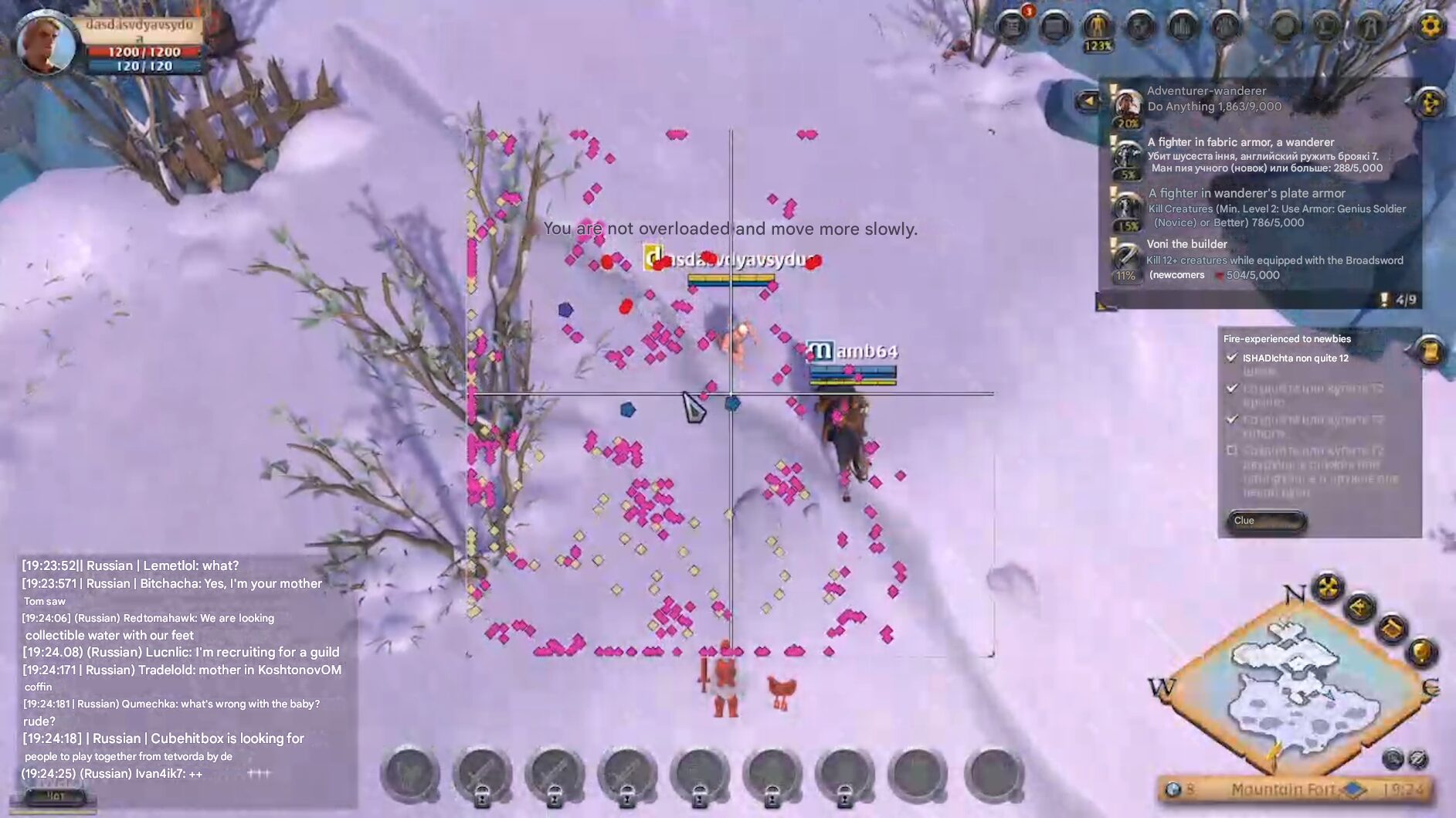
Mason Albion Online Radar is a customizable Albion Online radar cheat for Windows PC designed to display nearby players, mobs, resources, NPCs, chests, Mists, mounts and other useful information directly through a real-time 2D radar.
Whether you are gathering high-tier resources, searching for valuable loot, scouting dangerous zones or monitoring nearby players, Mason provides additional map awareness without filling your screen with unnecessary visual elements.
The radar can be customized by category, resource tier, colors, size, zoom, position and display radius, allowing you to build a clean setup for farming, exploration, PvP scouting or general Albion Online gameplay.
🧭 Albion Online 2D Radar
The core of Mason is its Albion Online 2D radar, which displays important nearby entities and objects in real time.
Individual radar categories can be enabled or disabled depending on what you want to track.
- Show Players – Display nearby players and monitor movement around your position.
- Show Mobs – Locate supported mobs and creatures in the surrounding area.
- Show Resources – Find nearby gathering resources more efficiently.
- Show NPCs – Display supported NPC locations on the radar.
- Show Chests – Locate supported loot chests nearby.
- Show Mists – Display supported Mists and related locations.
- Show Mounts – Track supported mounts around your position.
This makes Mason useful as both an Albion Online player radar and a broader exploration and gathering tool.
👤 Albion Online Player Radar
The built-in player radar helps you monitor other players in the surrounding area.
This can be useful when traveling through PvP zones, gathering resources or scouting an area before moving further.
- Nearby Player Detection
- Player Position Tracking
- Custom Player Colors
- Adjustable Radar Range
- Custom Radar Zoom
Player information is displayed as part of the radar interface, allowing you to keep the game world itself relatively clean.
⛏ Albion Online Resource Radar
Mason includes a dedicated Albion Online resource radar for gathering.
Instead of manually searching every part of a zone, you can display supported resources directly on the radar and filter them according to the tiers you actually want to find.
- Resource Detection
- Resource Tier Filter T1–T8
- Custom Resource Colors
- Adjustable Display Radius
- Separate Resource Visibility Controls
The T1–T8 resource filter allows lower-value tiers to be hidden when you want to focus only on more relevant gathering targets.
📦 Albion Online Chest & Loot Radar
Mason can also display supported Albion Online chests on the radar.
Chest filtering allows you to reduce unnecessary markers and concentrate on specific chest tiers.
- Show Chests
- Chest Tier Filter T1–T4
- Custom Chest Colors
- Adjustable Radar Range
Combined with player, mob and resource detection, this gives Mason a broader radar feature set instead of limiting the software to only one type of target.
🌫 Mists, Mobs, NPCs & Mount Radar
Mason supports several additional Albion Online radar categories.
- Mobs – Display supported mobs around your location.
- NPCs – Track supported NPC positions.
- Mists – Display supported Mists and related radar markers.
- Mounts – Monitor supported mounts in the surrounding area.
Every category can use its own color settings, making it easier to distinguish different objects without overcrowding the radar.
⚙️ Fully Customizable Albion Radar
Mason provides extensive customization for the radar interface.
- Transparency Control – Adjust radar opacity to suit your interface.
- Position X / Y – Move the radar to your preferred screen position.
- Radar Size – Increase or decrease the overall radar size.
- Zoom – Adjust how much of the surrounding area is displayed.
- Radar Radius – Configure the effective display range.
- Custom Colors – Assign different colors to players, mobs, resources, chests, NPCs and Mists.
You can create a compact minimal radar or a larger information-heavy layout depending on your preferred playstyle.
🎯 Resource & Chest Filters
Filters help keep the Mason radar clean by removing information you do not currently need.
Resource Tier Filter:
- T1
- T2
- T3
- T4
- T5
- T6
- T7
- T8
Chest Tier Filter:
- T1
- T2
- T3
- T4
This allows you to configure Mason around the content you are currently farming instead of displaying every available radar marker simultaneously.
💻 Mason Albion Online Compatibility
- Game: Albion Online
- Versions: Official Client / Steam
- Operating System: Windows 10 / Windows 11 x64
- CPU: Intel / AMD
- Display Modes: Windowed / Borderless
- Anti-Cheat: In-game bypass included
Important: The Mason radar is visible in screenshots and screen recordings. Keep this in mind when recording, streaming or sharing your screen.
Game and anti-cheat updates can affect third-party software compatibility, so always check the current product status and setup instructions after major Albion Online updates.
🛡 Mason Albion Online Radar Features
Mason focuses on providing a clean and configurable Albion Online ESP radar instead of filling the product with unrelated features.
- 2D Radar Overlay
- Player Radar
- Mob Radar
- Resource Radar
- Resource Tier Filters T1–T8
- NPC Radar
- Chest Radar
- Chest Filters T1–T4
- Mist Radar
- Mount Radar
- Custom Colors
- Adjustable Transparency
- Adjustable Size & Position
- Radar Zoom & Radius Controls
🔍 Mason Albion Online Radar for Gathering & Scouting
Albion Online contains large zones filled with resources, mobs, other players and potential threats. Mason provides additional information through a single configurable radar interface.
Gatherers can use the resource radar and tier filters to focus on specific materials. Players moving through dangerous zones can use the player radar to maintain better awareness of nearby activity. Chest, mob, NPC, Mist and mount tracking provide additional information while exploring the world.
Because each radar category can be individually configured, Mason can be adjusted for gathering, scouting, PvP awareness or general exploration.
❓ Mason Albion Online Radar FAQ
What is Mason Albion Online Radar?
Mason is an Albion Online radar cheat for Windows PC that displays supported players, mobs, resources, NPCs, chests, Mists and mounts through a customizable 2D radar.
Does Mason show Albion Online players?
Yes. Mason includes a player radar for displaying supported nearby players.
Can Mason find Albion Online resources?
Yes. The software includes resource detection and filtering for resource tiers from T1 through T8.
Does Mason show chests?
Yes. Mason includes chest radar functionality with filters for supported chest tiers T1 through T4.
Does Mason work with Albion Online on Steam?
Yes. The current compatibility information includes both the official Albion Online client and Steam version.
Does Mason work on Windows 11?
Yes. Mason supports Windows 10 and Windows 11 x64 according to the current product requirements.
Can Mason be customized?
Yes. You can change radar transparency, position, size, zoom, radius, filters and individual colors for different radar categories.
Is the radar visible while recording?
Yes. The radar can appear in screenshots and screen recordings.
📦 Get Mason Albion Online Radar
Mason Albion Online Radar combines player detection, resource tracking, chest filters, mobs, NPCs, Mists, mounts and extensive customization in a single radar package.
If you are looking for an Albion Online radar cheat with Player ESP, Resource ESP and Loot Radar functionality, Mason provides a flexible feature set for gathering, scouting and exploration.
Choose your Mason Albion Online license, check the current software status and follow the provided setup instructions after purchase.
| Duration | 1 day, 7 days, 30 days |
|---|
Reviews
There are no reviews yet.