



Capyware Roblox External Cheat
Capyware Roblox External is a feature-rich external cheat for Roblox built around a clean overlay, responsive aim assistance, detailed player ESP, radar, and extensive customization.
Designed for Windows 10 and Windows 11, Capyware automatically detects the active Roblox player and camera without requiring Roblox Studio configuration or complicated manual setup.
Whether you want a clean visual setup, detailed player information, customizable targeting assistance, or a compact radar, Capyware gives you full control through an easy-to-use interface.
Player ESP
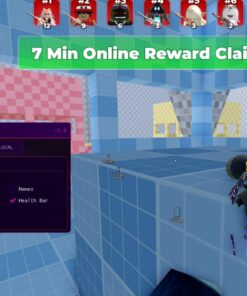
Get clear real-time information about nearby players with a fully customizable ESP system.
Features include:
- Full Box ESP
- Corner Box ESP
- Player usernames
- Team and enemy detection
- Separate team and enemy colors
[TEAM],[ENEMY], and[UNKNOWN]player labels- Show everyone, enemies only, or teammates only
- Health bars in supported Roblox games
- Player distance display
- Distance shown in meters or Roblox studs
- Snaplines
- Adjustable ESP display range
- Custom ESP colors
- Adjustable opacity
- Adjustable line thickness
Capyware automatically attempts to identify teams when the game exposes the required player information.
Aim Assistance
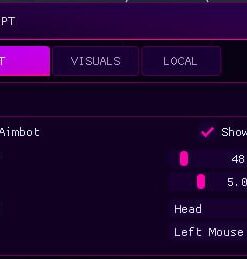
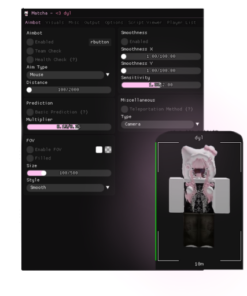
Capyware includes configurable aim assistance designed to give you control over how targeting behaves.
- Hold-to-aim activation
- Head targeting
- Torso targeting
- Automatic confirmed-teammate exclusion
- Sticky targeting
- Adjustable aim radius
- Adjustable maximum range
- Adjustable smoothing
- Adjustable mouse gain
- Visible FOV / aim-radius circle
- Multiple selectable aim keys
- Mouse button support
- Alt-key support
You can configure the aiming behavior from smooth and subtle movement to a much more responsive setup depending on your preference.
Player Radar
Keep track of player positions with an integrated radar that rotates together with your Roblox camera.
Radar options include:
- Camera-relative player radar
- Adjustable radar size
- Adjustable radar range
- Clear player positioning
- Team-aware player information where supported
Custom Crosshair
Capyware also includes a built-in customizable crosshair.
Adjust:
- Crosshair length
- Center gap
- Overall appearance
This allows you to keep a consistent crosshair even in games where the default interface changes between weapons or situations.
Performance & Overlay Controls
Capyware is designed to remain configurable across different systems and Roblox experiences.
Included performance options:
- Economy update preset
- Balanced update preset
- Smooth update preset
- Adjustable overlay update rate
- Automatic background throttling
- Performance HUD
- Sampling information
- Rendering information
This makes it possible to balance overlay responsiveness and system usage based on your PC and the Roblox game you are running.
Automatic Roblox Detection
No Roblox Studio configuration is required.
Capyware automatically handles:
- Roblox player detection
- Roblox camera detection
- Overlay initialization
- Menu focus handling
- Background throttling
The aim system is automatically suspended while the Capyware menu is open or while Roblox is not the active window.
Easy-to-Use Menu
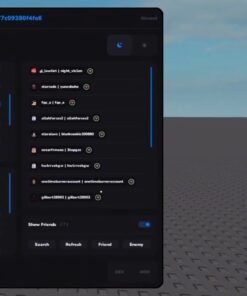
Press Insert to open or close the Capyware interface.
Your configuration can be saved so you do not need to rebuild your preferred setup every time you launch the software.
Additional interface features include:
- Saved settings
- Restore default settings
- Optional Capyware watermark
- Fast access to ESP, aim, radar, crosshair, and performance settings
Windows Compatibility
Supported operating systems:
- Windows 10 64-bit
- Windows 11 64-bit
For the best experience, we recommend keeping Windows, Roblox, and Capyware updated to their latest available versions.
Game Compatibility
Roblox games can use very different character systems, team systems, health implementations, cameras, and custom frameworks.
Because of this, feature compatibility may vary depending on the Roblox experience.
Some games may support every Capyware feature immediately, while others may require individual compatibility improvements.
We are actively improving Capyware and expanding support across Roblox games.
Something Not Working? Contact Us
If Capyware does not work correctly in a game you want to use, contact our support team and let us know.
We actively investigate compatibility reports and can:
- Fix broken functionality
- Improve existing game support
- Add compatibility for additional Roblox experiences
- Improve ESP detection
- Improve team detection
- Improve health detection
- Tune overlay and targeting behavior
- Add new features based on customer feedback
Capyware is continuously developed, so customer reports directly help us improve the software and expand compatibility.
Why Capyware?
Capyware combines visual information, configurable targeting assistance, radar, crosshair customization, performance controls, and automatic Roblox detection inside one lightweight external application.
Instead of forcing one fixed configuration, Capyware gives you detailed control over how the software looks and behaves.
Main features at a glance:
- Player ESP
- Box & Corner ESP
- Username ESP
- Team Detection
- Health Bars
- Distance ESP
- Snaplines
- Aim Assistance
- Head / Torso Selection
- Sticky Targeting
- Aim Smoothing
- Adjustable FOV
- Player Radar
- Custom Crosshair
- Performance HUD
- Multiple Performance Presets
- Saved Configurations
- Automatic Roblox Detection
- Windows 10 & Windows 11 Support
- Regular Compatibility Improvements
Capyware Roblox External is actively developed and improved based on Roblox updates, game compatibility, and customer feedback.
| Duration | Lifetime |
|---|
Reviews
There are no reviews yet.