
-
×
 Escape From Tarkov Standard Full Access
1 × $28.99
Escape From Tarkov Standard Full Access
1 × $28.99
Obsidian Escape From Tarkov Cheat with Aimbot, ESP, Loot ESP and Radar
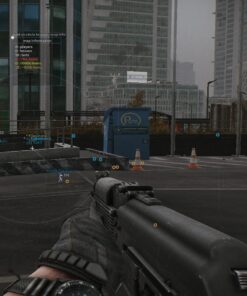
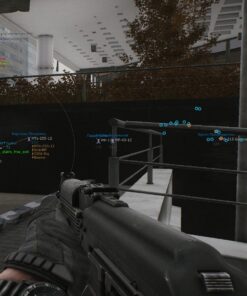
Obsidian Escape From Tarkov Cheat is a feature-rich private software package designed for players who want greater raid awareness, flexible targeting assistance, detailed player information, advanced loot filtering and additional control over movement, weapons and visual settings.
The software combines Aimbot, Player ESP, Bot and Boss ESP, Loot ESP, Container ESP, Radar, Quest Features, Extraction ESP, Weather Control, Movement Options, Weapon Modifications and Config Management inside one organized interface.
Obsidian is built around the demanding gameplay of Escape from Tarkov, where positioning, information, equipment and reaction time can determine whether a raid ends with a successful extraction or the loss of valuable gear.
With customizable target selection, detailed enemy information, price-based loot filters and multiple raid utility features, Obsidian EFT Cheat provides a complete toolset for different maps, playstyles and raid situations.
Why Choose Obsidian for Escape From Tarkov?
Escape from Tarkov combines complex maps, limited information, valuable loot, AI-controlled enemies, bosses, extraction points and high-risk combat.
Obsidian is designed to bring these elements together through one configurable menu. Users can identify different player roles, highlight valuable items, monitor extracts, adjust targeting behavior and save multiple configurations for different maps or gameplay styles.
Main Advantages
- Advanced EFT Aimbot with FOV, prediction, bone selection and multiple targeting priorities.
- Role-based target filtering for PMC, Scav, Bot, Boss and Team.
- Detailed Player ESP with boxes, skeletons, weapons, health and Chams.
- Loot ESP with price, distance, category and preset filters.
- Container and corpse tracking for military, medical, valuable and common loot.
- Radar with adjustable size and distance scale.
- Extraction Point ESP with distance and custom colors.
- Quest features including Instant Plant.
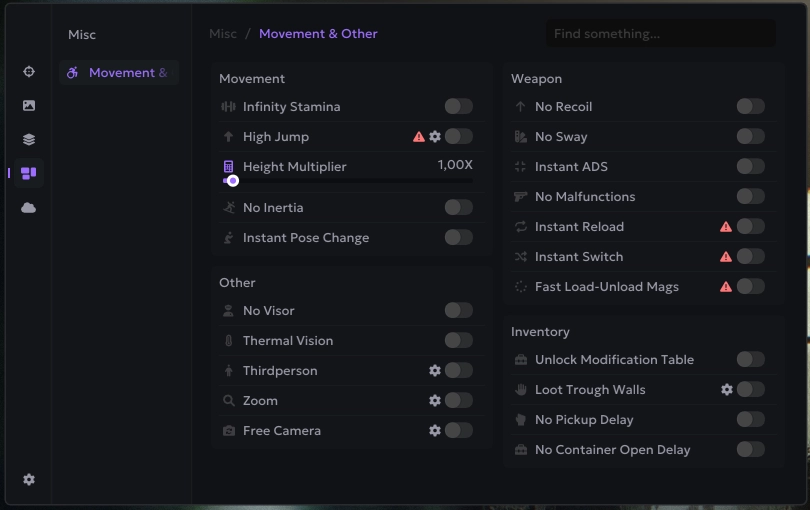
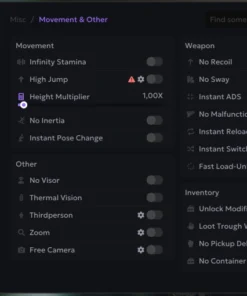
- Movement options such as Infinite Stamina, High Jump and No Inertia.
- Weapon modifications including No Recoil, No Sway and Instant ADS.
- Stream Bypass for supported capture configurations.
- Intel and AMD processor support.
- Compatible with supported versions of Windows 10 and Windows 11.
- Full configuration system with create, import, export, load and delete options.
Obsidian Escape From Tarkov Cheat Features
Obsidian includes several major feature categories:
- Aimbot
- Player and AI Visuals
- Quest Features
- Extraction ESP
- Transition ESP
- HUD Information
- Radar
- World and Weather Settings
- Loot ESP
- Container ESP
- Movement Features
- Weapon Features
- Inventory Features
- Additional Visual Tools
- Configuration System
Each category can be configured separately, allowing users to build a minimal information setup or activate a more detailed raid profile.
Advanced Escape From Tarkov Aimbot
The Obsidian Aimbot provides extensive control over how targets are detected, selected and tracked.
Users can configure different roles, targeting priorities, body points, maximum distance and visibility requirements.
Core Aimbot Features
- Enable or disable Aimbot.
- Assign a custom Aim Key.
- Draw a custom Crosshair.
- Select Crosshair color.
- Display the active Aimbot FOV.
- Enable Dynamic FOV.
- Select FOV color.
- Adjust the FOV value.
- Set maximum targeting distance.
- Choose the preferred target-selection method.
- Select target bones.
- Filter targets by role.
- Enable visible-target-only mode.
- Add teammates to the friendly list.
- Enable Smart Bone.
- Configure target priority.
- Select Rage, Legit or Limbs mode.
- Enable Bone Tremble.
- Enable Instant Hit.
- Enable Target Lock.
- Use Force Bone.
- Enable Prediction.
Custom Aim Key and Crosshair
The Aimbot can be assigned to a custom mouse or keyboard button.
This gives users direct control over when targeting assistance is active and makes it easier to integrate Obsidian into an existing Escape from Tarkov control setup.
The built-in Crosshair can also be enabled and customized with a preferred color.
Crosshair Options
- Enable or disable Crosshair.
- Select a custom Crosshair color.
- Use Crosshair together with the Aimbot.
- Save Crosshair preferences inside configurations.
Aimbot FOV and Dynamic FOV
The Aimbot FOV controls the size of the active target-selection area around the center of the screen.
A smaller FOV creates a more focused targeting area, while a larger FOV allows the system to consider targets across a wider part of the display.
FOV Options
- Draw FOV circle.
- Enable Dynamic FOV.
- Select FOV color.
- Adjust FOV value.
- Save different FOV values for different configurations.
- Combine FOV with maximum target distance.
Dynamic FOV can adapt targeting behavior according to supported conditions and helps provide more flexible target selection.
Target Selection Priorities
Obsidian includes several target-selection methods.
Available Selection Types
- Closest to Crosshair
- Closest by Distance
- Lowest Health
Closest to Crosshair prioritizes the target nearest to the center of the screen.
Closest by Distance selects the opponent physically nearest to the player.
Lowest Health prioritizes targets with less remaining health.
These selection methods can be combined with role filters, visibility settings, bone selection and maximum distance.
Target Bone Selection
Obsidian allows users to choose which body area should be prioritized.
Available Bones
- Head
- Neck
- Stomach
- Pelvis
- Legs
Bone selection can be adjusted depending on weapon type, distance and preferred targeting behavior.
Target Role Filtering
Escape from Tarkov includes several types of enemies and AI-controlled entities.
Obsidian allows users to decide which roles should be targeted.
Supported Target Roles
- Bot
- Scav
- PMC
- Boss
- Team
This gives users more control over how the Aimbot behaves in raids with several different enemy types.
Teammate Management
The Team section allows friendly players to be added and excluded from regular targeting behavior.
Team Options
- Add teammate.
- Identify friendly players.
- Avoid selecting teammates.
- Display teammates separately.
- Use separate visual settings for team members.
Team management is especially useful when playing in a squad and using detailed visual features.
Visible-Only Targeting
The visible-only option allows the Aimbot to focus on targets that are not blocked by supported walls, terrain or objects.
This can help reduce unnecessary targeting through obstacles and provide more controlled behavior.
Visible-only targeting can be combined with:
- Role filters
- Maximum distance
- Bone selection
- Target priority
- Smart Bone
- Target Lock
Smart Bone
Smart Bone automatically selects a supported target point based on the current situation.
This can reduce the need to manually switch between Head, Neck, Stomach, Pelvis and Legs during different engagements.
Smart Bone can be combined with role filters, visibility checks and targeting priorities.
Rage, Legit and Limbs Modes
Obsidian includes several aiming behavior profiles.
Rage Mode
Designed for stronger and more direct targeting behavior.
Legit Mode
Provides a more controlled targeting configuration based on selected FOV, distance and priority settings.
Limbs Mode
Focuses on supported limb target points.
These modes can be used as a starting point and adjusted through the available Aimbot settings.
Bone Tremble
Bone Tremble applies supported variation to the selected target point.
This feature can be enabled or disabled depending on the desired targeting configuration.
Instant Hit
Instant Hit is included as an advanced aiming feature for supported configurations.
Its behavior may depend on the current Escape from Tarkov version, weapon and product status.
Always verify current compatibility before use.
Target Lock
Target Lock helps keep the Aimbot focused on a selected enemy while the configured conditions remain active.
This can reduce unwanted switching between several nearby PMCs, Scavs, Bots or Bosses.
Target Lock can be combined with:
- Aim Key
- FOV
- Maximum distance
- Role filtering
- Visibility check
- Bone selection
Force Bone
Force Bone allows users to temporarily prioritize a selected body point.
This can be useful when the normal profile uses Smart Bone or another target area, but a specific bone is preferred for a particular situation.
Prediction
Prediction helps compensate for target movement and supported projectile behavior.
This can be useful during longer engagements or when enemies are moving across open terrain.
Prediction can be combined with maximum targeting distance, FOV and selected bones.
Target Appearance Settings
Obsidian includes several visual options connected to the selected Aimbot target.
Target Appearance Features
- Target Marker
- Target Snapline
- Custom Target Color
- Bullet Tracers
These settings make it easier to identify which target is currently selected and observe supported shot information.
Player ESP
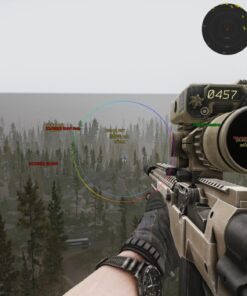
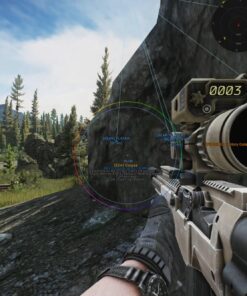
The Player ESP system displays detailed information about detected players.
Each element can be enabled separately, allowing users to create either a clean layout or a detailed raid-awareness profile.
Player ESP Features
- Player Box
- Skeleton
- Name
- Distance
- Weapon
- Health
- Chams
- Custom colors
- Adjustable display distance
Player ESP can be configured separately for different roles.
PMC ESP
PMC ESP displays supported information about player-controlled characters.
PMC Information
- Box
- Skeleton
- Name
- Distance
- Weapon
- Health
- Chams
- Custom color
- Maximum display distance
This information can help users understand the position, equipment and condition of nearby PMCs.
Bot ESP
Bot ESP supports the same main visual options as Player ESP.
Bot ESP Features
- Box
- Skeleton
- Name
- Distance
- Weapon
- Health
- Chams
- Custom visual settings
Bot information can be configured separately from PMC, Scav and Boss visuals.
Scav ESP
Scav ESP displays supported information about detected Scavs.
Scav ESP Features
- Box
- Skeleton
- Name
- Distance
- Weapon
- Health
- Chams
- Separate colors and distance settings
This helps distinguish Scavs from PMCs and other AI-controlled roles.
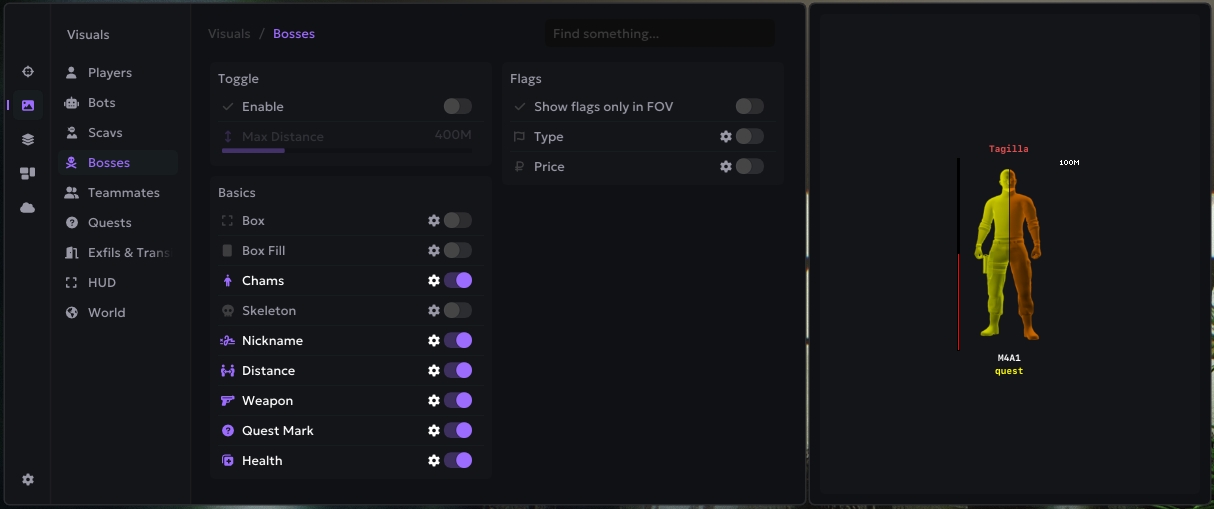
Boss ESP
Boss ESP displays supported Escape from Tarkov bosses using separate visual settings.
Boss ESP Features
- Boss Box ESP
- Boss Skeleton
- Boss Name
- Boss Distance
- Boss Weapon
- Boss Health
- Boss Chams
- Custom boss colors
Boss-specific visuals can help identify high-risk AI enemies during raids.
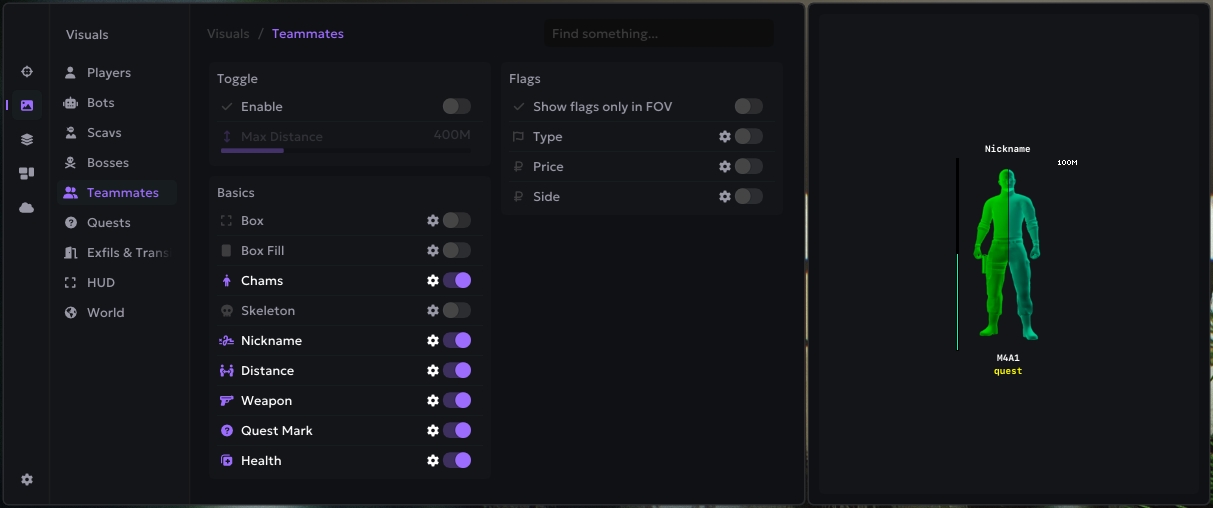
Teammate ESP
Teammates can be displayed through the same core visual system with separate settings.
Teammate ESP Features
- Teammate Box
- Teammate Skeleton
- Teammate Name
- Teammate Distance
- Teammate Weapon
- Teammate Health
- Teammate Chams
- Separate friendly colors
This makes it easier to distinguish squad members from hostile players and AI entities.
Box ESP
Box ESP places a visual frame around detected players, bots, Scavs, bosses or teammates.
Boxes provide a clear positional reference and can be combined with names, distance and weapon information.
Skeleton ESP
Skeleton ESP displays the approximate body structure of detected entities.
It can be used together with Box ESP or independently for a cleaner visual layout.
Name and Distance ESP
Name ESP displays the role or supported identity information of detected entities.
Distance ESP shows how far away they are.
This is particularly useful in Escape from Tarkov because fights often take place at very different ranges.
Weapon ESP
Weapon ESP displays the weapon currently held by a detected target.
This can provide additional information about the likely combat range and threat level of nearby enemies.
Health ESP
Health ESP shows the current supported health information of detected entities.
This can help users understand whether a target is damaged or at full health.
Chams
Chams apply supported visual highlighting to detected characters.
Chams can be configured separately for:
- Players
- Bots
- Scavs
- Bosses
- Teammates
Colors and appearance can be adjusted according to personal preference.
Quest Features
Obsidian includes additional functionality for supported quest interactions.
Quest Feature
- Instant Plant
Instant Plant is designed for supported planting tasks and can reduce the time required for compatible quest interactions.
The feature may depend on the active quest and current product version.
Extraction ESP
Extraction points are essential in Escape from Tarkov.
Obsidian includes an Exfil section that displays supported extraction locations.
Exfil Features
- Enable or disable Extraction ESP.
- Display distance.
- Select custom color.
- Monitor supported exits.
- Use different settings for different maps.
Extraction ESP can help users identify available exits and understand how far away they are.
Transition ESP
Obsidian also includes a Transitions section.
Transition Features
- Enable or disable Transitions.
- Display distance.
- Select custom color.
This feature can help identify supported map transitions or connected raid locations.
HUD Features
The HUD section provides additional combat and weapon information.
HUD Options
- Ammo Counter
- Fire Mode
- Out-of-FOV Arrows
- Arrow Size
- Arrow Radius
- Hit Information
- Hit Log
- Hit Sound
Ammo Counter
Ammo Counter displays supported ammunition information directly through the Obsidian HUD.
This can help users monitor their current magazine without relying only on standard in-game checks.
Fire Mode Display
Fire Mode shows the current supported firing mode of the equipped weapon.
This can provide quick confirmation when switching between semi-automatic and automatic modes.
Out-of-FOV Arrows
Out-of-FOV Arrows show the direction of detected threats outside the visible area of the screen.
Arrow Settings
- Enable or disable arrows.
- Adjust arrow size.
- Adjust arrow radius.
- Use with Player ESP.
- Save settings inside configurations.
These indicators can provide additional awareness when enemies are located behind or beside the player.
Hit Log and Hit Sound
The Hits section provides information when supported hit events occur.
Hit Features
- Hit Log
- Hit Sound
- Supported hit feedback
- Configurable HUD behavior
This gives users additional confirmation during combat.
Radar
Obsidian includes a built-in Radar for positional awareness.
Radar Features
- Adjustable Radar size.
- Adjustable distance scale.
- Player position tracking.
- Use together with ESP.
- Save Radar preferences.
Radar provides an alternative positional overview when several players, Scavs or bosses are moving around the same area.
World and Weather Control
The World section includes supported weather and environment settings.
World Features
- Weather Control
- Wind Control
- Rain Control
- Fog Control
These settings allow users to adjust supported environmental conditions for improved visibility and comfort.
Weather Control
Weather Control provides additional control over supported environmental presentation.
It can be used together with rain, wind and fog options.
Wind Control
Wind settings can be adjusted through the World section.
The exact effect may depend on the current game version and supported configuration.
Rain Control
Rain Control allows supported rain effects to be adjusted.
This can help create a clearer visual environment during raids with heavy weather.
Fog Control
Fog Control provides additional visibility control in supported conditions.
The setting may be useful on maps or during weather situations where fog reduces visibility.
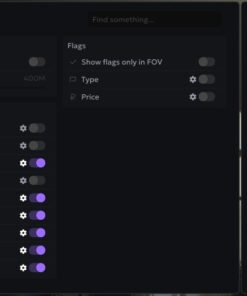
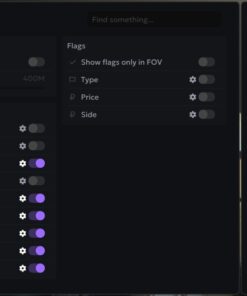
Loot ESP
The Loot ESP system highlights supported items and allows users to filter them by value, category and distance.
Escape from Tarkov contains a large number of items, so flexible filtering is important for maintaining a clean interface.
Loot ESP Features
- Enable Loot ESP.
- Price Filter.
- Maximum display distance.
- Item categories.
- Loot presets.
- Custom filtering.
- Value-based item selection.
- Category-based item selection.
Price Filter
The Price Filter allows users to display items based on supported value information.
This can help focus on more valuable loot and hide low-value objects.
Possible uses include:
- Show only high-value items.
- Hide common low-value loot.
- Prepare different price thresholds.
- Create separate presets for different raid goals.
Loot Distance
The maximum loot distance controls how far away supported items appear.
A smaller distance can keep the screen cleaner, while a larger value provides a wider overview.
Loot Categories
Items can be filtered by supported category.
This helps reduce visual clutter and makes it easier to focus on the loot needed for a particular raid.
Loot Presets
Presets allow users to prepare different item configurations.
Possible presets may include:
- High-value items
- Quest items
- Medical items
- Weapon parts
- Hideout materials
- General loot
- Map-specific loot
Container ESP
Obsidian includes a dedicated Container section.
Supported Container Categories
- Military
- Medical
- Valuable
- Common
- Stash
- Dead Body
- Computer
Each container type can be displayed according to the selected settings.
Military Containers
Military container ESP highlights supported military loot locations.
These containers may contain weapons, ammunition, attachments or other combat-related items.
Medical Containers
Medical container ESP displays supported medical loot locations.
This can make it easier to locate healing items and medical supplies.
Valuable Containers
Valuable container ESP highlights supported locations associated with higher-value items.
Common Containers
Common container ESP displays standard supported containers found throughout raids.
Stash ESP
Stash ESP highlights supported hidden or ground stash locations.
This can be useful for players following stash routes or searching for additional loot away from high-traffic areas.
Dead Body ESP
Dead Body ESP displays supported corpses and bodies.
This can help locate equipment left after fights and identify areas where combat recently occurred.
Computer ESP
Computer ESP highlights supported computers and PC blocks that may contain electronic components or other items.
Movement Features
Obsidian includes several movement-related options.
Movement Features
- Infinite Stamina
- High Jump
- No Inertia
Infinite Stamina
Infinite Stamina is designed to reduce or remove supported stamina limitations.
This can provide more consistent movement during long raids.
High Jump
High Jump increases supported jump behavior.
The feature may be useful for movement and reaching certain positions.
No Inertia
No Inertia reduces supported movement inertia effects.
This can make directional changes feel faster and more responsive.
Weapon Features
The Weapon section includes several modifications designed to adjust gun behavior.
Weapon Features
- No Recoil
- No Sway
- Instant ADS
No Recoil
No Recoil reduces supported weapon recoil.
This can make automatic and repeated fire easier to control.
No Sway
No Sway reduces supported weapon movement while aiming.
This can provide a steadier view during longer engagements.
Instant ADS
Instant ADS reduces supported aim-down-sight transition time.
This can help users enter an aiming position more quickly.
Inventory Features
The Inventory section includes additional interaction options.
Inventory Features
- Loot Through Walls
- Extended Reach
Loot Through Walls
Loot Through Walls allows supported item or container interaction without standing directly beside the object.
The exact behavior may depend on the map, item and current software version.
Extended Reach
Extended Reach increases the supported interaction distance for loot and other compatible objects.
Additional Features
Obsidian includes several extra visual and camera options.
Other Features
- Thermal
- Thirdperson
- Zoom
- Free Camera
Thermal
Thermal provides supported thermal-style visual information.
This can improve visibility under certain environmental or lighting conditions.
Thirdperson
Thirdperson changes the supported camera perspective from first-person to a third-person view.
Zoom
Zoom provides additional visual magnification.
This can be useful for observing distant areas without changing the equipped optic.
Free Camera
Free Camera allows supported camera movement independent of the normal player view.
The feature should be used according to the current product instructions and compatibility status.
Configuration System
Obsidian includes a complete configuration manager.
Config Features
- Create
- Load
- Import
- Export
- Delete
The Config System allows users to prepare different profiles for specific maps, weapons or raid goals.
Possible configurations may include:
- PMC-focused profile
- Loot-focused profile
- Boss hunting profile
- Scav profile
- Minimal ESP setup
- Full visual setup
- Long-range Aimbot profile
- Close-range combat profile
Import and Export Configs
Configurations can be imported and exported.
This makes it easier to move settings between installations or share supported configuration profiles.
Language Settings
The Settings section includes language selection.
Available languages may depend on the current version of Obsidian.
FPS Lock
FPS Lock allows users to set a preferred frame-rate limit.
This can help maintain a more stable performance target depending on the computer and game configuration.
Stream Bypass
Obsidian Escape From Tarkov includes a Stream Bypass for supported capture and screen-sharing configurations.
This feature is designed to provide additional control over whether the software overlay appears in compatible recording or streaming applications.
Capture behavior may depend on:
- Recording application
- Capture method
- Selected source
- Current software version
- Windows configuration
Users should test the chosen capture method before recording or streaming.
Important Xbox Game Bar Requirement
Xbox Game Bar must be enabled in Windows for the software to function correctly.
Before launching Obsidian:
- Open Windows Settings.
- Go to Gaming.
- Open Xbox Game Bar settings.
- Make sure Xbox Game Bar is enabled.
- Restart the required applications if necessary.
Disabling Xbox Game Bar may prevent the menu, overlay or other supported software components from working correctly.
HWID Spoofer Information
Obsidian Escape From Tarkov does not include a built-in HWID Spoofer.
Users who require separate hardware identification protection should not assume that spoofing functionality is included with this product.
Spoofer Status
- Built-in HWID Spoofer: No
- Separate spoofer: Not included
- Hardware-ban protection: Not part of the product package
Always review the current product information before purchasing.
Supported Game Display Modes
Obsidian supports the main Escape from Tarkov display modes.
Supported Modes
- Windowed
- Borderless Windowed
- Fullscreen
Users can choose the display mode that best fits their preferred setup.
Processor Support
Obsidian supports compatible processors from both major CPU manufacturers.
Supported CPUs
- Intel
- AMD
The system must still meet the remaining software, Windows and configuration requirements.
Windows Compatibility
Obsidian supports:
- Windows 10 version 1903 through 22H2
- Supported Windows 11 versions
Operating System Requirements
- 64-bit Windows installation
- Supported Windows build
- Required system components
- Xbox Game Bar enabled
- Current supported drivers
Compatibility may change after Windows, Escape from Tarkov or BattlEye updates.
Product Compatibility
- Game: Escape from Tarkov
- Anti-Cheat: BattlEye
- Software: Obsidian Escape From Tarkov Cheat
- Processors: Intel and AMD
- Operating Systems: Windows 10 1903–22H2 and Windows 11
- Display Modes: Windowed, Borderless and Fullscreen
- Stream Bypass: Included
- HWID Spoofer: Not included
- Xbox Game Bar: Must be enabled
- Aimbot: Included
- Player ESP: Included
- Bot, Scav and Boss ESP: Included
- Loot ESP: Included
- Radar: Included
- Container ESP: Included
- Movement Features: Included
- Weapon Features: Included
- Config System: Included
System Requirements
Before purchasing Obsidian Escape From Tarkov Cheat, make sure the computer meets the current requirements.
- Supported Intel or AMD processor.
- Windows 10 version 1903–22H2 or supported Windows 11 version.
- 64-bit operating system.
- Xbox Game Bar enabled.
- Stable internet connection.
- Working Escape from Tarkov installation.
- Administrator access may be required.
- Current system drivers.
- Supported display mode.
- Conflicting overlays or background applications may need to be closed.
- The setup guide must be followed in the correct order.
Important Setup Information
For the best installation experience:
- Confirm that your Windows version is supported.
- Make sure Xbox Game Bar is enabled.
- Verify that Escape from Tarkov launches correctly.
- Download the latest available Obsidian files.
- Close conflicting overlays or background applications when required.
- Launch the software according to the provided guide.
- Enter the license key when requested.
- Configure Aimbot, ESP, Loot and Radar settings.
- Create and save your preferred configuration.
- Check the current product status before every launch.
Do not skip setup steps or use outdated files, as this may cause launch or compatibility problems.
What You Receive After Purchase
After completing the order, you receive the available Obsidian product access and setup information.
- Obsidian Escape From Tarkov Cheat license.
- Download access.
- Installation instructions.
- Aimbot.
- Player ESP.
- Bot, Scav and Boss ESP.
- Loot ESP.
- Container ESP.
- Radar.
- Extraction ESP.
- Quest features.
- Movement options.
- Weapon options.
- Stream Bypass.
- Config System.
- Product support.
A HWID Spoofer is not included.
Frequently Asked Questions
Does Obsidian include an Aimbot?
Yes. The Aimbot includes FOV, target priorities, bone selection, role filters, prediction, Smart Bone, Target Lock and additional settings.
Can I target PMC, Scav, Bots and Bosses separately?
Yes. Obsidian includes role-based targeting options for PMC, Scav, Bot, Boss and Team.
What can Player ESP display?
Player ESP can display boxes, skeletons, names, distance, weapons, health and Chams.
Does it include Loot ESP?
Yes. Loot ESP includes price filters, distance filters, categories and presets.
Can Obsidian show containers and corpses?
Yes. Supported categories include military, medical, valuable and common containers, stashes, dead bodies and computers.
Does Obsidian include Radar?
Yes. The Radar includes adjustable size and distance scale.
Does it show extraction points?
Yes. Exfil ESP can display supported extraction points, distance and custom colors.
Does it include a HWID Spoofer?
No. Obsidian Escape From Tarkov does not include a built-in HWID Spoofer.
Does Xbox Game Bar need to be enabled?
Yes. Xbox Game Bar must be enabled in Windows for the software to function correctly.
Does Obsidian support AMD processors?
Yes. Compatible Intel and AMD processors are supported.
Does it support Windows 11?
Yes. Supported Windows 11 versions are compatible.
Does it work in fullscreen mode?
Yes. Windowed, Borderless Windowed and Fullscreen modes are supported.
Is Stream Bypass included?
Yes. Stream Bypass is included for supported recording and capture configurations.
Can I save and share configurations?
Yes. Configurations can be created, loaded, imported, exported and deleted.
Is permanent undetected status guaranteed?
No third-party software can guarantee permanent undetected status. Escape from Tarkov, BattlEye and Windows updates may affect compatibility at any time. Always check the current product status before use.
Buy Obsidian Escape From Tarkov Cheat
Obsidian Escape From Tarkov Cheat is a complete option for players looking for an EFT cheat with Aimbot, Player ESP, Scav and Boss ESP, Loot ESP, Radar, Extraction Tracking, Movement Features, Weapon Modifications and Stream Bypass.
Its detailed role filters, price-based loot options, container tracking and configuration system make it suitable for different maps, raid goals and gameplay styles.
Choose your preferred license duration, complete the order and follow the provided setup instructions to begin using Obsidian Escape From Tarkov Cheat from CrazyCapyStore.
| Duration | 1 day, 7 days, 30 days |
|---|
Be the first to review “Obsidian Escape From Tarkov”
Related products
Price range: $4.99 through $31.99
Price range: $14.99 through $99.99
Reviews
There are no reviews yet.