


Private HWID Spoofer – Arc Raiders
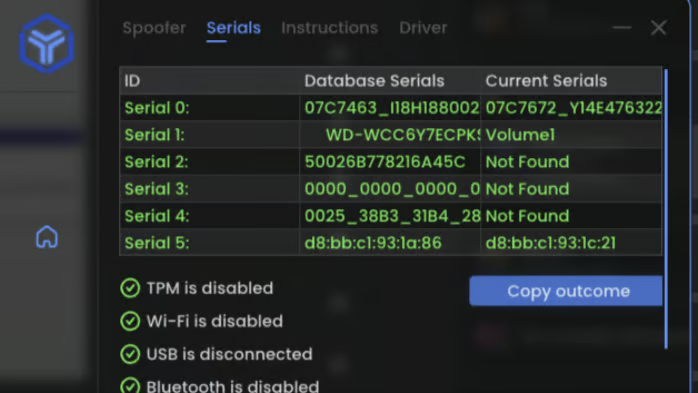
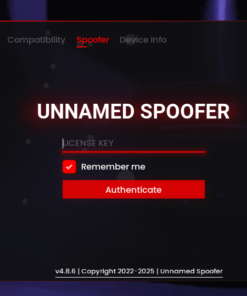
Private HWID Changer for Arc Raiders is a hardware ID spoofer that temporarily changes the unique identifiers of your PC, letting you bypass hardware bans on this game until your next reboot. It does not unban accounts – it only gives your PC a fresh “hardware fingerprint” so you can safely play on a new account.
This tool is designed for experienced users. You must clearly understand what you are doing when using any spoofing or cheat software.
Important Notes & Disclaimer
-
🔐 1 Account = 1 PC
Your license is tied to the first PC on which you launch the program.
Once activated, you cannot use the same account on a different PC. -
⛔ Does NOT unban game accounts
The spoofer only removes the hardware ban from your PC while it’s active.
Your old, banned accounts remain banned. Always use a fresh account. -
🔄 Temporary spoof – works until reboot
-
The spoofer changes your HWID until you restart your PC.
-
After a reboot, all original hardware data is automatically restored.
-
-
🧠 We strongly recommend using a new game account
The correct functioning of the spoofer is guaranteed only if the account has not been previously banned.
Always create a new Arc Raiders account after spoofing. -
⚠️ “Hardware component has changed” error
If you see this error:-
Disable the spoofer (do not run it again),
-
Restart your PC,
-
Log in without spoofing and check your system / account setup.
-
Use this software at your own risk. We do not take responsibility for bans caused by incorrect setup, old banned accounts, or unsafe behavior in-game.
Key Features
-
🎮 Designed for Arc Raiders
-
Fully focused on Arc Raiders hardware bans and HWID checks.
-
-
🧬 Temporary HWID Change
-
Changes key hardware identifiers used by anti-cheat systems.
-
All spoofed data returns to normal after you restart your PC.
-
-
💾 Runs from USB Flash Drive
-
You can run the spoofer directly from a flash drive.
-
Ideal if you want to keep the tool off your main system drive.
-
-
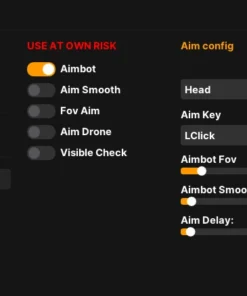
🔗 Works with Cheats / Software
-
If you use our cheat and this spoofer together:
-
Default recommendation: run the cheat first, then run the spoofer.
-
If both products are from us, the launch order is not critical.
-
-
System Requirements
-
🧠 CPU: Intel or AMD (x64)
-
🖥 Operating System: Windows 10 / Windows 11 (64-bit only)
-
🧩 Supported Windows Builds:
-
Windows 10:
-
1903 (18362)
-
1909 (18363)
-
2004 (19041)
-
20H2 (19042)
-
21H1 (19043)
-
21H2 (19044)
-
22H2 (19045)
-
-
Windows 11:
-
21H2 (22000)
-
22H2 (22621)
-
23H2 (22631)
-
24H2 (26100)
-
25H2 (26200)
-
-
👉 How to check your Windows build:
Press Win + R → type winver → press OK. A window will show your version and build number.
Recommended Software Prerequisites
For correct operation, we strongly recommend installing:
-
✅ Microsoft Visual C++ Redistributable packages (2008–2019)
-
✅ Latest DirectX Runtime
You should also disable or remove the following before using the spoofer:
-
🔒 Antivirus software – disable or uninstall (many AVs block spoofer drivers).
-
🛡 Windows SmartScreen – disable.
-
🛡 Windows Defender – disable real-time protection.
-
🚫 FaceIt Anti-Cheat – uninstall (CS:GO third-party anti-cheat).
-
🚫 Vanguard – uninstall (Valorant anti-cheat).
Additional technical requirements (if errors appear):
-
🧬 Enable VT-x / SVM in BIOS (hardware virtualization)
-
🚫 Disable Hyper-V in Windows (it can conflict with drivers and spoofers)
Extra Safety Steps if You Still Get Banned
If you continue to get hardware bans even with the spoofer, follow these mandatory steps before using it again on a new account:
-
Change PC Name
-
Right-click This PC → Properties → change computer name.
-
Restart your PC to apply changes.
-
-
Create a New Windows User
-
Create a new local user in Windows.
-
Log out and sign in under this new user.
-
-
Reset Network Settings on the New User
-
Press Win + I → Network & Internet.
-
Scroll down → Network reset → confirm.
-
Restart your PC again.
-
-
(Rare but possible) Reinstall Windows
-
In very persistent cases, a clean Windows installation may be required.
-
After that, you can:
-
Log into your new Windows user.
-
Register a new Arc Raiders account.
-
Run the cheat / software (if used).
-
Launch the Private HWID Changer (from USB if you prefer).
-
Play on your new, clean setup.
Basic Usage Flow (If You Use a Spoofer)
-
Prepare the system
-
Make sure system requirements and prerequisites are met.
-
Disable antivirus, SmartScreen, Defender, and remove FaceIt/Vanguard if installed.
-
-
Restart your PC
-
Log in to Windows (preferably under your new user).
-
Log in to your game launcher first
-
Open the Arc Raiders launcher,
-
Log in with your new account,
-
Close or minimize as needed.
-
-
Run the Spoofer (from USB or local folder)
-
Run as Administrator.
-
Wait until the tool finishes spoiling/confirming success.
-
-
Launch the game / cheats
-
Start Arc Raiders.
-
If you’re using both our cheat and spoofer:
-
Default: run the cheat first, then spoofer – or follow the note that when both products are ours, the order doesn’t matter.
-
-
-
After you finish playing
-
Simply restart your PC to restore your original HWID.
-
| Duration | 1 day, 1 month |
|---|







Reviews
There are no reviews yet.